Find Exhibitors and Event Locations with Dryfta’s App Floor Plan

Dryfta: Find Your Way Around

Finding an exhibitor should not require switching between a printed map, a company list and a separate set of booth numbers. Dryfta connects the published event floor plan with exhibitor information, giving visitors a route from a company they want to meet to its location.

The event app provides a Floor Plan destination under More when Exhibitors is enabled. Visitors can explore the map, select a booth and open the associated exhibitor profile. Company details can also offer a route back to an assigned booth. Here is how those connections work and what organizers should prepare before sharing the map.
Continue reading

When Conference Data Stops Meaning the Same Thing: Define Every Registration, Author and Attendee Field

When Conference Data Stops Meaning the Same Thing: Define Every Registration, Author and Attendee Field

A conference CRM data dictionary for an utterly perplexed event planner is like water in the middle of the desert for a parched man. It’s relief for when you’re swirling in truckloads of data that simply do not make coherent sense. I mean, what was this person thinking when they gave a field a goofy name like ‘function red,’ right? What is that even supposed to mean? Not a single member on the team can come up with an answer. The only guy who can has, well, already left the company. Goodbyes were said, and a farewell was thrown. Now it is just you losing your sanity in the middle of the night.

Continue reading

Draw Signatures in Dryfta Mobile Forms on iPhone and Android

Dryfta: Sign on Your Phone

Some event forms need a signature as well as a typed answer. Attendees can now draw that signature directly in supported Dryfta app forms on iPhone and Android, keeping the task within the event experience they are using.

The signature field provides a drawing area with Undo and Clear controls. It works with the event’s form configuration and saves through the normal form workflow. This addition supports account creation, general forms and surveys, including session survey routes. Here is how to prepare a useful signature field, guide attendees through it, and understand the limits before adding one to your event.

Continue reading

Daily Three in Dryfta: Polls, Session Feedback and New Connections

Dryfta Daily Three: polls, session feedback and new connections.

Conference apps work best when attendees have a clear reason to return throughout the day. Daily Three gives participants three focused invitations: answer a poll, share session feedback and make one new connection. Eligible actions contribute points and collectible badges, helping people see their progress.

For organizers, the feature offers a simple way to introduce participation without creating an overwhelming checklist. Attendees can open the event homepage, follow the available missions and review their rewards under My Points. Availability depends on the event’s settings and eligible activities. Here is how to explain the experience and prepare your event for it.

Continue reading

The Empty Stage Problem: Plan for Presenter No-Shows and Substitute Speakers

The Empty Stage Problem: Plan for Presenter No-Shows and Substitute Speakers

Ever gotten stood up at a blind date? Now visualize this happening to you at this massive event you’re hosting. Something that you’ve spent the last few weeks conceptualizing, planning, and executing. Yet, at the end, all goes downhill when a speaker doesn’t show up. This is precisely why your organization needs a conference presenter no-show policy. Because unlike blind dates, you just can’t get over it. The stakes are enormous, and the entire room is watching. It is a crime to let your attendees down like that.

So, when disaster hits, what do you do?

Continue reading

Automatic Translation in the Dryfta Event App: Let Attendees Choose a Language

Dryfta: An Event App in Your Language

International attendees should be able to explore a conference without first becoming fluent in its main language. Dryfta offers automatic translation in the event app, helping attendees read eligible navigation and public event content in a language they choose.

Organizers control whether translation is available and can set a starting language for the event. Attendees then use a language selector under More, with an Original option for returning to the source text. The feature also supports right-to-left presentation for languages such as Arabic. Here is how to prepare it, explain it to delegates, and use automatic output with appropriate care.

Continue reading

Download Your Dryfta Event for Offline Access to Schedules and Maps

Dryfta: Your Event, Ready Offline

Conference Wi-Fi can be difficult to reach just when an attendee needs a room number or the next session time. Dryfta’s offline event download lets attendees prepare event information while connected, then refer to saved content when their connection is unavailable.

The download focuses on the program and essential event reference material. It also makes an important distinction between saved event content and personal details an attendee has deliberately opened online. This guide explains what is included, how to prepare before arrival, and which activities still need a connection so your team can set clear expectations for every delegate attending.

Continue reading

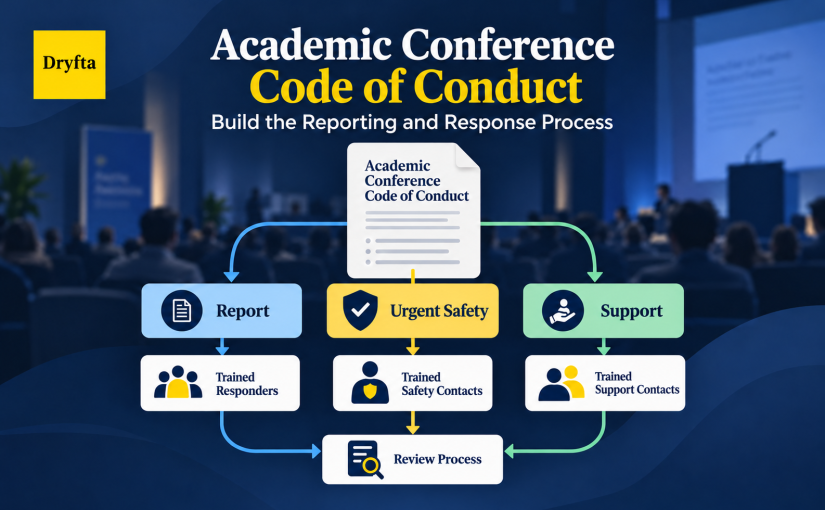
A Conference Code of Conduct Is Only the Start: Build the Reporting and Response Process

An attendee tells a volunteer that another participant’s behavior made them feel unsafe. The conference website says that harassment is prohibited. The volunteer, however, does not know who receives the report, what they may promise or whether the situation needs an urgent response. The policy exists, but the process stops at “contact us.”

A working academic conference code of conduct closes that gap. It sets expectations for participants and connects those expectations to reporting routes, trained roles, safety decisions, fair review and clear communication. This guide explains how to build that operating process before a concern reaches the team.

Continue reading

A Clearer Dryfta Event App: Schedules, People and Event Information Together

Dryfta: A Clearer Event App

A conference app earns its place when attendees can find their next session, recognize a speaker and reach useful event information without stopping to ask for directions. The refreshed Dryfta app brings those tasks into a clearer experience on iPhone and Android.

The update improves schedule navigation, people and company information, and the way event content appears across the app. Organizers continue to manage the event in Dryfta, while attendees use familiar destinations with more useful detail. Here is what has changed, how it supports a busy conference day, and what your team should check before inviting attendees to explore.

Continue reading

Dryfta Event App Publisher: A Clearer Workspace and Saved App Preview

Dryfta: Shape Your Event App

Preparing a conference app involves several connected decisions: what attendees should see, how the event should look on a phone, and where organizers should manage app communications. Dryfta’s latest Event App Publisher update gives that work a clearer home in the event administration dashboard.

Event App Publisher is now a dedicated module, with direct access to app setup, Push Notifications, and Private Messaging. A new phone-style preview also shows the guest homepage using your event’s saved settings. Together, these changes help organizers review the saved mobile experience and find the relevant controls before directing attendees to their event’s mobile app.

Continue reading

What Your Event Software SLA Really Promises on Conference Day

What Your Event Software SLA Really Promises on Conference Day

It is thirty minutes before registration opens. Staff stand at the desk with lanyards in hand, and the attendee lookup screen will not load. The organizer calls support and says what many of us would say: the contract promised 99.9% uptime. Surely this will be fixed at once. Perhaps it will. Perhaps it was never promised.

An event software SLA is easy to treat as reassurance and hard to read as an operating document. This article reads it the second way. Using one fictional outage, it shows which clause decides what an organizer can expect, before anything fails.

Continue reading

When Volunteers Become the Front Line: Training Conference Teams for Event Day

When Volunteers Become the Front Line: Training Conference Teams for Event Day

An attendee walks up five minutes before a session. Her badge will not scan. The room name on the sign differs from her schedule. She also needs a step-free route. The volunteer wants to help. But all they received was a schedule and a branded shirt. They guess, and the guess is wrong.

This is a preparation gap, not a willingness gap. Selection is done. Now you need conference volunteer training that builds the skills, limits, and support each role needs.

Continue reading