
Switching event platforms has a terrible reputation.
You tell yourself, “We’ll switch after this event.” Then registrations open for the next one. Suddenly it’s too late. Rinse and repeat. A year goes by, and you’re still using the same platform you wanted to replace.
And it’s easy to see why.
The last thing anyone wants is registrations that don’t go through and attendees wondering what’s going on.
The good news? A smooth migration is completely possible. You just need to know what to move, what to test, and what to avoid. In this blog, we’ll show you how to migrate from one event management platform to another without losing data, step by step.
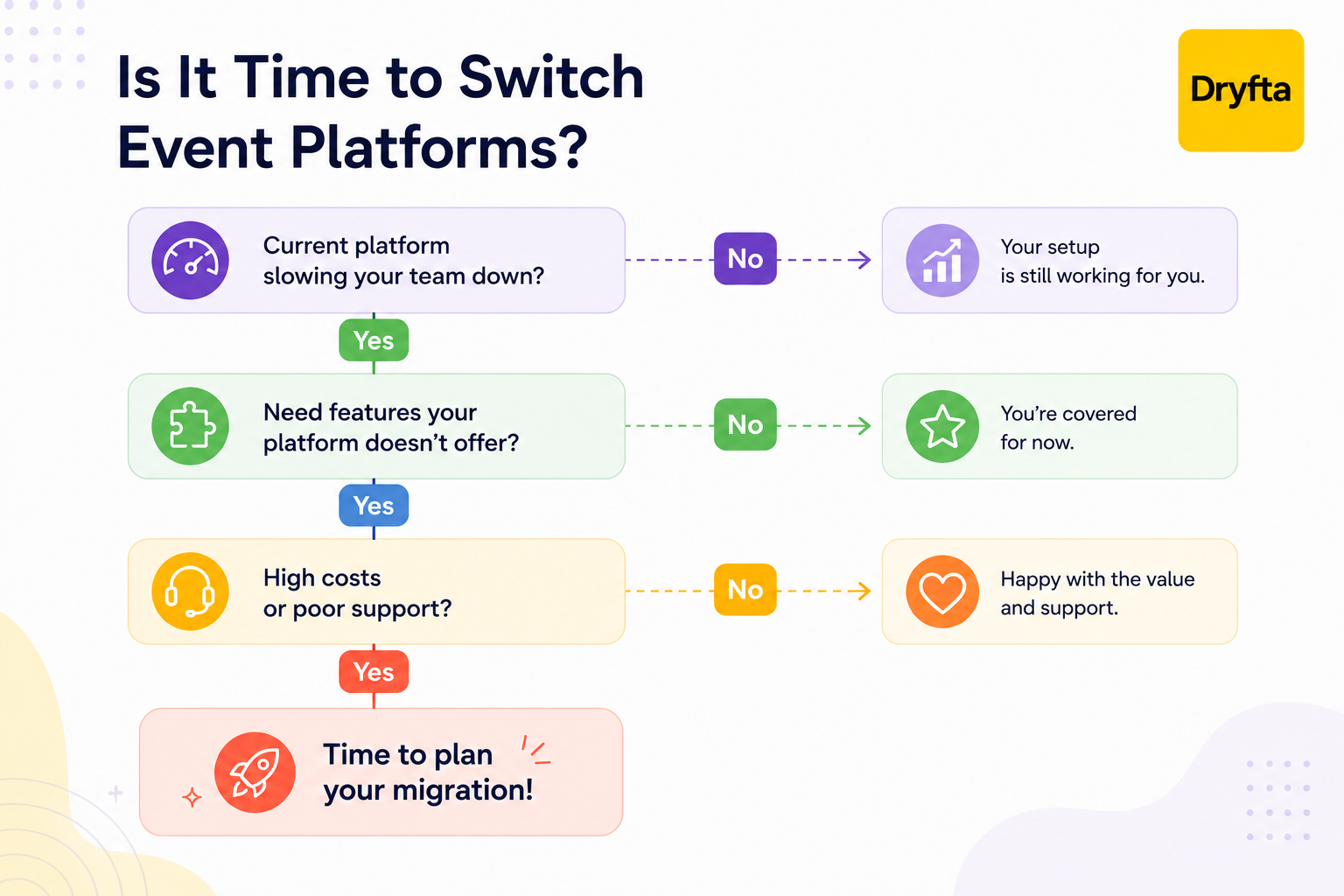
How to Migrate Your Event Management Platform Without Disrupting Your Events?
Forget the horror stories. In reality, if you migrate event management platforms the right way, it’s mostly routine admin work.
Export first. Run both systems side by side for a bit. And whatever you do, don’t migrate event management platforms in the middle of an active sale.
Almost every organizer worries about the same three things:
- “What if I lose my attendee list?”
- “What if someone gets stuck halfway through buying a ticket?”
- “Will my old event pages stop working and hurt my Google rankings?
Fair concerns. Luckily, none of that has to happen.
You can switch event software without losing data as long as you have a foolproof plan.
As mentioned before, never switch platforms while registrations are actively coming in. Wait until sales have closed or move before registrations open. And don’t forget your old event URLs. Redirecting them to the new pages helps visitors find the right information and maintains the search rankings you’ve already worked hard to earn. Following the right sequence makes it much easier to switch event software without losing data or disrupting your next event.
What a Complete Event Platform Migration Includes
Here’s where most organizers have the wrong perception of event platform migration. They think it’s just about creating a new account and importing a few files. That’s not the case. When you migrate event management platforms, you’re moving your registrations, event websites, attendee data, integrations, emails, and everything else needed to run your events.
Follow this event platform data migration checklist before you make the switch.
- Registration and ticketing data
Your registrations, ticket types, payment records, discount codes, and confirmations should all carry over. That way, you can continue where you left off without confusing your attendees. - Attendee management records
Contact details, check-in records, communication history and dietary preferences should all land in the new system exactly as they were. Attendees shouldn’t have to re-enter information they already gave you once. - CRM and integrations
Your platform probably connects to your event CRM, email tool, and maybe a payment processor too. Before you go live, make sure all those integrations work properly with your new platform. - Event apps and mobile experience
Your attendees shouldn’t even notice you’ve switched platforms. They should still be able to check the schedule, browse speaker profiles, network with other attendees, receive push notifications, and access their personalized agendas in their mobile event app without a hitch. - Historical reporting access
Your old event reports are more useful than you might think. Registration numbers, attendance trends, revenue, and engagement data can make planning your next event much easier. Don’t leave them behind during the migration.
To successfully migrate event management platforms, moving the data is only half the job. The real test is whether your team can log in on day one and get straight back to work.
According to Grand View Research, the global event management software market was valued at USD 16.0 billion in 2025 and is projected to reach USD 39.6 billion by 2033, meaning more organizations than ever are investing in event technology and eventually reaching the point where they need a better platform.
A Step-by-Step Guide to Event Platform Migration
No more talking about the “why.” Let’s get into the “how.”
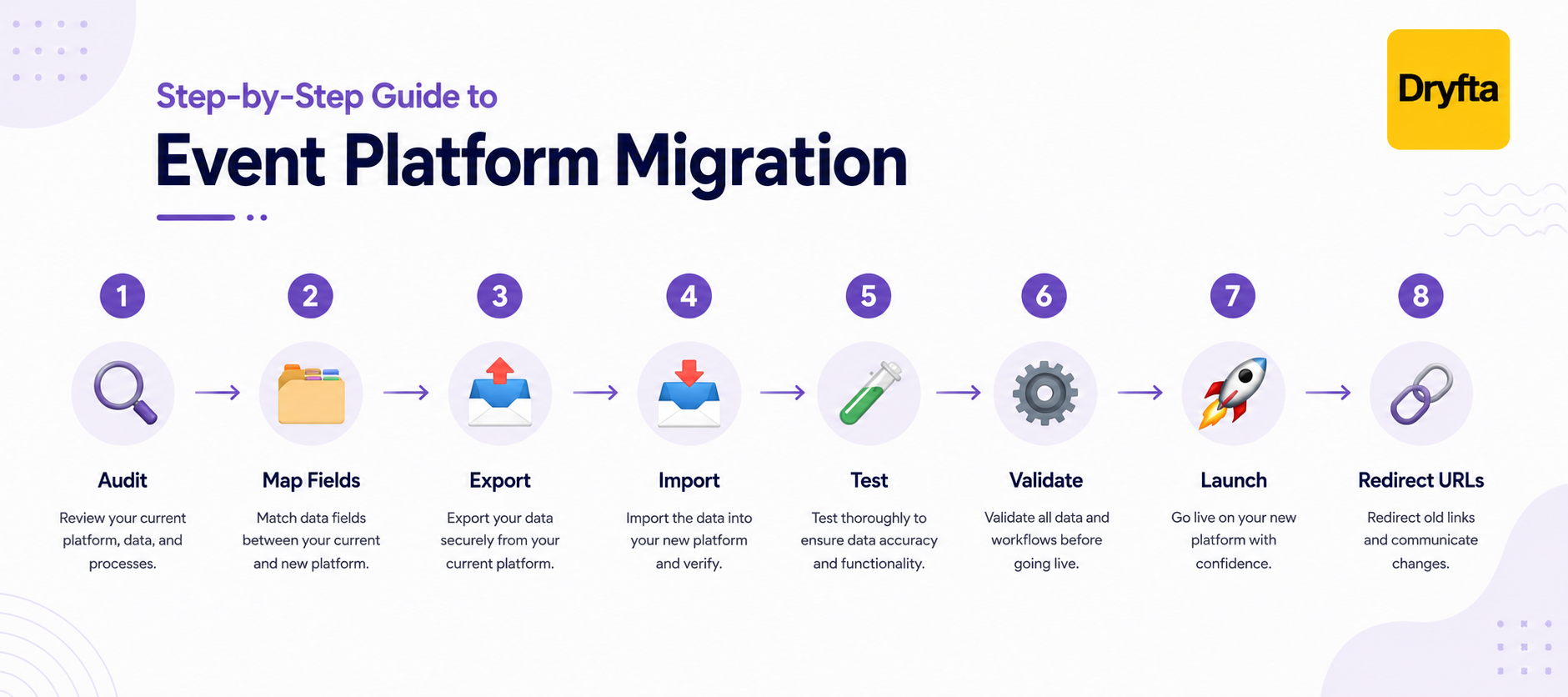
Here’s what your migration should actually look like from start to finish:
Step 1: Audit What You Have
Before you make the switch, take stock of everything you’re using today. Event registrations, attendee records, ticket types, event websites, reports, email templates, discount codes, integrations, and mobile apps should all be on your checklist. After all, you can’t migrate what you don’t know you have.
Step 2: Map Every Field to Its New Platform Equivalent
Every piece of data needs to know where it’s going. First names belong in first name fields. VIP statuses belong in VIP status fields. Custom responses should end up exactly where they should. That’s what helps you migrate event management platforms without losing any data.
Step 3: Export Everything, Not Just the Obvious Records
Most people remember to export attendee lists. That’s obvious and only part of the picture. Make sure registrations, invoices, discount codes, schedules, speakers, exhibitors, reports, email templates and media files are being exported too.
Step 4: Import in the Right Order
Don’t just import everything and hope for the best. Some data depends on other data. For example, contacts should usually be imported before registrations. Get the order wrong, and you’ll end up fixing duplicates and broken records later.
Step 5: Understand What Imported Data Does and Doesn’t Trigger
Imported registrations may not automatically send confirmation emails, trigger workflows, update your CRM, or notify attendees. Spend a little time learning what your new platform handles automatically and what needs to be done manually.
Step 6: Test With a Small Event First
Before your biggest event goes live, run a smaller one first. Ask your team to go through the entire attendee experience, from registration to check-in. Any little issues you find now will be much easier to fix than during a live event.
Step 7: Plan Your Cutover Carefully
Don’t migrate event management platforms while registrations are still open. Wrap up your current event first, then make the switch before registrations open for the next one. That’s one of the easiest ways to switch event software without losing data or interrupting someone’s checkout.
Step 8: Set 301 Redirects From Old Event URLs to New One
Your old event pages may already rank on Google or be saved in attendees’ bookmarks. 301 redirects make sure those visitors end up on the right pages automatically. It’s a simple way to switch event software without losing data or traffic.
Why Migration Is the Perfect Time to Clean Your Event Database
Take a look at your contact list for a second. Chances are it’s filled with duplicate entries and records nobody has touched in years. Don’t carry all of that into your new platform.
If you’re planning to migrate event management platforms anyway, why bring old problems with you?
Migration is the perfect time to:
- Remove duplicate attendee records
- Delete outdated or inactive contacts
- Standardize custom fields and naming conventions
- Organize registration data
- Review custom fields and remove anything nobody uses anymore
Cleaning up doesn’t mean losing your history, though. That’s the important part.
Event analytics help you plan what’s next. Whether it’s budgeting or comparing performance, you should still have access to everything after you migrate event management platforms.
Communicating the Switch to Your Team and Attendees
Your attendees and staff are switching platforms too. A quick update before launch helps everyone know what to expect. Keep this on your event platform data migration checklist.
- Let returning attendees know that your next event will use a new platform.
- Share the new registration link or event URL well before registrations open.
- Reassure attendees that their registration experience will still be simple and secure.
- Tell them where to go if they have questions or run into any issues.
Your internal team needs the same attention.
- Walk your staff through the new platform before the first live event.
- Highlight what has changed instead of assuming everyone will figure it out.
- Give your team time to practice common tasks like registrations, attendee lookups, session management, and reporting.
If your events include onsite check-in, don’t leave anything to chance.
- Test badge printing before event day.
- Confirm how QR codes are generated and scanned.
- Make sure your team knows the new check in process.
- Check whether you need different staffing levels or equipment compared to your old platform.
According to Forrester’s Q1 2026 State of B2B Events Survey, two-thirds of organizations have integrated their event platform with the rest of their sales and marketing technology, a 44% year-over-year increase, showing that more teams are modernizing the way they manage event data
A Pre-Migration Export Checklist
Before you migrate event management platforms, make sure you’ve downloaded everything you might need later. Nobody wants to say, “I wish we’d exported that” after the migration is over.
Keep this event platform data migration checklist handy before you make the switch.
[] Export attendee lists and order reports for every event from the last 2 to 3 years.
[] Download all custom registration questions along with attendee responses.
[] Save payout records and invoices for future accounting needs.
[] Keep an updated list of active discount codes and promo codes.
[] Back up event page content, images, and FAQs that you may want to reuse.
[] Record your CRM integration settings, including field mappings and sync preferences.
[] Save mobile app content like speaker profiles, exhibitor listings, schedules, and branding assets.
[] Create a list of every current event page URL to make 301 redirects much easier after the move.
Why Choose Dryfta to Migrate Event Management Platforms
Moving to a new platform is much easier when you have the right team helping behind the scenes.
You don’t have to figure this whole thing out on your own. Dryfta works with your team every step of the way, from before the migration starts to during the switch and long after you’re up and running.
Here’s how we help:
- Structured data export and import support: There’s no need to start from scratch. Dryfta helps you migrate your data on attendees, registrations, speakers, exhibitors, and other important records in an incredibly organized and easy way.
- CRM integration continuity: Dryfta keeps your CRM and other business tools connected, making sure your data stays in sync automatically whenever possible.
- One system for the full attendee journey as we advance: Once the migration is done, everything from registrations and payments to check-ins, networking, certificates, and reporting is in one place so that it is easier for your team to keep everything on track.
Thinking about switching platforms? Book a free Dryfta demo and see how easy switching platforms can be with the right team by your side.
Frequently Asked Questions
1. Will I lose my attendee data if I switch event management platforms?
No, not if you do it right. As long as you export everything before you switch and double check the import afterward, your attendee list stays completely intact. The trick is exporting more than just the obvious data; think notes, tags, and history too, so nothing gets left behind.
2. When is the best time to migrate to a new event management platform?
Anytime between events works great, especially when nothing is actively selling. The golden rule is simple: never migrate event management platforms while tickets are being sold or registrations are open.
3. Will I lose my search rankings when I switch event platforms?
Only if you skip the redirects. Old event pages may still appear in search results. So it’s important to set up 301 redirects from your old URLs to the new ones. That way, visitors are sent to the correct pages and your existing search visibility has a much better chance of staying intact.
4. Do I need to manually re-enter all my past attendee data in the new platform?
In most cases, no. Most organizations don’t type everything in again. Instead, they export their attendee records from the old platform and import them into the new one. If you’re planning to migrate event management platforms, importing existing records is the faster, safer, and much more practical approach.
5. Will imported attendees automatically receive confirmation emails in the new system?
That depends on your platform, and it’s worth checking before you hit import. Some platforms don’t send confirmation emails or trigger automated workflows for imported records. It’s a good idea to test this before your first live event so there are no surprises.
