
Here’s something to chew on: a well-used CRM can drive 29% more sales, 34% more productivity, and 42% sharper forecasting. Cool, right? Except most event teams never see those numbers because their ticketing tool and CRM don’t integrate well. Every purchase, every abandoned cart, every “maybe next time” attendee just disappears into thin air.
And if you’ve ever wondered why your marketing feels like guesswork, this is probably why.
Let’s fix that, shall we?
Think of this as your no-nonsense guide to getting your ticketing platform and CRM working together so that your data can finally earn its keep.
Event CRM Means Two Different Things — Which One Do You Need?
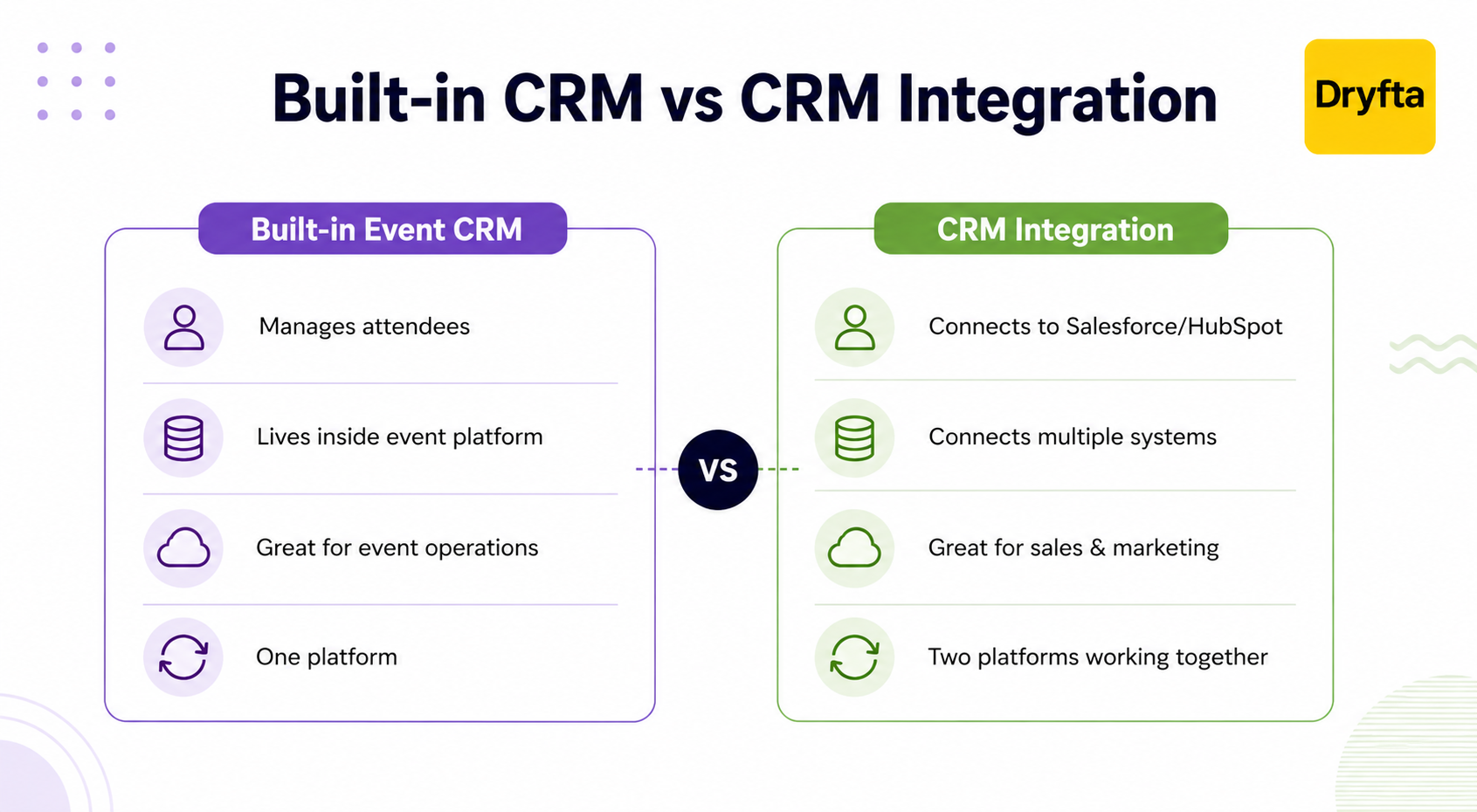
First things first, let’s clear up a common misconception. Hearing the phrase “event management CRM” usually brings two completely different interpretations depending on who you ask.
- You might think it’s nothing more than a built-in tool for tracking attendees and your event registrations.
- Or you see it as a way to connect your event data with the customer database your company already uses.
The latter is what most modern event teams are looking for.
Your event and attendee data automatically syncs with tools like Salesforce or HubSpot so that your sales and marketing teams always have the latest information. That’s what event ticketing software CRM integration is all about.
Here’s a simple way to think about it.
- Built-in event CRM = Manage attendee relationships inside your event platform.
- Event ticketing software CRM integration = Connect your event platform with the CRM your organization already uses.
For many organizations, the second option is the better fit. A high-performing event ticketing software CRM integration keeps your event platform connected to the rest of your tools, which means you don’t have to manage the same information across different systems.
That’s exactly what we’re going to unpack in this guide.
We’ll show you how event ticketing software CRM integration works and how to connect your event platform with Salesforce, HubSpot, or the marketing tools your team already relies on.
The Three Ways Event Software Connects to a CRM
CRM integrations aren’t all built the same. One platform might connect to Salesforce in minutes. Another could take days of setup. That’s why it’s worth understanding how CRM integrations work before you choose an event platform.
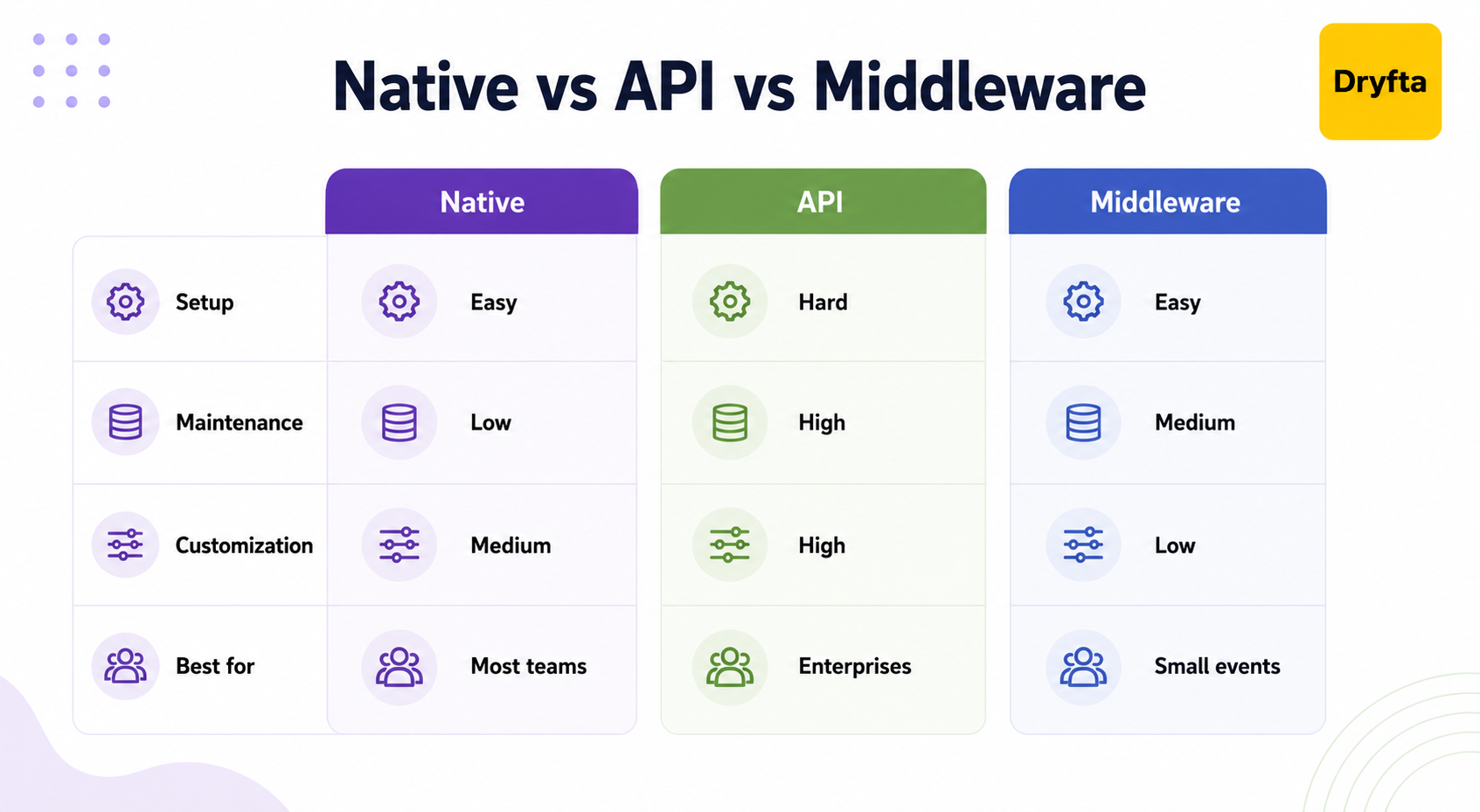
Most CRM integrations fall into one of these three categories:
- Native integration
A native integration is a built-in connection between your event platform and CRM. It’s the easiest option because it’s quick to set up, keeps your data in sync, and doesn’t need much maintenance. For teams using Salesforce, an event platform Salesforce integration with a native connector is the simplest option. - API and webhooks
If a native integration doesn’t do everything you need, APIs and webhooks are the next step. They require developer support, but they let you build an event ticketing software CRM integration that works the way your organization does. - Middleware (Zapier and similar)
Middleware tools connect your event platform and CRM, passing information from one system to the other. They’re popular because they’re easy to set up without writing code. That said, they aren’t always the best choice for large or complex events. During high-registration periods, you may experience sync delays or data inconsistencies. Understanding those trade-offs first can help you avoid problems in business-critical workflows.
What Data Syncs — And What Often Doesn’t?
Most platforms do a good job with the basics. A typical event ticketing software CRM integration will create a new Lead or Contact, update an existing record, connect the registrant to the right contact in your CRM, and trigger automated follow-up emails. For many organizations, that’s enough to keep attendee records up to date.
However, not all integrations stop at registration.
Some sync your valuable event data throughout the attendee journey, while others don’t.
When you’re comparing vendors, ask questions like:
- Does the integration only sync registrations?
- Can it sync session registrations and attendance?
- Will attendee engagement data also be transferred?
- Are cancellations and registration updates reflected automatically?
Answers to these questions can help you choose the right way to integrate event software with marketing stack tools and create more personalized campaigns after the event. And knowing exactly what your event ticketing software CRM integration can and can’t do will help you choose a platform that fits your long-term plans.
What CRM Integrations Do Event Platforms Offer?
A CRM integration can look very different from one event platform to another. You might get a native connection, a third-party integration, or an API that needs custom setup. Understanding these differences helps you choose the event ticketing software CRM integration that fits your organization.
- Multi-CRM native integration: The platform connects directly with several popular CRMs like Salesforce and HubSpot. Data is transferred automatically between systems and advanced features like two-way syncing and automatic updates are included. This is a good choice if your organization relies heavily on CRM data.
- Single-CRM native integration: Some event platforms are built to work with just one CRM. If that’s the CRM your organization already uses, setup is usually quick and easy. But if you switch to a different CRM later, you’ll likely need a new integration.
- Basic connector integration: These integrations focus on the essentials like syncing attendee registrations and contact details. More advanced information like session attendance or engagement data may not sync automatically. They’re often enough for smaller events.
- Uses a third-party connector: Data is synced through tools like Zapier instead of a direct integration. They’re easy to set up, but as your events grow, you may run into limits. Before choosing one, make sure the event ticketing software CRM integration can handle your event size and the data you need to share.
How Is CRM Different for Academic and Association Events?
Not every organization runs on Salesforce or HubSpot. For many academic and association events, the system at the center of everything is an Association Management System (AMS).
An AMS does much more than store contact details. It manages member records, renewals, dues, certifications, event registrations, and attendance history, all in one place.
That’s why event ticketing software CRM integration most probably involves connecting your event platform to an AMS rather than a traditional CRM. With everything syncing automatically, your team spends less time updating attendee records.
What to Ask Before You Buy — An Evaluation Checklist
Don’t wait until after you’ve signed the contract to find out how the integration works. These questions can help you spot potential issues before you commit.
[ ] Which CRM platforms are supported natively? Make sure the vendor lists the actual systems instead of saying “we integrate with CRMs.”
[ ] How does the integration work? Is it native, built with APIs, or dependent on middleware like Zapier?
[ ] What information gets synced? Does it include session attendance and engagement, or only basic registration details?
[ ] When someone registers or updates their details, how quickly does that information appear in your CRM?
[ ] Can you download all of your attendee data at any time or does the platform place limits on access?
[ ] Will the integration still work if your organization moves to a different CRM later?
[ ] After setup, does the integration need regular developer support or is maintenance handled by the vendor?
Asking these key questions guarantees you select an event ticketing software CRM integration that keeps sales and marketing pipelines running without missing a beat.
How Dryfta Approaches CRM and Marketing Stack Integration?
Less time spent managing attendee data means more time to focus on your event. With Dryfta, your attendee information is connected across all your tools so that it is easier to stay organized every step of the way.
Here’s how it works:
- A full-stack Event CRM that captures the complete attendee journey: With Dryfta, you don’t have to piece together attendee data from multiple systems. Our built-in event CRM keeps registrations, payments, communications, check-ins, and participation in one place. For organizations that need event ticketing software CRM integration, fewer systems also mean less manual data syncing.
- Structured and exportable attendee data: Every registration, attendee profile, payment record, and event interaction can easily be exported. Having complete control over your data makes it easier to report on past events and plan the next one.
- Built specifically for academic and association events: Dryfta is designed around the needs of universities and associations. It supports member-focused workflows, conference management, abstract submissions, and recurring events. Our platform is a natural fit for organizers who need more than just basic attendee management.
Curious how Dryfta fits into your existing event setup? Book a free demo and see how easy it is to keep your attendee and event data synced.
Frequently Asked Questions
1. What’s the difference between an event CRM and CRM integration?
An event CRM stores and manages attendee information inside the event platform itself. Event ticketing software CRM integration connects your event platform with an external CRM, such as Salesforce or HubSpot so that your attendee data is synced automatically between both systems.
2. Should I use a native integration, an API, or Zapier to connect my event software to my CRM?
It depends on your needs. A native integration is usually the easiest to set up and maintain. APIs offer more flexibility for custom workflows, while tools like Zapier are useful for simple connections but may not be the best choice for large or complex events.
3. Does CRM integration sync all my event data, or just registrations?
Not always. Some platforms only sync registrations and contact details. Others can also sync session attendance and engagement. Always ask what is included before choosing an event ticketing software CRM integration.
4. Who owns attendee data when using a ticketing platform with CRM integration?
You should always check the vendor’s policy. A good platform lets you keep full ownership of attendee data and export it whenever you need.
5. How does CRM integration help prove event ROI?
When you integrate event software with marketing stack tools and CRM, you can see what happens after someone registers. For example, an event platform Salesforce integration can help your team track leads, follow-up activities, sales opportunities, and customer interactions, making it much easier to measure the ROI of your events.
