Knowing how to manage conference speakers requires planning beyond the invitation. A speaker can accept months before an event and still arrive without the right schedule, slide format, travel details, or technical support. Good event speaker coordination turns that early commitment into a prepared, confident appearance.
This guide explains how to manage conference speakers after they confirm. It covers ownership, deadlines, information collection, communication, accessibility, technical checks, event-day support, and follow-up. The aim is not to send more messages. It is to make each message timely, specific, and easy to act on.
Scope of this guide: Start here once a speaker has agreed to participate. If you are still building the program, read our guide to choosing the right speakers for your event. University teams planning the initial approach can also use these speaker invitation dos and don’ts.
Define the speaker workflow before sending reminders
A reliable workflow has clear stages. A speaker moves from confirmed to information requested, materials received, schedule approved, technically ready, checked in, and complete. Each stage needs one owner and one next action.
Assign a lead speaker coordinator, even if several people help. Speakers should know whom to contact, and internal teams should know who can approve changes. The coordinator does not need to complete every task. They need to make sure no task loses its owner.
Set responsibilities early:
- Program team: Confirms the session purpose, format, participants, and content deadlines.
- Speaker coordinator: Maintains records, sends instructions, follows up, and routes questions.
- Production or AV team: Confirms presentation formats, equipment, remote connections, rehearsals, and backups.
- Travel or hospitality contact: Handles approved transport, accommodation, arrival details, and expenses.
- Marketing team: Uses only approved names, titles, biographies, headshots, and promotional permissions.
- Session chair or moderator: Receives the final run of show and manages the session itself.
Confirm the commitment in writing
Record the agreed session, format, duration, deadlines, fee or honorarium, approved expenses, travel responsibilities, cancellation terms, recording choices, and use of submitted materials. The document should match what the organizer and speaker actually discussed. Do not hide new obligations in a later briefing.
Use language approved by the organization’s legal or procurement team where appropriate. Give the speaker a copy, record its status, and route any exception to the person authorized to approve it. A signed document is useful only when the operational team follows its terms.
Maintain one speaker record with visible status
Scattered email threads hide missing information. Keep a central record for every speaker and give the team access according to role. A spreadsheet can work for a small program. A larger or recurring conference may need a shared event system with forms, permissions, task owners, and communication history.
Track only information the event genuinely needs. Mark each item as requested, received, approved, or overdue rather than relying on memory.
| Record area | What to track | Why it matters |
|---|---|---|
| Identity and contact | Preferred name, pronunciation, pronouns if volunteered, role, organization, email, phone for urgent event-day contact | Prevents public errors and gives the team an approved contact route |
| Session | Title, format, date, time, time zone, room or access link, duration, co-speakers, moderator | Keeps the published program and internal plan aligned |
| Content | Abstract, biography, headshot, slides, handouts, disclosures, final version status | Shows what is missing and which version is approved |
| Permissions | Agreement status, recording choices, promotional use, third-party content restrictions | Prevents the team from assuming permission that was never granted |
| Support | Accessibility needs, dietary needs, AV requirements, travel plan, accommodation, expenses | Lets the right team prepare without repeatedly asking the speaker |
| Operations | Task owner, due date, current status, last contact, next action, event-day check-in status | Makes follow-up specific and accountable |
Limit access to personal, accessibility, and travel information. Record what the speaker has approved for public display separately from private operational notes.
Set a deadline sequence that works backwards from the event
One final deadline creates a rush. Use a sequence of smaller milestones, then adjust the dates to suit the size and format of the event. The following is a practical starting point, not a fixed rule.
| Suggested timing | Organizer action | Speaker outcome |
|---|---|---|
| On confirmation | Send the agreement, session purpose, key dates, named contact, and information form | Speaker understands the commitment and next action |
| Eight to twelve weeks before | Confirm title, abstract, biography, headshot, permissions, travel needs, and accessibility support | Program and promotional details can be approved |
| Four to six weeks before | Confirm session format, co-speakers, schedule, AV needs, disclosures, and travel plan | Speaker can prepare for the actual room and audience |
| One to two weeks before | Collect final materials, test remote speakers, share arrival instructions, and issue the final briefing | Content and logistics are ready for delivery |
| Event day | Check in the speaker, verify the presentation, introduce the session contact, and confirm any changes | Speaker reaches the correct place prepared and on time |
| Within a few days after | Thank the speaker, settle approved expenses or fees, confirm recording next steps, and request feedback | The relationship closes professionally and records stay complete |
Build internal review time into every public deadline. A biography received on the program deadline still needs checking, approval, and publishing.
Make every speaker message answer four questions
Long messages often produce incomplete replies. Use a predictable structure so a speaker can scan and respond:
- Why am I receiving this? Name the event and session.
- What must I do? State one action or group closely related actions.
- When is it due? Include the date, time zone, and consequence of a delay when relevant.
- Where do I go for help? Give one contact and one submission route.
Send an immediate confirmation, milestone reminders, a final briefing, and only the exception messages the speaker needs. Avoid copying every speaker on every operational update. Segment messages by role, session, location, completion status, or travel requirement.
Use a recognizable subject line, such as “Action required: Final slides for [Event] due [Date].” When nothing is required, say that near the top. This small distinction reduces uncertainty and unnecessary replies.
Collect approved content without creating version confusion
Ask speakers to submit details through one form or portal rather than across several inboxes. Explain character limits, image specifications, file types, naming rules, and whether the material will appear publicly.
For biographies, give a clear length and audience instead of asking for a “short bio.” Dryfta’s conference speaker bio guide provides examples that organizers can share.
For presentations, record the upload date and version. Name one file as final, keep a backup available to production staff, and do not replace it silently. If a speaker brings a new version on event day, confirm that the technical team and session lead both have it.
Keep recording and reuse permission explicit. State whether a session may be livestreamed, recorded, edited, captioned, distributed, or used in promotion. Have appropriate legal or institutional reviewers approve the consent language, especially when events involve minors, sensitive research, performers, patients, or third-party material.
Coordinate the schedule, travel, and accessibility as one plan
A session time affects more than the agenda. It can change a speaker’s travel, rehearsal, accessibility support, meal plan, and availability for other commitments. Confirm the complete plan before publishing it as final.
Give each speaker:
- The correct time zone for every virtual or hybrid appointment.
- The room, venue entrance, or access link with arrival time and check-in instructions.
- The session format, speaking time, audience profile, co-speakers, moderator, and Q&A plan.
- The approved travel and expense process, including what requires advance authorization and which receipts to retain.
- A private route to request accessibility support, with enough lead time for the team to respond.
Do not make speakers repeat sensitive support requests to multiple departments. Route the information to the smallest appropriate team and confirm the agreed arrangements directly with the speaker.
Prepare the speaker for the room, platform, and audience
A confident expert can still struggle with an unfamiliar stage or virtual platform. Share practical conditions early: screen ratio, presentation computer, microphones, confidence monitor, internet connection, audience interaction tools, captioning, lighting, and whether videos require embedded audio.
Schedule a rehearsal when the format is complex, the speaker joins remotely, several people share a session, interpretation is involved, or the program will be broadcast. Use the rehearsal to test the real setup, not to repeat information already sent by email.
Final technical check:
- Open the final presentation on the event device.
- Test video, audio, fonts, links, and animations.
- Confirm captions, interpretation, or assistive support.
- Check the speaker’s name, title, and pronunciation.
- Store an accessible backup and identify who controls it.
- Confirm the contact route if the speaker cannot connect or arrive.
Use an escalation path for changes
Changes are easier to manage when the team decides in advance who can approve them. Define the response for a delayed arrival, schedule conflict, substitute speaker, missing slides, changed session title, technical failure, or withdrawal.
For each change, record the decision, owner, affected systems, and people who must know. A room change, for example, may need updates to the agenda, mobile experience, signage, AV plan, moderator brief, and attendee message. One update is not complete until every affected channel agrees.
Prepare a short fallback for each high-risk session. Options may include a remote connection, moderated interview, adjusted session order, approved substitute, backup presentation, or cancellation notice. Choose the response that protects the audience and avoids pressuring a speaker into an arrangement they did not accept.
Hand over a concise event-day brief
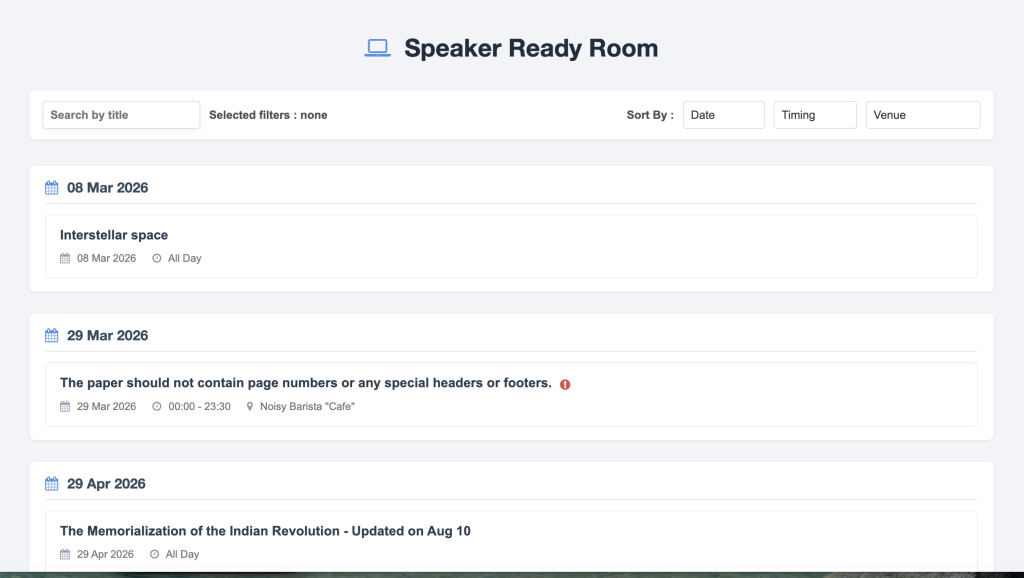
The speaker coordinator should not become the only person who knows the plan. Give the registration desk, speaker-ready area, AV lead, moderator, and room contact the information they need, without sharing private details that do not concern them.
The event-day brief should show the speaker’s arrival time, check-in point, session room or link, session timing, pronunciation, final file status, agreed support, responsible contacts, and any open issue. Mark changes clearly and time-stamp the latest version.
The session chair owns the in-room flow, not the entire pre-event workflow. Use the separate conference session chair checklist for introductions, timekeeping, audience questions, and session problems.
Close the loop after the event
Send a personal thank-you promptly and complete any approved payment or expense process. Tell the speaker when recordings, photographs, or session materials will be available and honor the permissions already recorded.
Ask a small number of useful questions: Did the briefing arrive at the right time? Was anything unclear? Did the room or platform support the session? Record the answers with operational notes for the next event.
Then close outstanding tasks, restrict or remove data that no longer needs to be retained, and archive the final approved materials according to the organization’s policy. A clean closeout prevents next year’s team from rebuilding the history from old inboxes.
A concise conference speaker management checklist
- Assign one lead coordinator and define internal owners.
- Create one controlled speaker record with status and next action.
- Confirm the session purpose, format, schedule, and participants.
- Record agreements, permissions, and public-content approvals.
- Collect biography, headshot, abstract, disclosures, and final presentation.
- Confirm accessibility, travel, hospitality, and expense arrangements.
- Test the actual room or virtual setup and keep a backup.
- Prepare an escalation path for delays, withdrawals, and technical failure.
- Give event-day teams a current, role-appropriate briefing.
- Thank the speaker, complete follow-up, and archive the final record.
Frequently asked questions
When should speaker management begin?
Begin as soon as a speaker confirms. Send the key dates, responsibilities, agreement, session context, and information request while the commitment is fresh. Early structure reduces repeated follow-up later.
What information should organizers collect from conference speakers?
Collect approved identity and session details, contact information, biography, headshot, abstract, presentation files, disclosures, recording choices, AV requirements, accessibility support, and any approved travel or expense information. Ask only for information the event needs and control who can access private details.
How often should organizers contact speakers?
Contact speakers at meaningful milestones rather than on an arbitrary weekly schedule. Most need a confirmation, requests tied to clear deadlines, a final briefing, and specific updates when something changes. Segment reminders so speakers who have completed a task do not receive an overdue notice.
How do you manage several speakers without losing track?
Use one shared record with a named owner, due dates, completion status, last contact, and next action for each speaker. Standardize the core process, then record exceptions for travel, accessibility, production, or session format.
What should happen if a speaker cancels or is delayed?
Use the event’s agreed escalation path. Confirm the facts, decide whether to move the session, connect the speaker remotely, use an approved substitute, change the format, or cancel, then update every affected team and attendee channel. Do not improvise a substitute or recording use without the necessary approval.
When does a shared event system become useful?
A spreadsheet may be enough for a small event with a few speakers. A shared event system becomes more useful when the team manages many sessions, repeated deadlines, segmented communication, files, permissions, and several staff roles. The deciding factor is workflow complexity, not speaker count alone.
Give speakers clarity, not more administration
Strong speaker management makes the next action obvious to both the speaker and the event team. One accountable coordinator, a visible workflow, timely messages, approved materials, and a tested contingency plan remove most last-minute surprises.
Dryfta can help conference teams keep speaker information, tasks, schedules, communications, and event operations connected. If your current process depends on scattered forms, spreadsheets, and email threads, request a Dryfta demo to discuss the workflow your event needs.