




Look at your browser right now. If you are currently managing multiple enterprise events, chances are you have 10 different tabs open, 3 separate spreadsheets across the screen, and a sinking feeling that something is about to slip through the cracks. It is an exhausting way to work, and frankly, it leaves your staff completely burned out.
But here is the good news: it does not have to be this way. To regain control, your event team needs absolute, centralized visibility over the event calendar. Housing your event operations in one place simplifies coordination to a great degree.
Throughout this guide, you will learn how enterprise event teams can streamline operations and manage multiple events more effectively using one event management platform.
The Hidden Cost of Managing Multiple Enterprise Events Across Disconnected Tools
Picture this: you’re a member of an events team in either a university, association or corporate environment with a very full calendar. The expectation from leadership is that you can manage multiple enterprise events throughout the year, typically 5, 10, or 20+ different projects.
How will you pull this off?
The standard approach is usually to spin up a new spreadsheet or a different registration and ticketing tool for every single event. It feels fine at first, right? But honestly, it’s costing you big time. Random tools make managing multiple enterprise events far more difficult and increase the risk of operational errors.
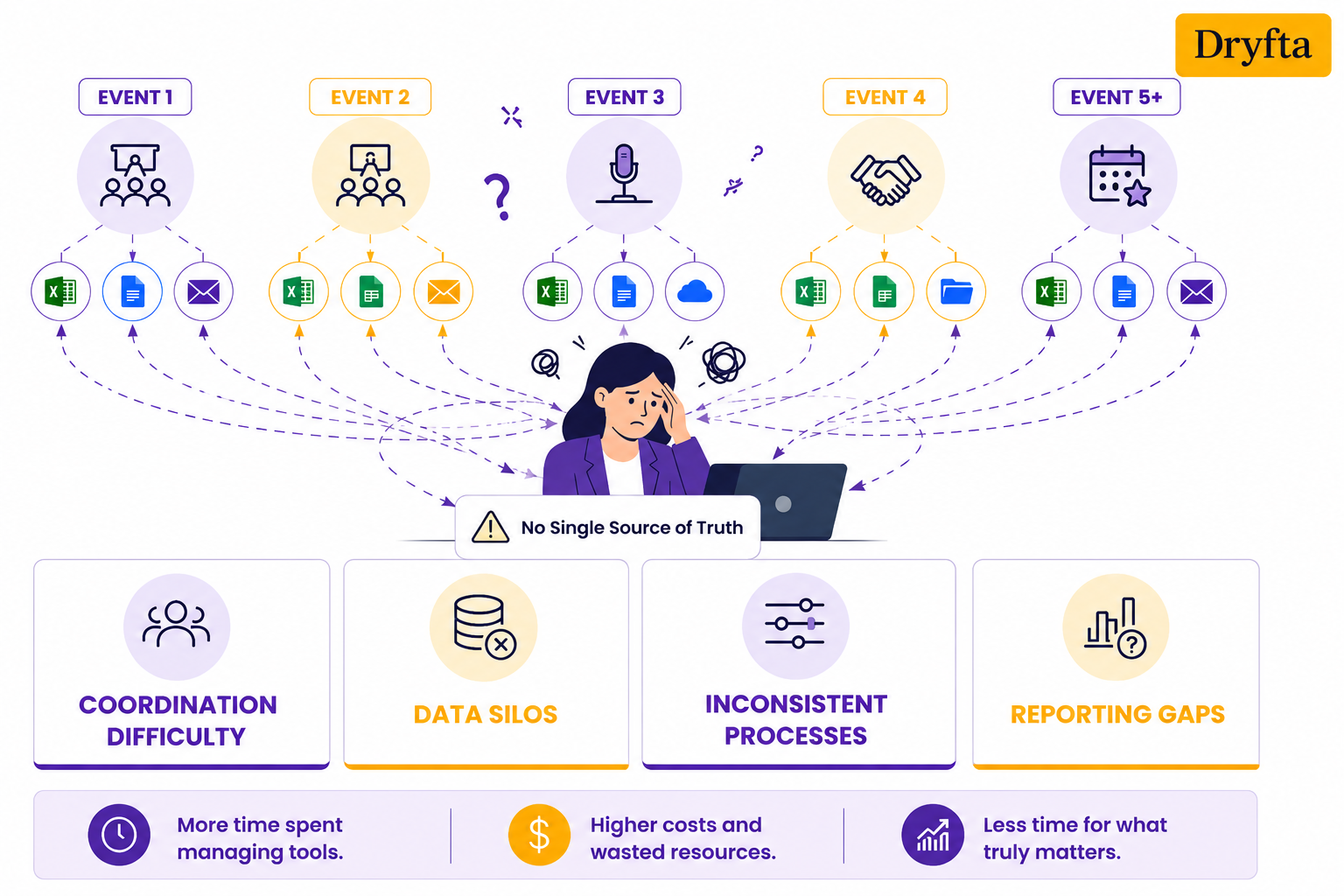
Let’s now consider the effects on your day-to-day operations:
- Coordination difficulty
If you use different software for each event, your team wastes more time looking for information than managing the event. Locating attendee information and reviewing speaker data may be more time-consuming than anticipated. Over time, those delays will surely affect your overall productivity. - Data silos
How can you understand your audience when every event keeps its data separate? If you store all attendee data in separate files, you can’t see your audience as a whole. You then have to copy and paste all the other information, and you’re sure to make a mistake. - Inconsistent processes
Without a unified multi-event management platform, every manager invents their own workflow. Consequently, your registration forms and client communication look wildly different every time. That inconsistency can confuse both your attendees and staff. - Reporting gaps
Trying to measure event ROI across your entire portfolio? Good luck with that. It’s enough to make anyone’s head spin to try to create a single report from 10 different tools.
Did you know? According to the International Association of Professional Congress Organizers (IAPCO), accredited organizers delivered 23,512 meetings and events in 2025, representing a 20.8% year-over-year increase.
Why Use a Single Platform for Multi-Event Management?
Managing multiple enterprise events is no small feat. If your staff is always changing from one tool (ticketing) to another tool (marketing) to another (attendee tracking), errors will happen as things get lost in transition. Why bounce between five different tools when one multi-event management platform can handle it all, right?
This is where a centralized system changes the game:
- Streamlined workflows and reusable processes: Stop re-inventing the wheel every single time you launch a new initiative. With centralized enterprise event planning software, you can clone past event websites and registration forms in just a few clicks. Reusing proven templates keeps your branding consistent and saves your team days of repetitive setup work.
- Unified data and consolidated reporting: When you’re managing multiple enterprise events, siloed reports can make performance tracking unnecessarily complicated. Enterprise event management software centralizes your data through a full-stack Event CRM, so reporting is accurate and easy to understand.
- Improved team collaboration and clear role management: Keeping your event team on the same page is easier with role-based access event management. It helps with enterprise event team collaboration by giving staff, event managers, vendors, contractors, and sponsors access to exactly what they need.
- Cost and time savings that compound with scale: Paying for dozens of separate software subscriptions can put unnecessary pressure on your event budget. A multi-event dashboard helps reduce your software expenses and makes billing easier to manage across your entire event portfolio. Best of all, the time you save multiplies with every new project you add to your calendar.
Key Features to Look for in Multi-Event Management Software
The more entries on your event calendar, the less capable entry-level platforms are at performing, costing your team time and sanity. A solid enterprise event management software will help you manage logistics far more efficiently.
The platform you pick must offer these features:
- Centralized dashboard for all events: A centralized dashboard lets you and your staff see who has registered for which events while viewing venue updates from one place.
- Role-based access and permissions: Role-based access provides appropriate access and control for each user. Strong security and architecture also help protect sensitive event information.
- Seamless checkout and ticketing: Your checkout process should manage ticket sales, promo codes, and invoicing in one seamless workflow.
- Team collaboration tools: Planners should have team task lists and digital note-taking tools to support on-the-fly changes in setup.
- Cross-event template builders: Your platform should let you copy your best website layouts and signup forms to launch new events in a few clicks.
- Automated communications and marketing: Automated email workflows keep attendees informed with ticket details and important event updates.
- Enterprise workflow management: Large enterprises often follow different approval structures and compliance requirements. Platforms that support workflow customization and on-premise deployment give teams greater control over their internal processes.
The goal is pretty simple. Spend less time dealing with admin work and more time creating great events.
How Dryfta Supports Efficient Multi-Event Management?
Most event teams can handle one conference without much trouble. The real challenge begins when multiple events start competing for the same time and attention. Dryfta helps simplify that complexity through a centralized event management system that brings registrations, communications, schedules, and reporting into one place. That way, managing multiple enterprise events does not require your event team to constantly switch tabs.
Here is a closer look at how Dryfta simplifies event planning through centralized event management:
1. Manage all events from one dashboard
Feature description:
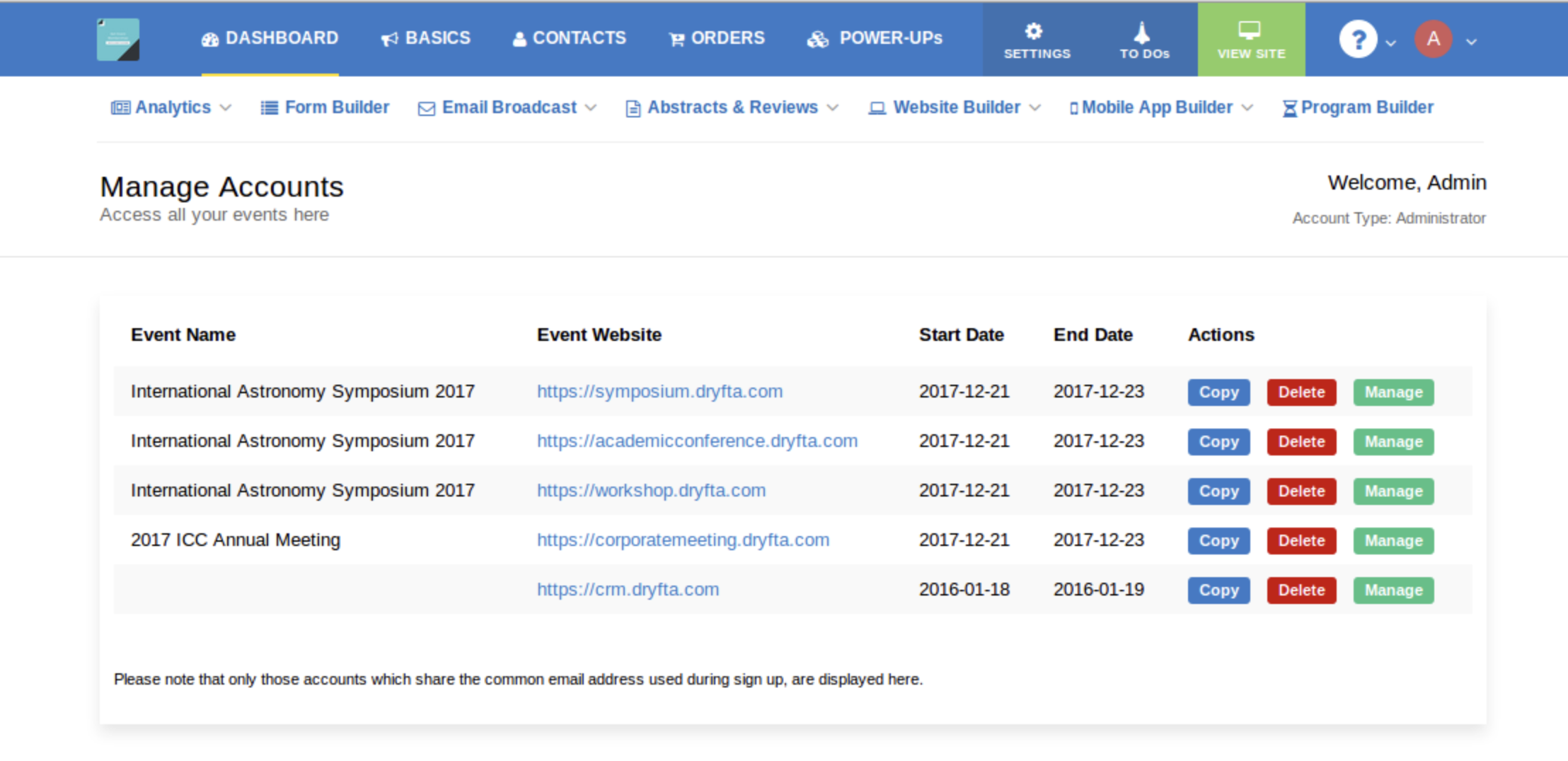
Dryfta features a dedicated multi-event dashboard that lets you see your entire portfolio of past and upcoming events at a glance. You can choose whether to manage, copy, or delete an event. Bringing everything into a single dashboard makes managing multiple enterprise events much easier.
Workflow:
- Hover over the My Profile icon in your dashboard
- Click My Events
- View all your past and upcoming events in one list
- Click Manage to open and manage an event
- Click Copy to copy an event along with its event data
- Choose which event data you want to copy to the new event
- Click Delete to remove an event
2. Assign roles and permissions to unlimited team members
Feature description:
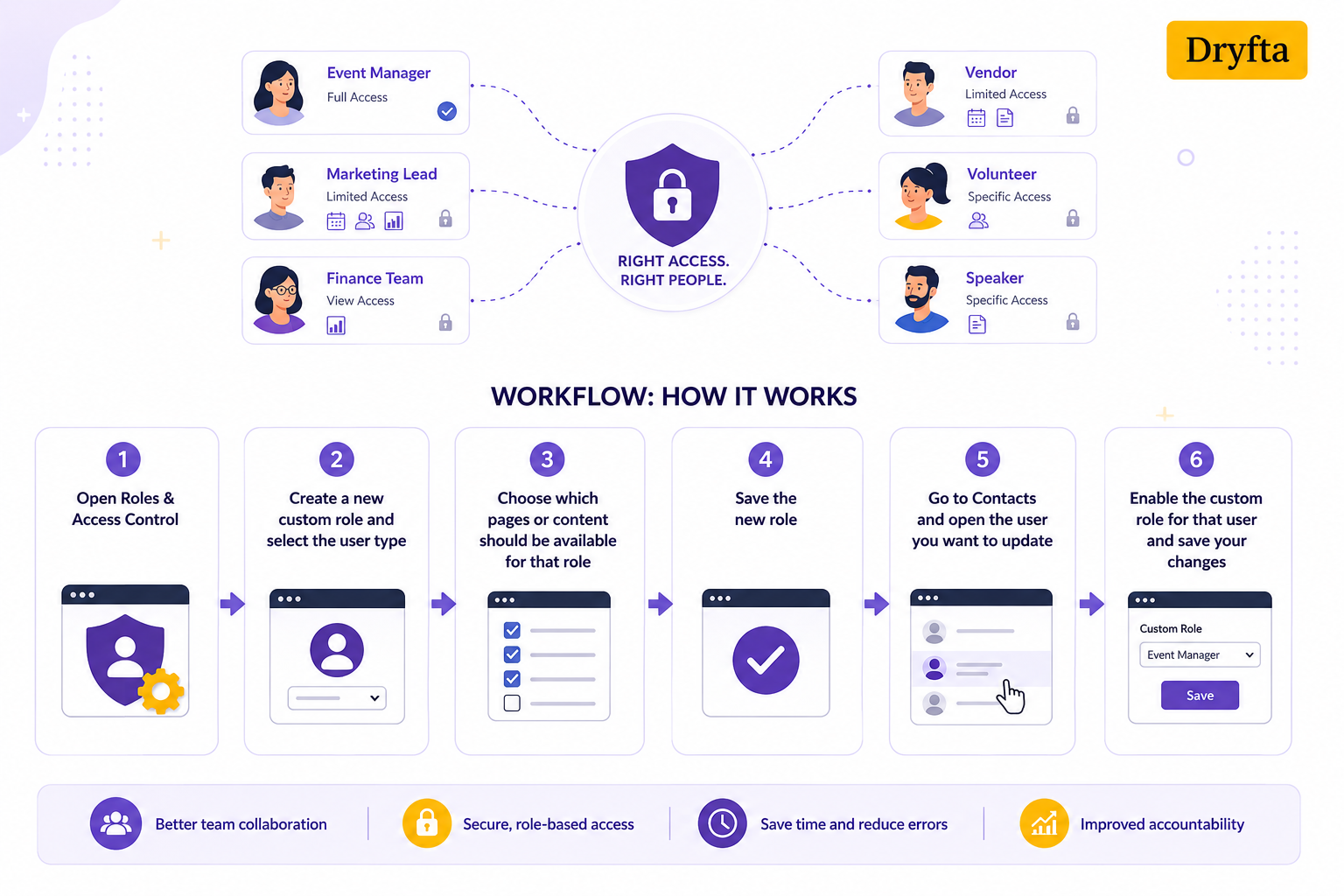
When multiple people are working on the same event, not everyone needs access to everything. Dryfta’s role-based access control let you create custom roles, specify which pages or content each role can access, and assign them to the right users. It is a simple way to support better enterprise event team collaboration.
Workflow:
- Open Roles & Access Control
- Create a new custom role and select the user type
- Choose which pages or content should be available for that role
- Save the new role
- Go to Contacts and open the user you want to update
- Enable the custom role for that user and save your changes
3. Unified attendee and contact management
Feature description:
A centralized contact database can save event teams a lot of time. Dryfta integrates attendee and contact records into one organized system. Thanks to Dryfta, locating and managing attendee information is easier than ever.
Workflow:
- Go to Contacts
- Click Add Filter
- Select the field and the associated option you want to use
- View the filtered list of contacts
- Click Export to download the results as a CSV file
Or, if you need a custom report:
- Go to Analytics → Custom Reports
- Click New Report
- Select Contacts and Attendees under the user types section
- Choose the fields you want to include in the report
- Save the report
- Click View Report and download it as a CSV file
4. Automated email campaigns across events
Feature description:
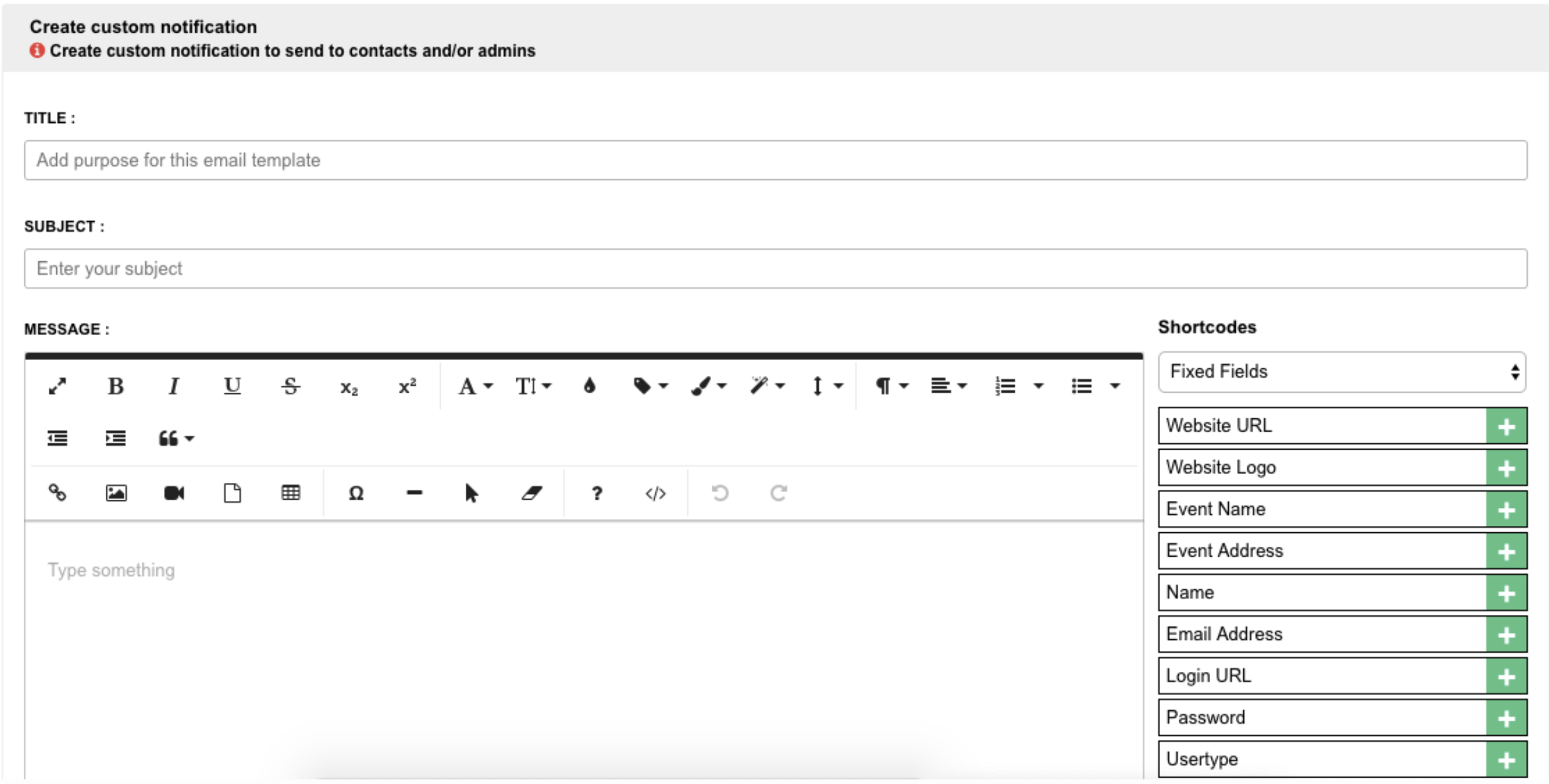
Dryfta includes a native email marketing tool that lets your team create custom campaigns, build personalized email templates, and send messages to different attendee groups. Automated notifications can be configured to respond to specific actions. Your team can manage multiple enterprise events while maintaining consistent communication from registration through post-event follow-up.
Workflow:
- Create a custom email notification
- Add the email title, subject, and message
- Choose the form that should trigger the notification
- Optionally, select a specific form field to trigger the email
- Save the notification workflow
- Review campaign activity through the built-in campaign reporting dashboard
- Export campaign reporting data when needed
5. Comprehensive analytics and cross-event reporting
Feature description:
Making informed decisions starts with having access to accurate event data. Dryfta provides built-in analytics to track registrations, check-ins, orders, speakers, and other key event metrics. Reports can be filtered, saved, exported as CSV files, and shared through a secure link, making centralized event management and enterprise event team collaboration much easier.
Workflow:
- Open Analytics and create a new custom report
- Enter a report name and select a date range
- Choose the user type and the fields you want to include
- Apply filters to narrow down the results
- Save the report and view the live version
- Download the report as a CSV file or share the report link with stakeholders
- Use the Event Snapshot view to monitor live event activity, including registrations, check-ins, speakers, reviewers, and orders
6. Reusable event websites for every event
Feature description:
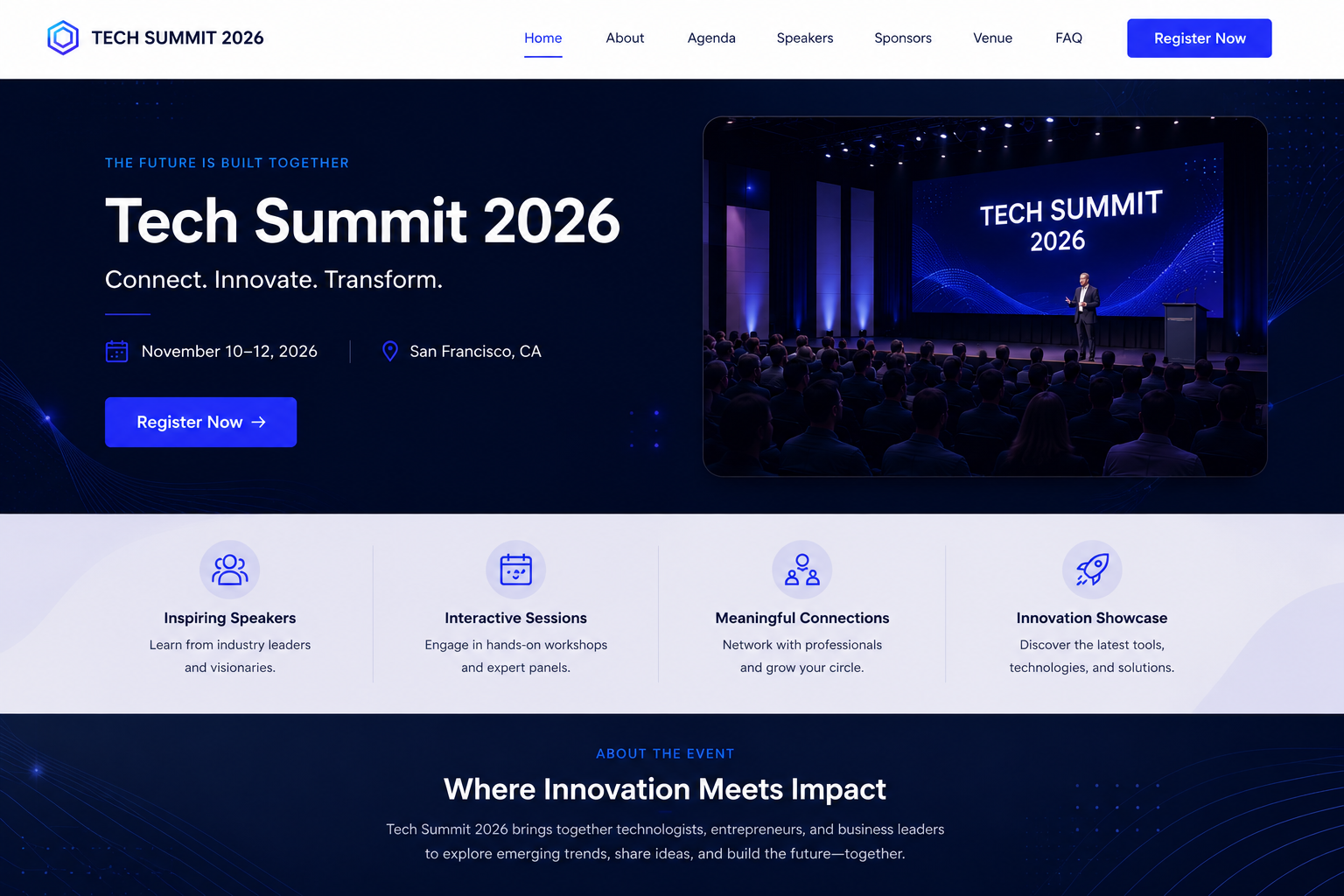
Creating a new event website for every conference is time-consuming. With Dryfta’s built-in event website builder, managing multiple enterprise events is a walk in the park. You can build dedicated pages for attendee and reviewer registration, as well as abstract submissions, while customizing the forms that appear on each page. Since website content and forms are managed from the same platform, your enterprise event team collaboration is streamlined.
Workflow:
- Create a new event website
- Customize pages, menus, and branding elements
- Add registration, abstract submission, reviewer, or speaker forms
- Configure content and participant workflows based on event requirements
- Preview the website and make updates as needed
- Publish the website
- Reuse the website structure for future events and update event-specific content, dates, and forms
7. Reusable Form Builder for Enterprise Events
Feature description:
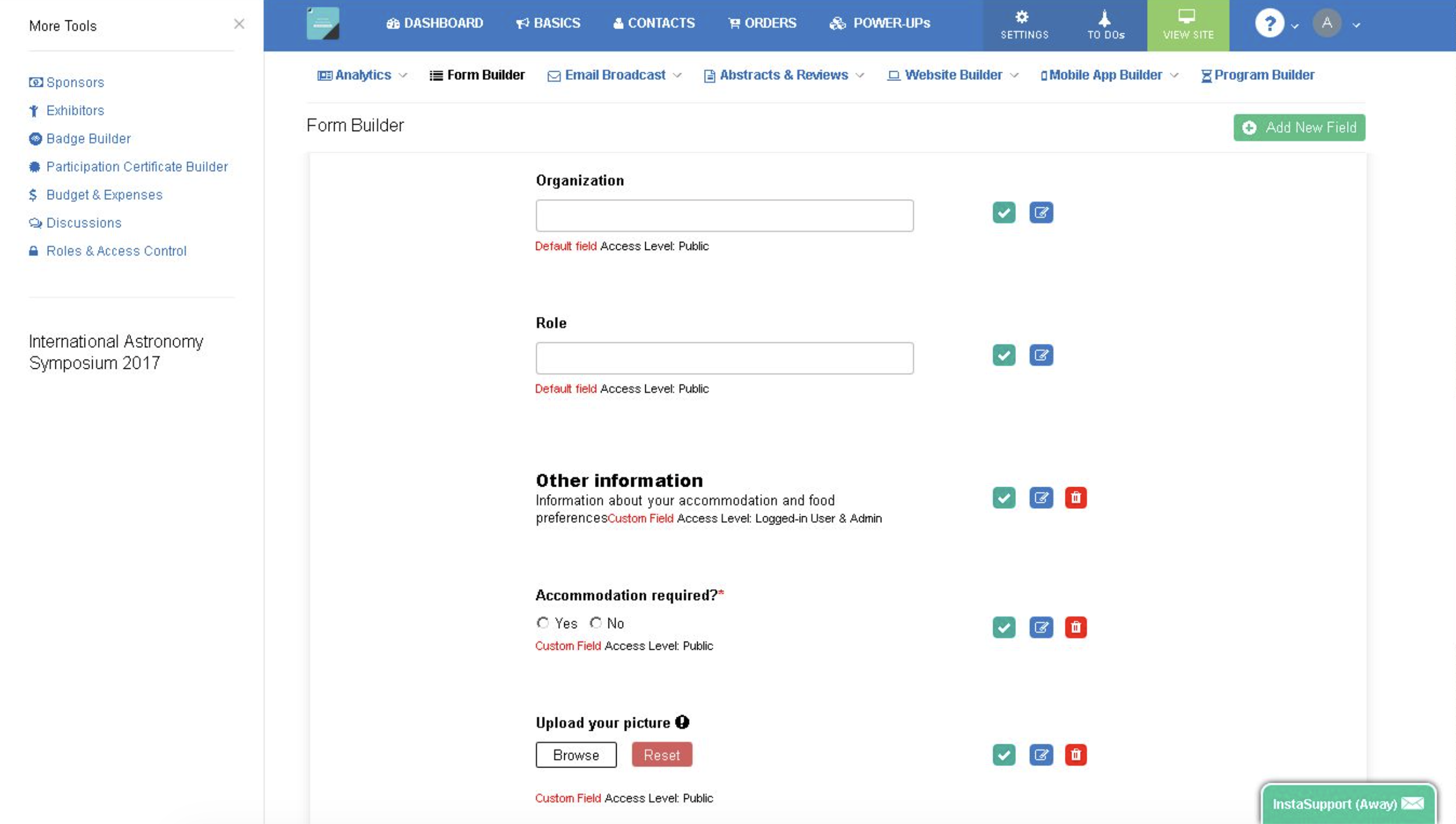
Dryfta’s form builder helps organizers create and reuse registration and submission forms while managing multiple enterprise events. New forms can be linked to specific user roles, existing fields can be copied into new forms, and completed forms are automatically published to the event website.
Workflow:
- Go to Roles & Access Control and create a new role if needed
- Open Form Builder
- Create a new form and select the appropriate form type
- Choose the role that should have access to that form and save it
- Add new fields or copy existing fields from another form
- Once the form is ready, it is automatically published on the event website
- If needed, go to Website Builder > Navigation to hide or show the form link
Believe it or not, 66% of associations now plan their major conference more than 12 months in advance, reflecting the growing complexity of event operations and long-term portfolio management.
Best Practices for Enterprise Event Teams Using a Multi-Event Platform
Getting your hands on powerful tech is a great first step, but how you actually deploy it makes all the difference. Transitioning to a multi-event management platform requires a shift in strategy.
Here is a blueprint for your team managing multiple enterprise events:
- Standardize event templates and workflows before your first event
Take the time to build reusable registration forms and event website templates in advance. Doing so helps maintain consistency across your event branding. It also helps your team launch new events with far less effort. - Leverage role-based access to create ownership
Avoid the security risks that come with sharing a single admin account across your entire team. A good enterprise event management software lets you assign role-specific permissions based on individual responsibilities. Temporary staff can focus on their assigned tasks, while sensitive financial and administrative data remains protected. - Use automation to eliminate recurring manual tasks
Stop spending valuable time manually sending ticket confirmations or tracking invoices. Enterprise event management software can automate attendee communications and payment tracking as soon as a registration is completed. Event teams can then focus more attention on other high-impact priorities. - Monitor cross-event analytics to optimize the portfolio, not just individual events
A single event only tells part of the story. A multi-event dashboard helps organizers analyze performance across multiple events, revealing which engagement strategies consistently resonate with attendees. Cross-event insights also strengthen reporting and budget discussions with stakeholders. - Encourage team communication within the platform, not outside it
Keeping event discussions and vendor notes together is a wise choice. Moving your daily operational discussions away from random chat apps ensures critical context never gets lost.
The Bottom Line
Growing event portfolios bring new challenges. More teams and more stakeholders can make coordination harder than it needs to be. At times like these, look nowhere but Dryfta. Our multi-event dashboard centralizes your registration, communication, reporting, website/form building, and attendee data in a single environment.
Take the next step and discover Dryfta’s multi-event management features firsthand and see how easily your team can maintain consistency across every event. Book your free demo today!
Frequently Asked Questions
1. What are the main challenges in managing multiple enterprise events simultaneously?
One of the biggest challenges of managing multiple enterprise events is working across random tools. Separate spreadsheets and standalone tools often lead to data silos. Keeping your event reports aligned is much harder when information is scattered across multiple platforms.
2. How does a multi-event management platform improve efficiency?
A multi-event management platform brings everything under one roof. It gives your team reusable website templates and centralized dashboards, so you stop building every project from scratch. You save hours on admin work and can easily run your entire event calendar without burning out.
3. Can Dryfta handle multiple events with different teams and permissions?
Absolutely! Dryfta makes enterprise event team collaboration simple and safe. It features smart role-based access event management, letting you assign precise permissions to unlimited staff. Your temporary volunteers can handle attendee check-ins seamlessly, while your sensitive financial reports stay secure.
4. Is it possible to generate consolidated reports across multiple events in Dryfta?
Yes, it is super easy. With Dryfta’s multi-event dashboard, your attendance numbers and ticket revenue are available from a single view. There is no need to manually combine reports from different tools.
5. How does automation help when managing multiple events concurrently?
Automation is a true lifesaver when managing multiple enterprise events at once. It handles ticket confirmations, receipts, routine email reminders, payment acknowledgments, registration updates, and event notifications for you.
6. Which organizations benefit most from Dryfta’s multi-event management?
Academic communities, universities, and enterprise teams running five or more large-scale projects a year get the most value. If your team is tired of paying for multiple software subscriptions and wants to streamline workflows, Dryfta is your ultimate solution.
