Once you’ve got your webinar checklist with the items in order, the next obvious question arrive; What kind of webinar tool do I use? Do I need one at all in the first place? Picking the right webinar platforms is one of the most consequential technical decisions a marketing or events team makes and it is also one of the most under-researched. Most teams default to whatever video conferencing tool they already use for internal meetings and discover the limitations of that decision at the worst possible time, live, in front of an audience they worked weeks to attract.
The Need For Modern Webinar Platforms
Platforms that specialize in running webinars, the virtual avatar of conventional seminars, do more than just livestream an event or run a zoom call. Webinars today are a format of their own, with evolving needs, nuances and features. This evolution means that webinar event managament platforms like Dryfta, are built to look after more than admitting participants into a live call. Virtual events are no longer barriers to attendee engagement and satisfaction. Rather, they’re doing the right opposite: offering convenience and greater opportunities in event management.
Contemporary event management softwares make setting up a webinar as simple as ABC. However, their functions don’t end there. And nor do they cease in functionality at the end of the webinar. Built with the technological capacity to attend to functions directly and indirectly associated with the webinar, event management platforms are the whole package. It includes everything from initial registration, follow-up communications, analytics in real-time to post-event CRM infrastructure. The right webinar platform will work for your event even before you begin to do so manually. Likewise, automated webinar management platforms make building longer-term associations with attendees feasible, an activity that was previously subject to manual constraints in facilitation.
Not enough team members to cooridinate post-survey forms.
Not enough technological depth to play around with QR-based questionnaires.
Broken forms and gateways that crash as attendees scurry to get in.
You name an issue and it comes up during and after hosting a webinar. At times, it bgeins even long before, just as you are now perplexed about the right webinar platform for your needs. However, the webinar software market is not short of options.
A Billion Dollar Market
According to BloggersPassion (2025), the webinar software platforms market is projected to grow to $29.39 billion by 2034, up from $9.91 billion in 2025.
More than 60 million webinars are expected to be hosted globally in 2026, according to DemandSage. These numbers point at the need and pressing relevance of webinar platforms today. Here’s why webinar platforms matter in 2026:
- Webinar tools that operate singularly may prove effective for one-time, small-scale presentations. However for events that operate at a larger scale, with greater operational nuance, a webinar software is the right choice.
- Events hosted with organizational and commercial goals in mind, such as lead and revenue generation, will benefit more from full-cycle event platforms capable of handling the entire workflow.
- Modern webinars today, like physical sessions, operate on multi-track means. When more than one session or theme is involved, webinar organization turns markedly complex. This calls for automated solutions on top of skillfull manual coordination.
- All-in-one webinar management softwares, such as that offered by Dryfta, work incredibly well for organizations hosting webinars as a component of a larger event marketing framework. When you use the same software, with the kind of unified interface that Dryfta offers, your event marketing efforts also reflect the same consistency.
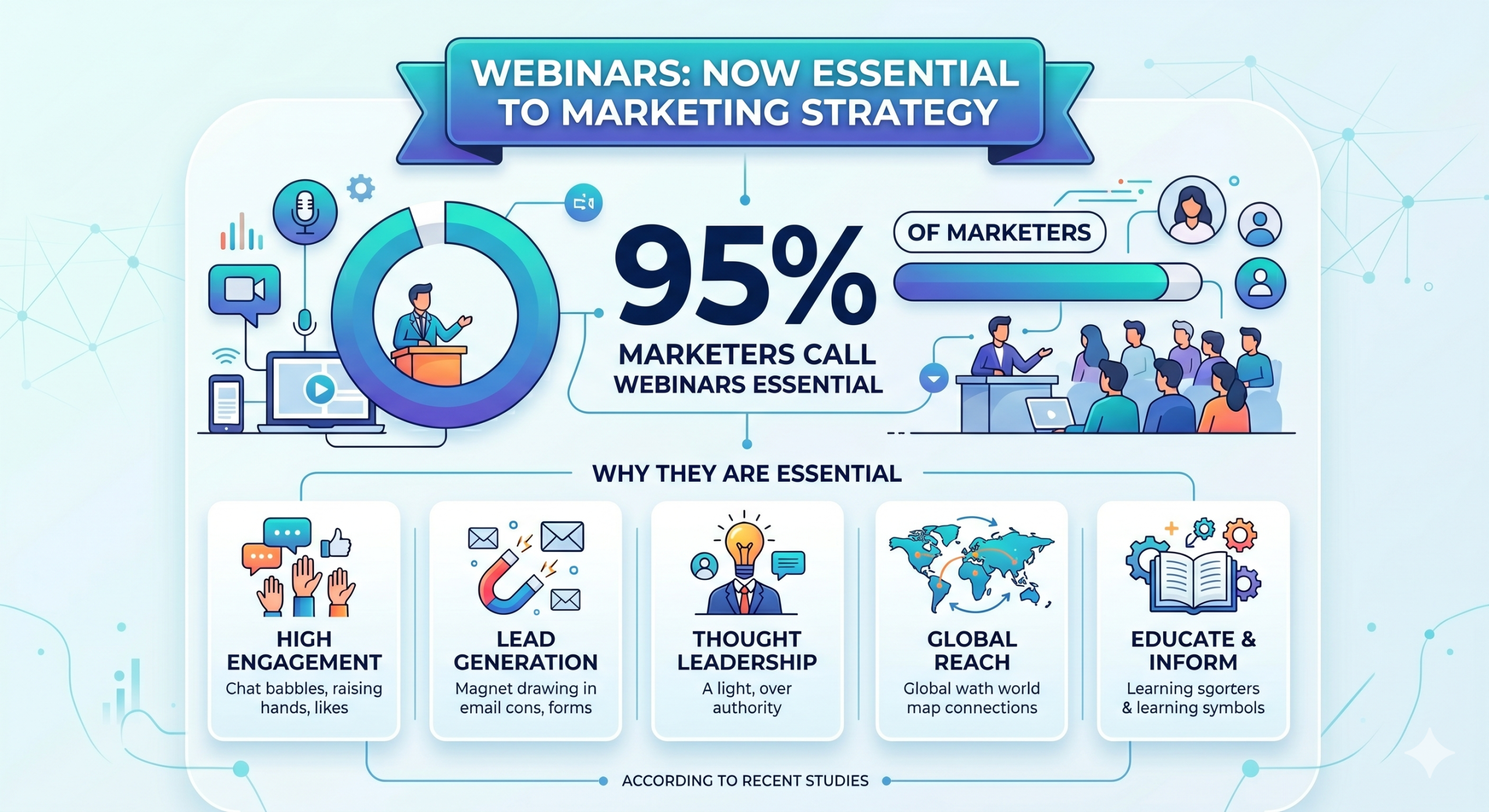
With 95% of marketers now calling webinars essential to their strategy, according to recent studies, the question is not whether to invest in webinar software platforms. It is, which one to invest in?
This guide covers the best webinar platforms available in 2026, what they do well, where they fall short, what they cost and which type of team each one actually suits.
What is a Webinar Platform?
A webinar hosting platform is best defined as a software that lets a host broadcast a live or pre-recorded session to a remote audience, with tools for registration, attendee interaction and post-event analysis built in. At its most basic, it is a video broadcasting tool with a registration page attached. At its most sophisticated, it is a full-scale marketing and lead generation engine that integrates with your CRM, tracks individual attendee behavior and automates your follow-up sequences.
Common Webinar Formats
There are several popular formats employed by the webinar organizers, often separated by function and use case. Business organizations choose webinar formats that prioritize their commercial objectives. A non-profit organization, on the other hand, may look at virtual fundraising. Let’s take a brief look into some webinar formats:
- Live presentations: The typical webinar style involving live speakers, dynamic presentations and interactive sessions.
- Panel discussions: Virtual panels and round table discussions facilitating expert discussion and conversation involving multiple speakers.
- Product demonstrations: A commonly employed means of advertising by businesses. As an instance, even Dryfta offers a flexible and weekly virtual demonstration of its webinar management software.
- Pe-recorded sessions: These are sessions streamed at scheduled times to simulate a live experience.
Webinar Management Platforms For Event Teams- Who Uses Them and Why
Event teams employ webinar management platforms for a variety of reasons. Marketing teams may use them for demand generation, product launches and thought leadership. Corporate training departments, on the other hand, may use them to deliver compliance programs, onboarding content and distributed skills development.
Webinar Tool vs Webinar Platform vs Virtual Event Platform
3 categories populate the webinar management market. Let’s understand what they are, how they differ from one another and how to make the right choice further ahead.
Webinar Tool
A webinar tool is the most elemental category. Products like Zoom Webinars or Google Meet handle live video sessions for a defined number of attendees. They cover the core broadcast need and typically include Q&A, basic polls and a recording function. These work well for internal town halls, simple training sessions and small-audience presentations where polish and automation are secondary concerns. What they cannot offer is purpose-built registration, marketing automation, branded event pages, meaningful analytics or integration with event CRM systems.
Webinar Platform
A webinar platform is a more complete product that is designed around the full lifecycle of a webinar program. It includes customizable registration pages, automated confirmation and reminder workflows, attendee segmentation, detailed analytics and CRM integrations with tools like HubSpot or Salesforce. This category serves marketing teams and recurring content programs well.
Virtual Event Platform
A virtual event platform extends the infrastructure further into multi-session and multi-track eevents. Herein, organizers can host parallel session rooms, virtual sponsor booths, networking lounges, agenda builders, integrated attendee apps. Virtual event platforms are best suited for organizers hosting virtual conferences, trade shows and summits where the goal is to offer an experience that can placed on par with a physical counterpart.
Platform by Use Case
We’ve looked at the 3 most common webinar management platform formats. In this section, we’re placing it in perspective for you. Know what platform works best by event type, scale and features required.
How To Choose The Right Webinar Platform?
The right webinar hosting platform depends on three things:
-
- The size of your audience
- The sophistication of your team’s technical setup and
- The degree to which webinars need to connect directly to your sales pipeline.
One report found that 45% of attendees watch webinars on demand rather than live.
This means that the platform you choose needs to handle not just the live event but the recording, hosting and distribution of content that continues to generate views for weeks afterwards.
Key Features to Look for in a Webinar Platform
Reliable Video and Audio
Every other feature becomes irrelevant if the stream is unstable. Look for adaptive bitrate streaming that adjusts to variable attendee bandwidth, low-latency delivery for genuine real-time interaction and infrastructure built on redundant cloud architecture. Check whether the platform uses proprietary streaming technology or depends on a third-party provider, since the latter introduces quality inconsistencies that no feature list can compensate for. Before committing to any platform, run a full technical test at the attendee volumes you actually expect.
Registration and Ticketing
Purpose-built registration is one of the clearest dividing lines between a video conferencing tool and a real webinar platform. You need customizable forms that capture the fields your program requires, support for free and paid access tiers, automated confirmation delivery and a clean attendee management interface. For programs that combine webinar and in-person components, an integrated registration and ticketing system that handles both under a single attendee record is simply the more coherent approach.
Branded Event Pages
Your registration page communicates credibility before a single attendee joins. A platform that confines branding to a logo upload and a color code is not a branded experience. It is a dressed-up generic template. Look for platforms that allow you to apply consistent branding across registration pages, confirmation emails, session rooms and post-event communications. Custom domains, branded waiting rooms and sponsor logo placement all contribute to a professional environment. Generic platform branding erodes trust, particularly with external audiences who have no prior relationship with your organization.
Automated Email Reminders
Attendance rates are directly responsive to automated email workflows. Confirmation sends, reminder sequences at configurable intervals, post-event follow-up emails carrying replay links or next-step calls to action. These are the mechanisms that close the gap between registration intent and actual attendance. More sophisticated platforms allow behavioral segmentation, so attendees who watched the full session receive different follow-up compared to those who dropped off in the first fifteen minutes. That distinction is not a small thing.
Q&A, Polls, Chat and Surveys
The difference between an audience that watches passively and one that participates actively comes down almost entirely to the quality of the tools available and how well they are designed. A strong platform gives moderators control over Q&A queuing, the ability to approve, dismiss or redirect questions before they reach the speaker. Live polls and word clouds drive real-time participation and return usable data on audience sentiment. Post-session surveys capture satisfaction scores and intent signals that feed directly into follow-up workflows. Check whether this data is exportable and how it connects to individual attendee records.
Speaker and Moderator Controls
Production quality depends on how much control you actually hold over the session environment. Platforms should let you bring speakers on and off camera independently, manage slide advancement centrally, maintain a backstage channel for pre-session coordination and pass control between hosts without any disruption to the live experience. Green room functionality, where speakers can join and check their audio and video setup before the session goes live, reduces the kind of technical incidents that damage audience confidence significantly.
CRM and Marketing Integrations
A webinar that does not feed data into your CRM or marketing automation system creates manual work and attribution gaps that accumulate quietly over time. The most commonly required integrations involve Salesforce, HubSpot, Marketo and ActiveCampaign, though the specific list depends on your existing stack. Check whether the integration is native or requires a middleware connector like Zapier, how frequently data syncs and which fields are included. For event-centric programs, a platform with a built-in event CRM removes the integration dependency at the source.
Recording and On-Demand Access
Live attendance rarely represents the full audience for any webinar. On-demand replay typically generates as many views as the live session, sometimes more. Recordings should be produced automatically at high quality, stored securely and made accessible either behind a registration gate or openly, depending on your distribution strategy. Check whether recordings are hosted on the platform or need to be exported to a third-party video host, and what the storage limits are on your plan tier.
Analytics and Reporting
The reporting depth available to you determines how much you can learn from each session and how persuasively you can demonstrate program value to the people who fund it. Registration-to-attendance conversion rates, attendee join and drop-off times, participation rates for Q&A and polls, replay view counts. These are the baseline analytics that should be built into your event system. Better platforms provide individual attendee scores that can inform lead scoring models. Built-in analytics that connect webinar data to broader event program data offer a program-level view that no isolated webinar tool can replicate.
Security and Access Control
For paid events, corporate training or confidential presentations, access control is not a secondary consideration. Look for unique attendee links that cannot be shared without detection, waiting room approval workflows, password-protected sessions and role-based permissions that distinguish clearly between speakers, moderators and attendees. For international programs, data residency and GDPR compliance are not box-ticking exercises. Ask vendors directly about their data processing agreements and where attendee data is physically stored.
Best Webinar Platforms in 2026 – A Detailed Comparison
In the table below, we’re comparing 8 of the best webinar platforms currently available in the market. We’re contrasting them across the factors that matter most to event and marketing teams. These include things such as audience fit, free trial availability, entry-level pricing and user ratings, among other things.
Free Webinar Platform Options- What You Can Avail at No Cost
The free webinar platform market is larger than most people expect, and more limited than most free plan marketing copy suggests. Knowing exactly what each free tier includes and where it cuts off is the difference between a tool that works for your use case and one that forces an upgrade the moment you run your first real session. Some of the best free webinar platforms available in the market include:
-
- LiveWebinar offers one of the most functional free tiers available. For individual trainers or small teams doing internal sessions, it is genuinely usable. The cap at 5 attendees is the obvious ceiling.
- Livestorm is another platform whose free plan caps sessions at 30 attendees and 20 minutes per meeting. However, it allows unlimited events and includes the platform’s full engagement tooling: polls, Q&A, chat and attendee analytics. For teams wanting to test a professional-grade online webinar platform before committing to a paid plan, Livestorm’s free tier is one of the most useful in the market right now.
- Zoom platform’s free plan is widely used but not specifically designed for webinars. Group calls are capped at 40 minutes and 100 participants. The Webinars feature is a paid add-on that starts at $79 per month for up to 500 attendees. The free plan does not include it.
How to Choose the Right Webinar Platform
- Begin With the Outcome: Start with the outcome the webinar must produce. Lead generation, product education, customer training, academic knowledge transfer and internal communications are distinct goals that favor different platform types entirely. A marketing webinar designed to move prospects into a sales pipeline needs CRM integration and lead scoring capabilities that a training webinar does not require. A conference session embedded in a multi-day program needs speaker management and agenda integration that a standalone marketing webinar does not. Clarity on the goal eliminates a significant portion of the market before you evaluate a single feature.
- Match Format to Technical Requirements: Format shapes the technical requirements of a session more than most organizers initially account for. A solo presentation with slides needs reliable screen sharing and a clean slide view. A panel discussion with four speakers needs independent speaker controls and a layout that presents all participants without visual confusion. A training session with assessments needs branching logic or quiz functionality. A hybrid seminar with in-person and virtual attendees needs a platform that treats both audience segments as genuinely equal, not one that positions virtual attendees as an afterthought.
- Estimate Audience Size With Honesty: Most platforms tier their pricing by attendee capacity, and the gap between tiers can be substantial. Estimate your expected audience realistically, including on-demand viewers who will access the recording days or weeks after the live session. Check whether the platform counts live and on-demand viewers against the same capacity limit or treats them separately. For international programs, confirm that stream quality is acceptable across the geographic regions where your audience is located, since CDN coverage varies considerably between vendors.
- Test Tools Before You Commit: Identify the mechanisms your program requires before you start comparing products. If live polls drive participation in your sessions, confirm that polling is included in your plan tier and not a paid add-on. If post-session surveys are central to your quality measurement process, check how survey data is stored and whether it connects to individual attendee records. If Q&A moderation matters for managing high-volume sessions, test the moderation workflow directly rather than accepting a feature checklist at face value.
- Verify Branding Capabilities in a Live Walkthrough: Many platforms advertise branding capabilities that amount, in practice, to a logo upload and a color selector. If your program requires a registration experience that matches your website design, verify what level of CSS control or template customization is actually available. Check the mobile experience on the registration page specifically, since a significant and growing share of registrations come from mobile devices for almost every program type.
- Demand Specificity on Analytics: Ask each shortlisted vendor to show you a sample post-event report and confirm which metrics are available at which plan tier. Check whether individual attendee data is exportable for use in your CRM or marketing automation tool. If your program requires demonstrating return on investment to internal stakeholders, confirm that the platform produces the specific metrics your reporting framework requires, before you sign, not after.
- Understand Data Ownership Before Any Contract: Before signing anything, establish clearly who owns the attendee data collected by the platform and what happens to it if you switch vendors. Confirm that you can export complete attendee records in a format your other systems can consume. Check whether the integrations you need are native or connector-dependent, since connector dependencies add cost and introduce additional failure points. For organizations running multiple event types, a platform that centralizes all event data in a single CRM removes integration complexity at its source rather than managing it continuously downstream.
- Think Past the Next Session: The most expensive platform decisions are the ones that require a full migration six months after launch because the original choice could not grow with the program. Before committing, ask vendors about multi-event management, team permissions at organizational scale and pricing at higher volume. If your program is likely to expand into virtual conferences or hybrid events, evaluate platforms that can support that growth now rather than forcing a migration at precisely the moment program complexity is increasing.
What to Evaluate Before You Commit To A Webinar Platform
Most virtual event software comparisons focus on price and attendee limits. Both matter. But the features that most directly affect whether a webinar actually performs, in terms of lead quality, conversion rate and attendee retention, are often further down the product spec sheet. Here are some things to be on the lookout for when surfing for webinar platforms that suit your needs:
-
- Registration and automated reminders: This is where most webinar revenue is lost before the session even begins. Reports suggest that a large number of registrations happen in the final week before the event. And a substantial number happen on the day of the event itself. If you are using a platform that cannot send automated, customizable reminder emails, you are leaving attendance on the table.
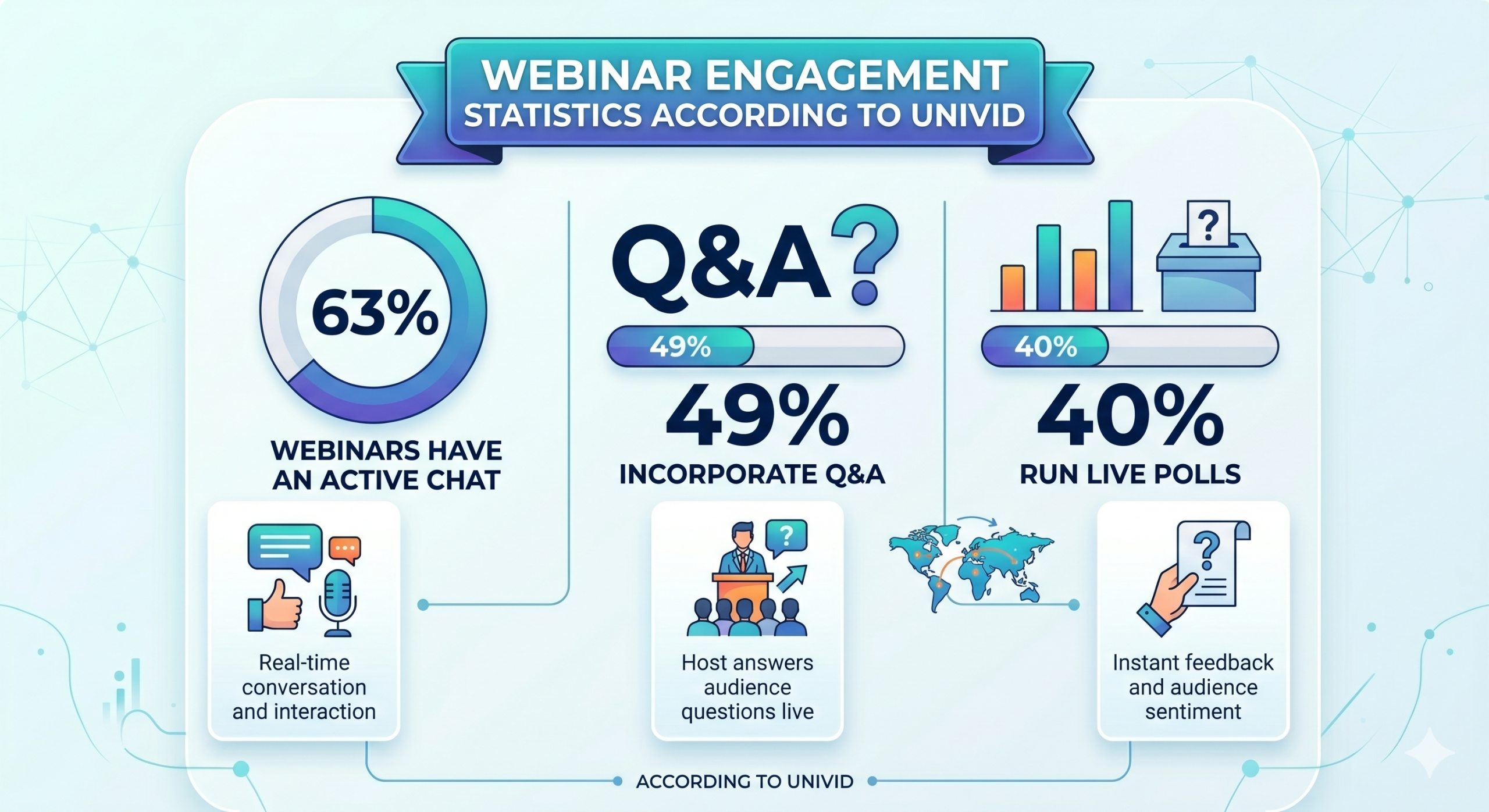
- Engagement tools: Polls, Q&A, live chat and reaction features, these are some features that separate a webinar from a video recording. According to Univid, 63% of webinars have an active chat, 49% incorporate Q&A and 40% run live polls. Platforms that make these features easy to deploy mid-session and without the host having to switch screens or break the flow of the presentation produce measurably better attendee retention.
- CRM integration: A feature that will determine if your webinar generates pipeline or merely attendance data. Platforms that push and record attendee behavior, like who asked a certain question, who stayed for the full session or who clicked the call to action link. This data when added directly into your CRM, gives your sales team actionable intelligence rather than a CSV export.
When Is a Standalone Webinar Tool Not Enough?
A standalone webinar tool works a lot like a generic video conferencing platform. Well, it may have a few more provisions for attendee entry, admission and interaction. A standalone webinar tool can accommodate markedly more people than a free Zoom meeting or Google call.
However, even this tool that offers greater scale can underperform when it comes to:
- Running bigger conferences wherein a webinar is only a component of the larger event strategy.
- Multi-session events that woke around a few different themes and audience pools.
- More sophisticated functions like speaker and stakeholder management.
- A need for an event CRM. This is something that only a full-fledged webinar management platform like Dryfta can offer.
- Hosting repetitive events all year round. If you want to retain attendee data and are hoping to build a loyal audience pool, a standalone tool just won’t cut it.
The Verdict On Webinar Platforms
The right webinar platform is not the one that picks the most feature-rich option or the cheapest one. Rather, it is the one that matches platform capability to actual use case. For small teams and individual hosts, free tiers can be worth starting with. For B2B marketing teams running regular lead generation sessions, platforms with mid-tier pricing cover most requirements without the overhead of an enterprise contract. But if you are an organization that needs to connect webinar activity directly to revenue at scale, Dryfta is in a category of its own and is worth giving a try.
What all of the best webinar platforms share is this: they remove the platform from the story. When the technology is reliable, the host can focus on the content, the audience can focus on the value and the organization can focus on what happens after the session ends. That is the only standard worth optimizing for. If your team hosts both large conferences and smaller sessions like webinars, workshops or training events, managing them on separate platforms costs time, money and continuity.
Why Choose Dryfta for Webinar and Event Management?
Dryfta is an all-in-one event management platform that handles registration, attendee management, session scheduling, lead capture and post-event follow-up across every event format, large or small. Your branding, data and workflows stay consistent. Dryfta also lets you go multiple steps ahead and livestream or broadcast a live webinar session on another platform such as your organization’s website to maximize reach. Here are some of its most cited features by users who return to us consistently:
- A unified workflow: Dryfta’s users cite the event management software for its versatility in organizing events across formats. Whether it be a standalone webinar, a multi-track webinar, a larger conference or a global hybrid event, you name it and Dryfta has the tools to organize it.
- Branded Registration and Event Pages: Dryfta’s event website builder produces fully branded registration pages and event websites without needing any expert design or development assistance. You are free to pick from customized domains and a brand color palette, incorporate logos and session-level pages all within the platform.
- Attendee Segmentation: Segmentation tools let you filter and target attendees by registration category, session attendance, participation level or custom fields. This makes post-event follow-up more precise and considerably more effective.
- Interactive Event Tools: Tools to keep your attendees engaged throughout including Q&A moderation, live polls, session chat and post-session surveys are built into Dryfta’s event platform. The features are also connected directly to attendee records, making available data for later reference and analysis.
- Registration, Attendance, Engagement & Follow-Up: Dryfta’s analytics cover the full event lifecycle including registration and attendance, engagement during the event and later follow-up. With Dryfta’s features you can track session-level participation metrics as well as statistics on speaker performance and sponsor visibility.
- Centralized Workflows: The number one advantage of using Dryfta’s event management tool is that you have all your eggs in order. Always. Your event data is accessible from within a single, centralized event CRM. This makes the data tappable for insights that will support your events to come.
To explore these features for yourself, sign up for a free demo with Dryfta today. Find out what event management looks like when everything is in one place.
Frequently Asked Questions (FAQs)
What is a webinar platform?
A webinar platform is software that lets hosts broadcast live or pre-recorded sessions to an online audience, with tools for registration, attendee interaction and post-event analytics. The best webinar platforms include video streaming quality with engagement features, polls, Q&A, chat alongside CRM integrations and reporting dashboards. Some are standalone webinar software platforms. Others are built into broader event management suites that cover conferences and smaller sessions in one system.
What features matter most in a webinar platform?
Reliability is non-negotiable. A platform failure during a live session is not recoverable at the moment. Beyond this, the features that most affect outcomes are registration and automated email reminders, attendee engagement tools (polls, Q&A and live chat), CRM integration for post-event lead routing, and on-demand recording availability.
Are online webinar platforms worth the investment?
The data says yes. According to a report, the average cost per lead generated at a webinar is $72, compared to $811 at a trade show. Webinar-driven demo bookings increased 18% year-over-year in 2024 and 68% of marketers say webinars contribute directly to revenue generation. For B2B teams in particular, a well-run webinar on a reliable online webinar platform is one of the most cost-effective lead generation tools available