
Picture this. You hustle for weeks deciding on your webinar content, making slides, and perfecting them, but on the day of the event, you end up saying, “can everyone hear me?” That is followed by five minutes of a technical glitch. Now, this is all too real. And this is the reason preparing a webinar checklist is necessary.
Here’s a bitter pill to swallow: It’s 2026, and your audience has no time for things that don’t add value. This is why most webinars today are backed by serious data. They help drive conversions and boost brand authority to another level.
However, like all things in life, hosting such high-impact webinars requires meticulous planning. The webinar checklist that you prepare is going to be your handbook in choosing the right topic and building the proper agenda. Whether you’re a first-time host or a seasoned one, this guide is all you need to make the most of your webinar.
What is a webinar checklist?
A detailed webinar checklist presents a step-by-step guide that outlines all the essential aspects of hosting a virtual event. This checklist contains important details about webinar best practices, content preparation, technical support, and promotional ideas.
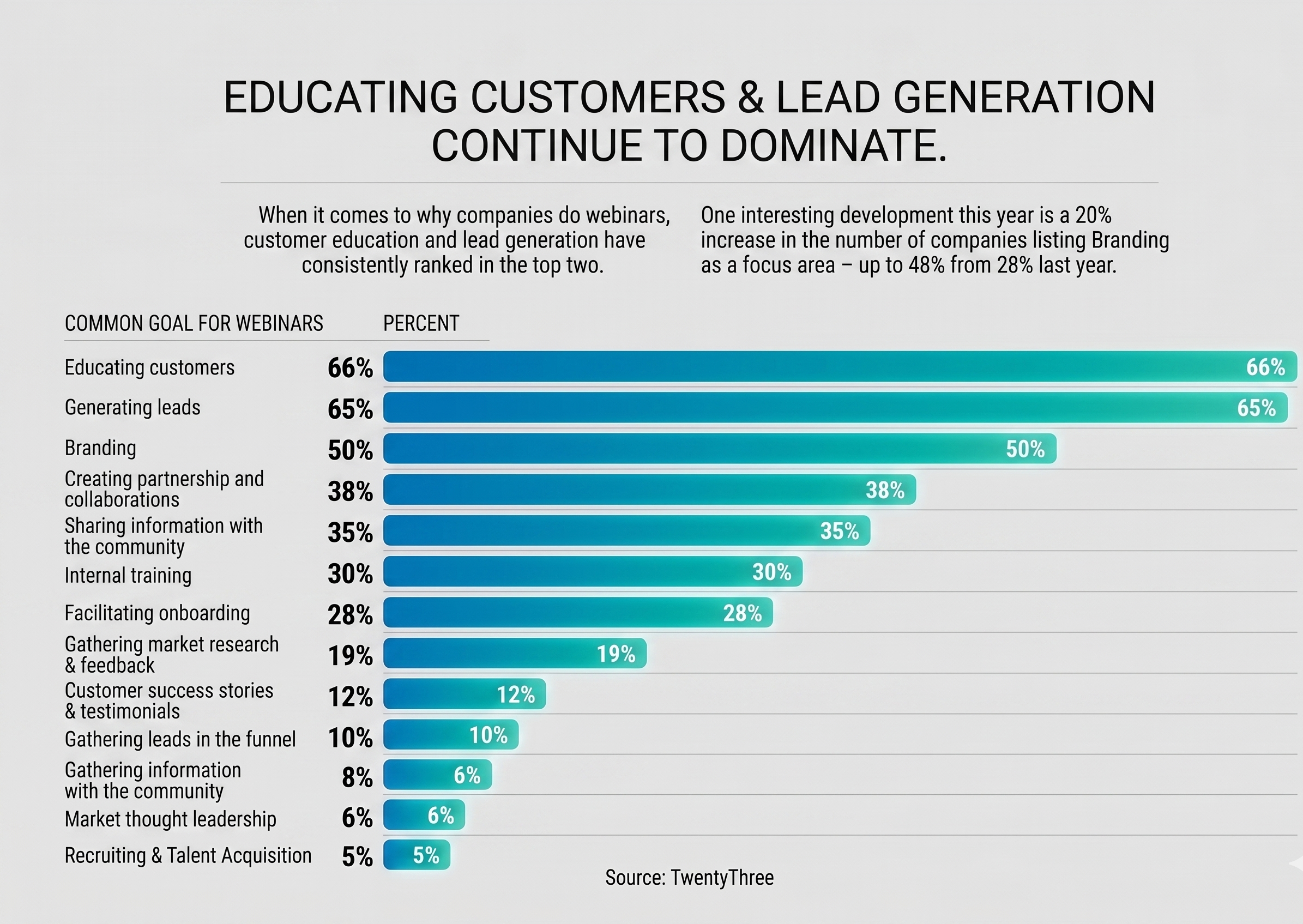
This webinar planning checklist covers the whole event lifecycle from finding the right webinar topic to post-event follow-ups. Considering webinars are one of the greatest tools in an event marketer’s arsenal, planning a detailed checklist well ahead of time definitely pays off. According to a report by TwentyThree, the most common reasons for hosting webinars are to educate consumers and generate leads.
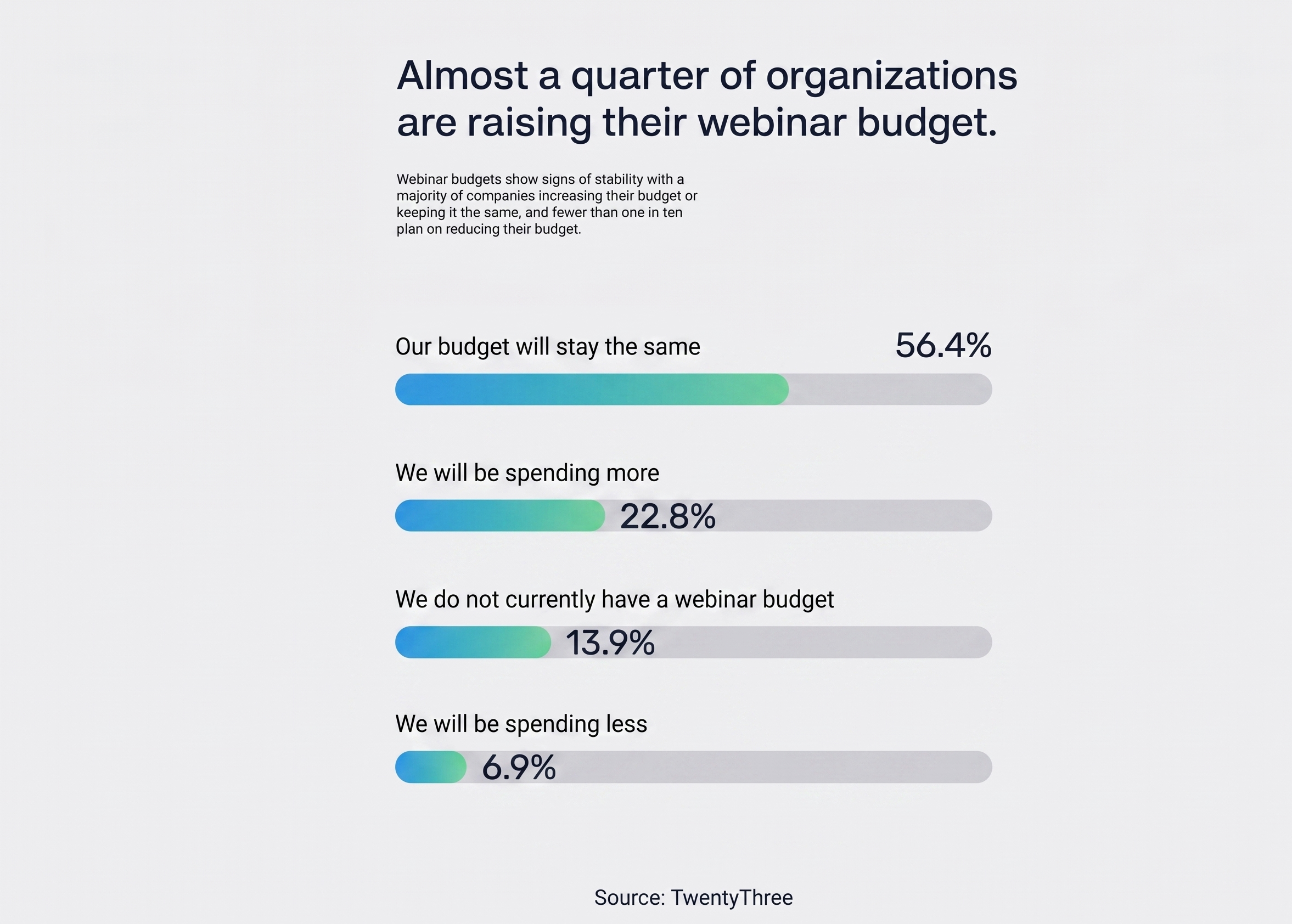
The same report also suggests that almost a quarter of the organizations surveyed have increased their webinar budget.
Pre-Webinar Checklist- How to Shape the Webinar Planning Process
Drawing up your webinar planning checklist at least 2 months in advance is the wisest thing you can do to ensure the success of your event. If you’re wondering how to put together a webinar in roughly 8 weeks, let’s give you a complete walkthrough.
8 Weeks Before Your Webinar
At this initial stage, you should be laying the groundwork for your upcoming webinar. Here’s how you’re going to plan everything-
Step 1- Finding an Appropriate and Trending Topic
The topic of your webinar is the first thing that will get the attention of your audience, hence it has to add value. Knowing the pulse of your audience helps you position your webinar as an unmissable event.
For example, instead of “AI in Digital Marketing”, try “7 Effective Ways to Utilize AI for Digital Marketing to Generate 10x More Leads.”
Step 2– Select the Right Virtual Event Software Platform
Finding a suitable virtual event software is a significant step in putting together a webinar checklist. Prioritize features like user-friendliness, interactive elements (such as Q&A and polls), and trustworthy tech support. Additionally, the platform you pick should offer different webinar types, such as-
Live webinars: Ideal for real-time interactions, Q&A sessions, and effective audience participation.
Automated webinars: These types primarily target a global audience and are a great way to ensure everyone can watch them at their convenience.
Step 3- Pick a Suitable Time to Schedule Your Webinar
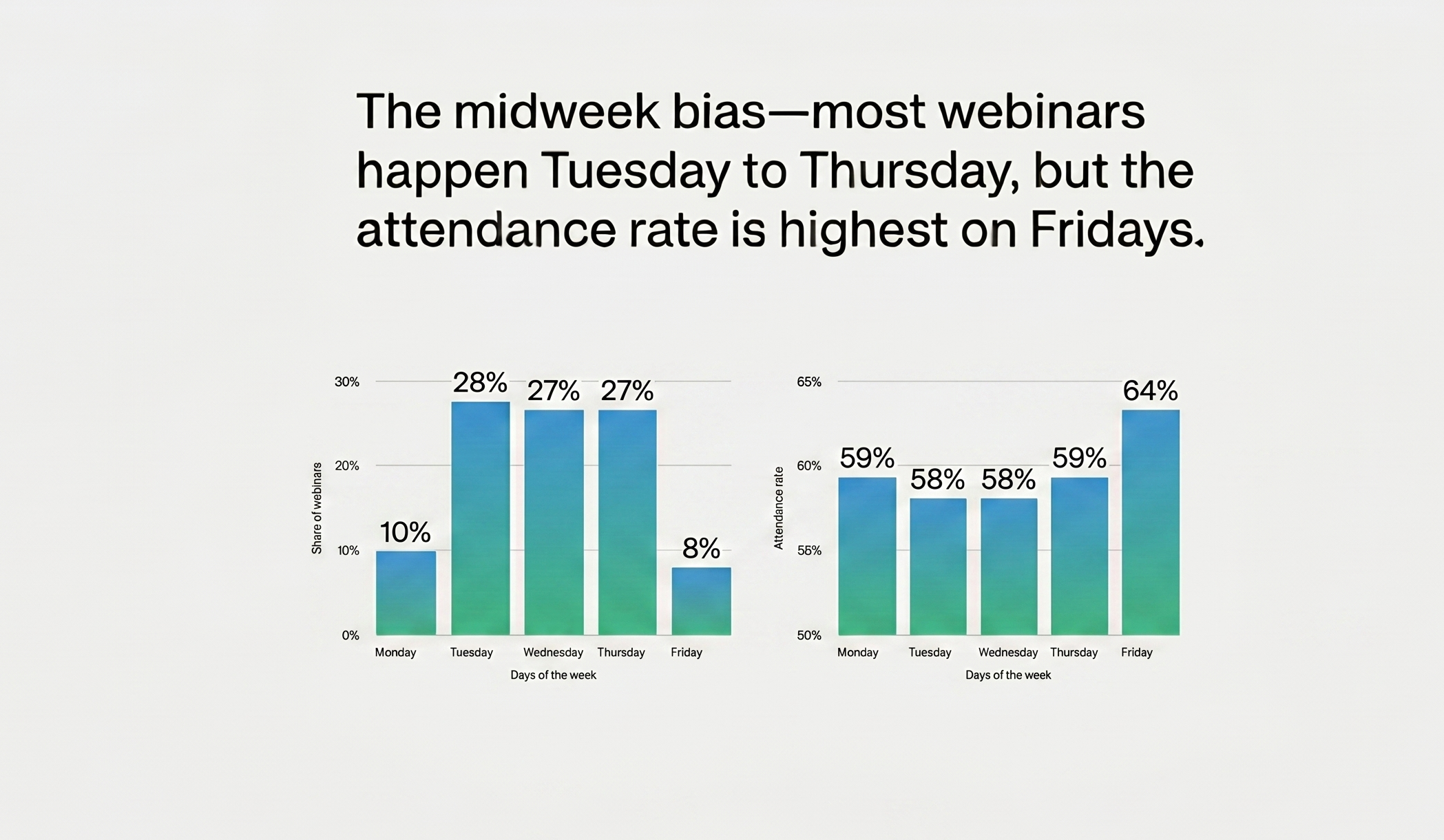
Timing is everything for your webinar preparation checklist. The timing of your webinar decides its attendance rate. A survey by TwentyThree suggests that the best days to host a webinar are midweek mornings, ideally any day between Tuesdays and Thursdays, around 10-11 AM.
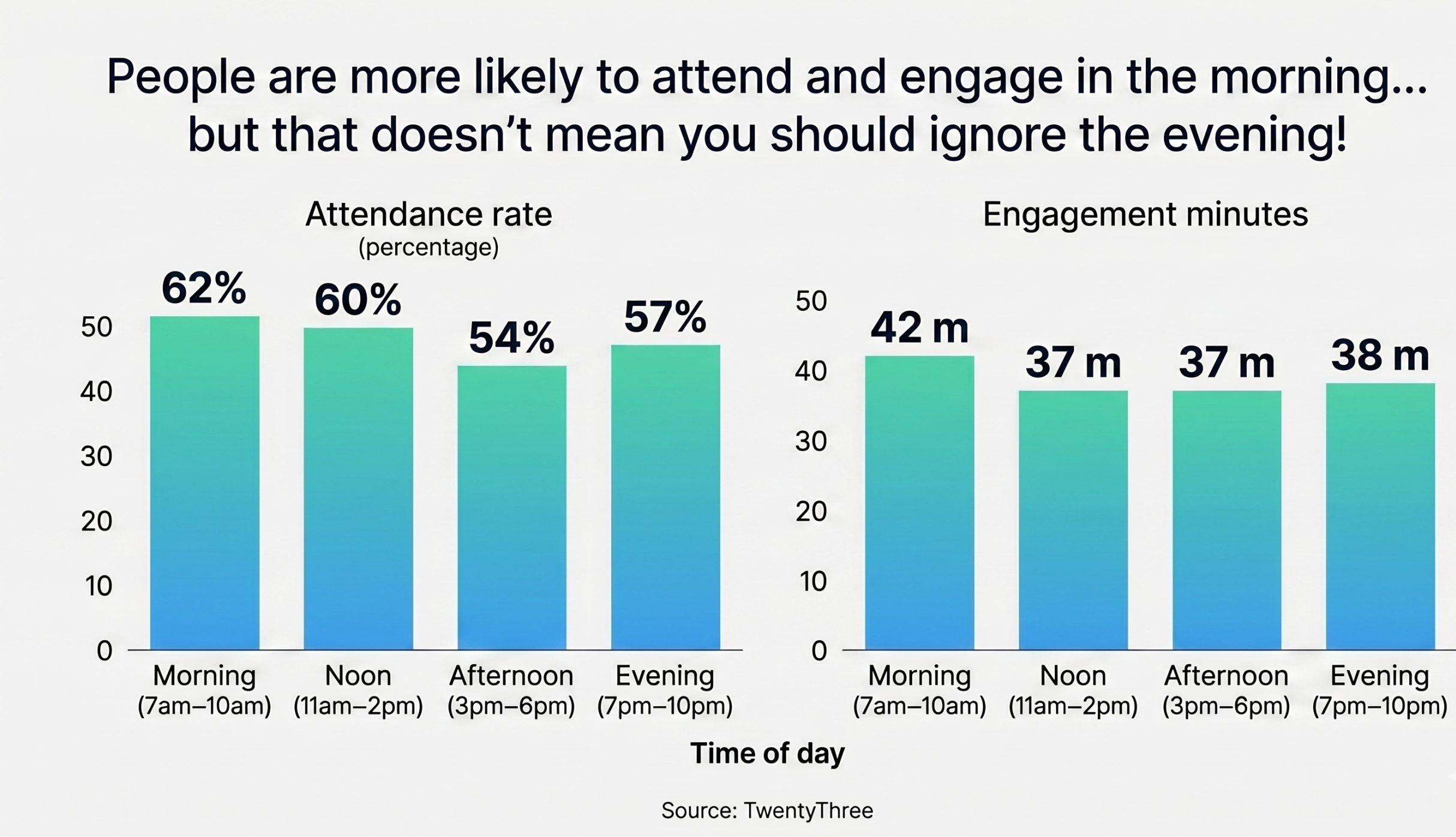
However, the same study highlights that the webinar attendance rates are usually the highest on Fridays.
5 Weeks Before Your Webinar
With 5 weeks left for your event, you’ve probably drawn the initial plan and found a relevant topic. Now, it’s time to dive deeper into the webinar checklist planning and ensure an unforgettable experience.
Step 1- Create a Thorough Marketing Plan
Your webinar preparation checklist should emphasize how you’ll promote your webinar. Here are a few pointers to consider-
-
- Identify the key channels where your target audience is most active. It could be LinkedIn, Reddit, Twitter, or any other forums.
- Craft your message for each platform you’re promoting your webinars in, so your audience relates to it.
- Collaborate with industry experts who can amplify your reach.
- Create a calendar for promotional activities for the next few weeks.
Step 2- Start Email Campaigns
Emails are a great way to pull audiences for your webinar, but it has to feel like a friendly nudge and not spam. So, come up with an idea based on a pain point, solution, or a real-time proven result based on your topic.
Initial announcement: Send emails to your entire mailing list to announce the webinar. Mention important details of your registration page and a clear CTA.
Teaser videos: Include snippets or glimpses of what will be discussed in the webinar.
Reminder emails: Send a series of reminder emails at the 3-week, 1-week, 5-day, and 1-day mark.
Now that the emails are sorted, let’s walk you through the next step of your webinar setup checklist.
Step 3- Create Promotional Materials for Webinar
Words alone may not be effective in capturing the attention of your audience. The promotional campaign you design should have eye-catching graphics, banners and other visual elements. Create social media graphics, email headers and banners that can be easily customized for different platforms.
3 Weeks Before Your Webinar
At this point in your webinar setup checklist, it’s time to turn all the planning into action to create buzz around your webinar. How do you do that? Read through this part of the webinar checklist template.
Step 1- Promote Your Webinar and Generate Curiosity
Feel free to use both organic and paid promotional strategies to reach your audience.
-
- Organic promotion: Share teaser snippets, infographics or even a behind-the-scenes video of preparing for the webinar.
- Paid promotion: Invest in targeted ads on Facebook, Instagram and LinkedIn for wider reach.
- Partnerships: Work with industry experts or brands to build trust and attract new audiences.
Step 2- Get the Interactive Elements Ready
Your webinar should include two-way interactions as much as possible. There are multiple ways to include these interactive elements, which consist of polls, Q&A, or breakout rooms. Adding these interactive elements ensures your audience stays engaged. Keep a set of meaningful questions ready for the Q&A and allot a separate time slot for this interaction.
Step 3- Conduct a Rehearsal before Your Actual Webinar
Before going live, carry out rehearsals to get the hang of the topic and maintain a good flow without any setbacks.
-
- Check audio, video, and screen sharing options to ensure it’s error-free.
- Time your presentation to see that it fits your webinar agenda without rushing or dragging.
Step 4- Having a Backup Plan is Essential
Technical glitches can happen at any time, without prior notice. Hence, it’s wise to have a backup rather than disappointing your attendees.
-
- Always keep a spare laptop and microphone ready for any unforeseen issues.
- Save all your presentations in the cloud for quick access.
- Pre-record your presentation. That way, even if a live broadcast gets interrupted due to technical issues, you can still deliver the content.
2 Weeks Before Your Webinar
As registrations open, you know you’re closer to your event than ever. Your focus on the webinar planning checklist for this phase should be to ensure everything is going smoothly.
Step 1- Checking the Roles and Responsibilities
The host needs to introduce the speakers and their roles before event begins. This is an essential step to maintain a stable workflow and ensure that each responsible person does it correctly. A quick pre-event catch up call with speakers helps you stay on the same page about the webinar’s timing and agenda.
-
- The host or organizer takes care of planning, communication, speaker and platform management.
- The speaker or presenter is responsible for the webinar topic, content, presentation and the overall flow of the event.
- The moderator helps with monitoring features such as live chat and Q&A.
- Tech support checks the streaming quality, recordings, backups, and troubleshooting.
Step 2- Create the Webinar Hosting Environment
A clean webinar setup results in limited distractions for your audience.
-
- Keep your background professional and clutter-free. A plain wall, a bookshelf, or even a branded backdrop works fine.
- You should choose a well-lit space to conduct your webinar. If natural light isn’t available, use other light sources.
- To limit distractions, choose a quiet room to conduct your webinar.
As Dr. Strange had put it in the Avengers movie, we are in the endgame now. After all that planning and hustling, you are ready for the big day.
Day of The Webinar
The event day is finally here. It is for this day that you have carefully prepared the webinar checklist template. Now it’s time to see it through. Let’s dive into some tricks and tips to help you conduct it smoothly.
-
- Log in to your webinar platform at least an hour before the start time, which lets you address any sudden technical glitches and ensures everything is ready.
- Check that your presentation deck is polished and exported in the right resolution. Store backups in the cloud and on a USB drive to prevent any unexpected issues.
- Welcome your attendees warmly as they join your webinar. Display a welcome slide with the important agenda and play background music.
- Pay close attention to audience engagement throughout the webinar. Utilize interactive features such as polls and chat, urge them to participate by asking questions.
- Stick to your schedule. Set specific time slots for each part of your webinar and maintain the time.
Post-Webinar Checklist- Ending It on a High
First of all, well done on executing the webinar flawlessly. You followed the webinar setup checklist, showed up and absolutely smashed it. That deserves applause. But wait! This isn’t over yet because the post-webinar insights matter just as much as the main event.
Step 1- Monitor the Webinar Stats Closely
The most important thing you need to do right after your webinar concludes is to check the analytics of the event. Most virtual event platforms come with tools that offer clarity on the following aspects-
-
- Total number of registrants
- Number of unique visitors
- Audiences who joined
- Audiences who replayed the recording
- Conversion rates
- Engagement rates
Assessing these numbers helps you understand how your webinar performed and shares insights that you can use for your next events.
Step 2- Send a Thank-You Email
Sending out thank-you emails is polite and one of the best ways to engage with your audience post-event. Personalize the emails by using the attendee’s name, a quick recap, and a replay link. Additionally, incorporate a CTA for your next event or newsletter subscription.
Step 3- Carry Out a Post-Webinar Survey
Send out a post-webinar survey to the audience who attended your event. You can include questions such as-
-
- Did the webinar meet your expectations?
- How satisfied are you with the webinar?
- How can we improve?
The information you gather is essential to enhance your future webinar experiences.
In a Nutshell
Webinars might be a powerful tool for marketing, but they shouldn’t feel scripted or rigid. Try experimenting with the content delivery, use humor and engage in organic interaction with your audience. All of this is possible when you have a detailed webinar checklist at hand.
Ultimately, you’re not just hosting a webinar; you’re creating an entire digital experience that generates leads and drives conversions. So get those creative juices flowing in your brilliant brain of yours and deliver a session that people will talk about long after it’s over.
And if you need assistance with hosting webinars, opting for a virtual event platform such as Dryfta makes things easier. Our advanced features are aimed at delivering seamless virtual experiences whether it’s a live streaming or a pre-recorded event. Check out the free demo and find out more about Dryfta’s features.
FAQs:
Why is a webinar checklist important?
A webinar checklist is essential as it ensures a seamless experience for your audience. The checklist focuses on keeping your team members aligned and preventing technical glitches. The webinar checklist template serves as a blueprint for planning, promoting, and conducting the live event.
What should be included in a webinar checklist?
A detailed webinar checklist should include several significant steps. These steps include-
-
- Defining the KPIs and target audience for your webinar
- Selecting a virtual event software platform to host the event
- Presenting engaging content such as slides or Q&As
- Conducting extensive technical rehearsals before the actual event
Apart from these steps, it’s also important to promote the event and collect feedback after the event is over.
What are the key steps before hosting a webinar?
Your pre-webinar planning checklist is just as important as the main event itself. Hence, it should be created with considerations about the following aspects-
-
- Choosing a relevant topic and expert speakers
- Determining the webinar format
- Presenting high-quality content
- Opting for a suitable virtual event software platform
- Deciding on a suitable time for the webinar
- Conducting promotional activities to attract more audience
What are the post-webinar checklist steps?
Even after the webinar is over, you need to devote time to post-event follow-up. Here are the steps that must be added to your webinar preparation checklist:
-
- Track the webinar analytics carefully
- Send an appreciation email to the attendees
- Conduct an attendee satisfaction survey after the webinar
What tools are needed for a webinar?
Hosting a great webinar requires a few essential tools, such as a webinar software (such as Demio, WebinarJam and Zoom) for registration and broadcasting. You’ll also need a high-quality external microphone, a high-resolution webcam, and additional lighting if necessary. Make sure you have a stable internet connection throughout the webinar’s duration.
What are common mistakes to avoid in a webinar?
While hosting your webinar, it’s crucial that you avoid making the common mistakes to ensure a great webinar experience. Some of the major mistakes are skipping tech rehearsals, packing slides with too much text, failing to interact with the audience, ignoring promotions and running over time.
