




According to Fortune Business Insights, the global event management software market is valued at USD 11.31 billion in 2026, reflecting the growing reliance on digital tools to manage real-time coordination and onsite event management. Successful onsite event management reflects strong planning, attention to detail, and a clear, structured process. When done right, it turns complex logistics into a seamless experience that meets event goals and leaves a positive impression on attendees.
In this article, we will walk through practical steps to improve every aspect of your onsite event management and help you run events more efficiently.
What Is Onsite Event Management?
It is impossible to discuss onsite event management without knowing what onsite events are. Onsite events are held in a physical location and require many elements to occur simultaneously. On the other hand, onsite event management oversees and manages every aspect of an event while it is in progress.
It is responsible for making sure that all aspects of an event proceed as planned and engaging attendees with activities that promote participation and interaction. A successful event management system will support onsite event management by its organization, tracking and monitoring features.
By now, you’re probably wondering how to make onsite event management work without things falling apart. Keep reading.
Benefits of Onsite Event Management
- Faster registration and check-in reduce wait times and create a strong first impression for attendees.
- Quick issue resolution helps fix tech glitches or schedule changes before they affect the event flow.
- Strong safety measures and crowd control keep the venue compliant and ensure attendee security.
- Clear vendor coordination ensures catering, AV, and setup teams deliver everything on time.
- Better data capture improves lead tracking and gives sponsors clear insights into event performance.
- Attendee support stays responsive, so guests get help and directions without delays.
- Less pressure on your internal team allows them to focus on networking and delivering quality experiences.
A Practical Guide to Onsite Event Management
Here is a practical guide to onsite event management that helps you stay organized.
Make Pre-Event Preparation a Priority
Pre-event preparation makes all the difference in onsite event management. Without a solid plan, you are guessing how things will go instead of executing, and that creates problems that are completely unnecessary.
To keep everything on track:
- Survey the location to identify power points and WiFi dead zones
- Draw up contingency plans for situations related to speaker cancellations or technological breakdowns.
- Do a dry run with your onsite teams to ensure everyone knows their roles.
Want to know the best part? The right onsite event management software can help make your planning process much easier than you think. Dryfta, one of the best onsite event management platforms available today, has been able to support organizers with tools including:
- A fully-integrated event networking application for streamlined communication amongst attendees.
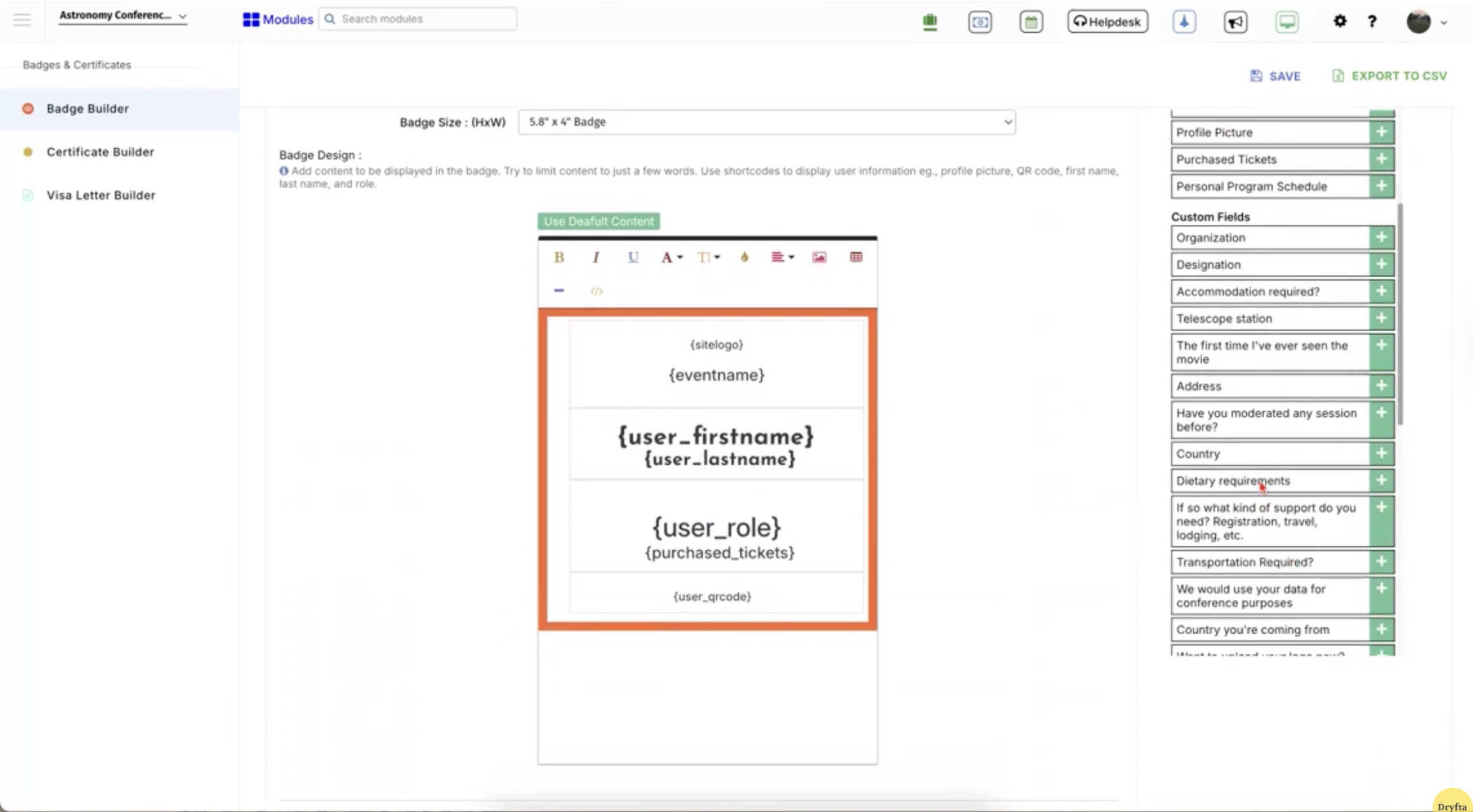
- Badge creation and onsite printing for check-ins and access control.
- Flexible workshop ticket sales.
- QR scanner-based session check-ins using either attendee lists or QR codes.
Strengthen Your AV and IT Setup
You can’t ignore the importance of technology at an onsite event. Audio, video and IT will ultimately determine how your team delivers and how your attendees experience your event. As such, it is critical to include these in your overall onsite event strategy.
Here is what the data says: Around 78% of organizers say in-person events are their most impactful marketing channel, which increases reliance on flawless AV and IT systems.
Onsite event management tools help you manage schedules and work with tech teams much more effectively. There are many ways to mitigate technical failures:
- Have a dedicated tech support team to ensure problems are resolved promptly without interfering with sessions.
- Conduct a complete technical rehearsal that includes testing presentations, check-ins and system capacity under realistic conditions.
- Arrange a venue walk-through with the AV and IT departments a day prior to the event to detect weak areas and address them early.
Make Check-in Quick and Hassle-Free
With the appropriate tools and systems, onsite event management is not as complicated as it may appear. An arrangement that can minimize wait times and gather the right data about the attendees can make a big difference. Dryfta’s onsite event management services support both self-service and staffed options so you can manage entry without confusion or delays.
Here are some practical ways Dryfta streamlines your check-in process:
- Allow participants to scan a QR code or search by email to check in quickly as soon as they enter.
- Print badges instantly at the kiosk to keep lines moving and reduce crowd build-up.
- Handle walk-ins, payments, badge reprints, and attendee updates in one place.
- Let attendees confirm their arrival in the app before arriving at the venue.
That said, for larger crowds, plan staggered check-in times to avoid bottlenecks.
Make the Event More Engaging for Attendees
Many attendees, especially at conferences and professional events, expect more than just sessions. They want to interact with speakers, content, and other participants in a meaningful way. It’s a classic win-win when you create opportunities that benefit both attendees and organizers.
A robust onsite event management system, like Dryfta, helps with check-ins and session updates through tools like its mobile event app. But it doesn’t stop there. With Dryfta, you can:
- Send real-time notifications regarding schedule changes, room shifts and important announcements.
- Allow the attendees to control their information, see connections, and manage what they post.
- Permit in-person communication, share connections, and networking in the app.
- Assist participants in creating their own schedules and keeping track of events.
- Promote engagement in sessions by providing immediate feedback and asking questions of the audience.
- Gather feedback from attendees immediately after each session.
The Impact of Poor Onsite Event Management
Poor onsite event operations can destroy months of planning and execution within minutes. The damage is not only to the event but also to your reputation and to potential future events. Losing money at an event is damaging enough; losing credibility with attendees, sponsors, and other stakeholders is much worse.
Onsite event management software is the solution many teams resort to in order to eliminate these risks and ensure that everything is going well.
Case in point:
- Last-minute fixes increase costs due to urgent equipment rentals and extra staffing.
- Disorganized check-ins and technical issues create a negative impression of your brand.
- Weak networking setups reduce the chances of generating leads and future business.
- Sponsors lose confidence when engagement is low or operations feel chaotic.
- Poor crowd handling can lead to safety issues and legal complications.
- Audio and visual failures make sessions ineffective and waste valuable content.
- Overworked teams face burnout from handling avoidable problems during the event.
The Bottom Line
Onsite event management involves systematic planning, accurate implementation, and swift adjustment to changing conditions. Every phase, from preparation to delivery, is very important in making the event experience smooth. Some key aspects discussed in this blog include effective registration, an onsite team, crowd management, vendor coordination, and reliable AV and IT support. These are the factors that will directly impact the success of your onsite event management efforts.
Each event is different, so flexibility is important. An event manager is well prepared and will adjust strategies based on the event’s scale, audience, and goals. The final aim is to provide a smooth, interactive experience for attendees and maintain operational control. Good onsite event management will enable you to achieve consistent outcomes and build long-term credibility.
For a more streamlined approach, Dryfta offers an all-in-one solution. Book a free demo to explore how it can support your next event.
FAQs
- What is onsite event management, and why does it matter?
Onsite event management is all of the activities that occur at the venue, from check-in and session flow to real-time issue resolving. Properly executed onsite event management will provide your customers with a smooth and engaging experience without delays or confusion.”
- How does onsite event management software improve event execution?
Onsite event management software lets you manage registrations, track attendance, coordinate sessions, and provide live updates from one place. The goal of onsite event management software is to reduce the time spent manually on a particular task while providing your team with greater control during the most important events.
- What are the best onsite event management platforms on the market?
Dryfta is among the best onsite event management tools, with quick check-in, on-demand badge printing, and real-time monitoring via its mobile app. EventsAir assists in the organization of complex events with real-time updates, and Cvent is aimed at the onsite registration, reporting, and logistics management at the enterprise level.
- Do I need onsite event management services for my event?
Onsite event management services may be useful in case you have a small team or a big event. They ease logistics, attendee management and technical integration, which simplifies onsite event management without straining your internal staff.
