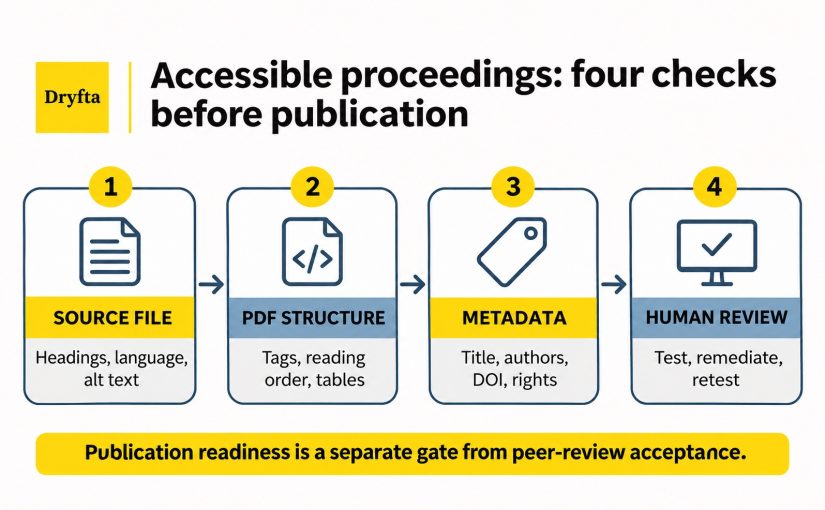
On the day before publication, a conference chair opens one final paper. It looks fine on screen, but a screen reader, which reads digital content aloud, follows the columns in the wrong order, cannot explain the main chart and announces the file by its filename. The online record also lists one author incorrectly. The paper passed peer review, but it is not ready for every reader.
This is why accessible conference proceedings need a separate final check. The conference team must confirm that readers can follow the paper, understand its images and find the correct title and author information. When something fails, the team also needs to know who will fix it and who will approve the corrected file.
Automated tools can find some missing information, but they cannot decide whether a document makes sense to a reader. A person still needs to check the final result.
Set the Requirements Before Authors Send Final Files
Fixing a template before authors use it costs less than correcting dozens of PDFs after publication. Agree on what every final file must meet before authors send it. Start with a short set of questions.
- Which formats will you release: PDF, web page, ebook or something else?
- What do the publisher and the website or archive storing the proceedings require?
- Which accessibility standard or policy applies to your event?
- Which source files and templates will authors receive?
- Which checking tools and manual reviews are required?
- Who will correct problems, and by when?
- What evidence is needed before final approval?
- How will exceptions and alternative formats be handled?
Put all your answers into a requirements checklist. Against each row, name the requirement, where it applies, the evidence that proves it, the person who checks it and what happens when a file fails.
| Requirement | Applies to | Evidence | Reviewer | If it fails |
|---|---|---|---|---|
| Document language is set | Final PDF | Property check | Production reviewer | Return or correct |
| Headings use real heading tags | Final PDF | Tag tree review | Accessibility reviewer | Return to author |
| Informative figures have alt text (a short image description) | Source and PDF | Manual review of each figure | Subject expert | Return to author |
| Metadata matches the record | Online publication record | Side-by-side comparison | Proceedings editor | Correct the record |
A checklist like this gives a production company something to quote against. It also gives an editor something to enforce. Gaps show up early, too. If nobody is responsible for fixing missing or poor alt text, you will learn that in February and not on release day.
Do not copy another conference’s accessibility checklist without checking your own requirements. Your publisher may ask for a particular PDF standard, and local rules can differ. Agree on the requirements with your publisher and accessibility adviser before authors submit their final files.
Two scope notes will save you time. Teams still choosing where proceedings will live can compare proceedings platforms separately. Submission forms are a different problem, and you can test the abstract submission form itself with its own guide.
Fix the Source Before Repairing the PDF
Most PDF problems begin in the original Word, LaTeX or InDesign file. A heading that is only bold text in the original file stays only bold text in the PDF. PDF tags, the hidden labels that identify headings, lists and tables, can be added after export, but they cannot recover meaning the author never recorded.
Authors should therefore build structure into the source. Use real heading styles instead of larger type. Make lists with the list tools and not with typed hyphens. Give tables a header row and keep their design simple. Add alternative text to informative images and prepare longer descriptions for complex ones. Write link text that makes sense out of context, such as the name of the destination. Set the document language. Keep the source order logical, since the PDF inherits it. Choose colors with enough contrast and add cues beyond color. Use fonts that keep letters and symbols searchable and readable. For equations, follow the method your publisher has approved.
Why does this matter so much? Tagging after export is slow and fragile. A vendor may spend an hour repairing one paper. If the author then revises the source and regenerates the PDF, those repairs vanish, and the team pays twice for the same fix.
Word, LaTeX and InDesign can each produce accessible output when authors use them well. None guarantees it. No single export setting makes a file accessible, and this article does not recommend one tool over another. Name the original file types you accept and publish a template for each. Then test the templates yourself before authors touch them.
The test is simple. Export a sample paper from your own template and run it through the checks described later. If the template fails, every author who follows it will fail as well.
Check the Structure a Screen Reader Needs
Open a finished PDF and the page looks complete. A screen reader sees something else. It reads the tag tree, an invisible outline that tells software what each piece of content is and in what order it comes. When that outline is wrong, the reader hears a scrambled paper.
Seven places deserve a check. The table lists what to verify in each and why it matters to a reader.
| Element | What to verify | Why it matters |
|---|---|---|
| Tags | PDF tags identify headings, lists and tables correctly | Screen readers can tell what each item is |
| Headings | Levels are logical and not skipped without reason | Readers can move through the document |
| Paragraphs and lists | Text is tagged as paragraphs and real lists | Reading stays coherent |
| Reading order | Content follows the intended sequence | Multi-column pages do not become scrambled |
| Tables | Headers and cells have meaningful structure | Readers can interpret relationships |
| Decorative items | Decorative items do not interrupt reading | Repeated or irrelevant content is skipped |
| Bookmarks | Longer papers have useful bookmarks where required | Readers can jump between major sections |
A tag that exists is not always a tag that is correct. A heading can be tagged as a paragraph. A list can be tagged as plain text, so the reader never hears how many items it holds. A two-column page can carry tags that leap from the left column to the right and back. Each of these passes a check for the presence of tags and fails a reader.
Conference papers raise two cases in particular. The two-column layout common in engineering and computing proceedings breaks reading order more often than any other. The results table is the second. Authors build it from tabs and spaces or paste it as an image, and a screen reader then cannot tell which number belongs to which column.
Running headers, page numbers and divider lines should be marked so screen readers skip them. Bookmarks that mirror the heading structure help in longer papers, and some publishers require them.
Repair steps depend on the software in use and change with each release, so they do not belong here. Give vendors and authors the publisher’s current guidance for tagging, reading order, tables and testing, and use this section as the list of what to verify.
Provide Text Alternatives for Figures, Tables and Equations
Structure is the skeleton of a paper. Figures, tables and equations carry its evidence, and they are where readers most often lose the argument.
Every informative image needs concise alt text that states its purpose. A chart of accuracy by model might read: “Bar chart comparing three models, with the proposed model highest.” Decorative images should be marked as decorative so readers skip them. Multi-series charts, diagrams, and multi-panel scientific images also need a longer description. Depending on the publisher, it can sit in the body text, in a note after the caption or in a linked file.
Do not paste the caption into the alt text. Screen reader users would hear the same words twice. Treat the caption, the alt text, and the surrounding paragraph as three parts of one explanation, each saying something different.
| Content | Short alt text | Long description or equivalent | Subject expert review |
|---|---|---|---|
| Decorative divider | No; mark as decorative | No | No |
| Simple logo | Depends on its purpose | Usually no | Brand owner if needed |
| Multi-series chart | Brief identification | Yes, including key relationships | Yes |
| Scientific image | Brief identification | Often yes | Yes |
Tables need real header cells, and layout tables should never appear. Color needs the same care. A chart that separates its lines only by hue fails readers with color blindness, so add line styles or labels. Scanned pages and images of text bring another hazard, because the words cannot be selected, searched or read aloud. Replace them with real text.
Equations, chemical structures and other notation follow the method your publisher approves. Some publishers accept tagged equations or an accessible maths format such as MathML. Others ask for a text description. Whichever applies, a subject expert should confirm the result.
That last step cannot be skipped. A person outside the field cannot judge whether a description of a protein diagram is accurate. AI tools can draft a description in seconds, and they can describe a figure confidently and wrongly. Treat any machine-written draft as a starting point for human review.
Check PDF Details and Publication Metadata
Metadata means the details stored about a paper, such as its title, authors and language. Some details sit inside the PDF. Others appear in the online record that readers and search services see.
Begin inside the file. The document title should be a real title and not the filename, and the PDF should display it in the window title bar. Set the primary language and mark passages in other languages where the software allows. Add author, subject and keywords if your publisher asks for them. Embed fonts, and choose ones that map characters to Unicode so text can be searched and read correctly.
The record comes next. A complete entry holds the paper title, the authors in published order with affiliations, the abstract and the keywords. Add a permanent paper identifier, such as a DOI, where one applies. Record the publication date and version, so a corrected file can be traced to the one it replaces. State the language along with license and rights information. Where an accessible alternative or supplementary description exists, link to it from the record.
Mismatches between the layers do quiet damage. A PDF titled one way and a record titled another confuses readers and citation tools alike. Someone should compare the two for every paper, or for a sample large enough to catch template faults.
For conference records, compare the publisher’s requirements with current Crossref guidance when DOI registration applies.
Do not invent mandatory fields. Your publisher or publication archive maintains the current list of required publication details. Copy those requirements into the checklist so each field has an owner and a check.
Use Automated Checks to Find Problems, Not Declare Success
Automated checkers are fast, and every proceedings team should use them. They are also easy to over-trust.
A good checker can find missing tags, a missing document title or language and empty alt-text fields. It can flag some heading and list faults, some table problems, some contrast failures and broken structure. Run it on every file and run it again after every change. At volume, nothing else catches these faults affordably.
Meaning is where it stops. A checker cannot tell whether alt text describes the purpose of a figure or merely repeats a filename. Reading order may pass every rule and still make no sense to a person. A heading may be tagged correctly and sit at the wrong level. A table may carry header cells that point at the wrong data. Link text may exist and still be useless, as a bare URL is. Equations and complex figures need an equivalent that someone has actually read. Even a paper that satisfies every rule can fail with the screen reader or similar tool a reader uses.
Because of this gap, a passing score should open the manual review and not close it. Ask your publisher and accessibility specialist which tools they approve. Tools test different rules and report them differently, so two checkers can disagree about one file. Record which tool and which version produced each result.
Never present one checker score as proof that a file meets every requirement. The honest statement is narrower. This file passed the automated checks listed here, and a named reviewer completed the manual steps in the next section.
Manually Check a Sample of Papers
Manual review is where an organizer learns whether a file works. It need not be heavy, but it needs a fixed route so every reviewer tests the same things.
Start with the properties. Check the title and language settings, and confirm they match the record. Move on to the headings, lists and bookmarks. Then read the document in logical order without relying on where things sit on the page. This step exposes scrambled columns faster than any other.
Review each informative image and each long description against the figure itself. Check tables cell by cell, asking whether every data cell ties back to its headers. Read the links out of context, as a screen reader user would when listing them. Confirm that text can be selected and searched. Where your publisher or policy requires it, put at least one paper through a screen reader with a qualified user or specialist.
Record every finding with the page, the element, a severity and an owner. A finding without an owner tends never to close. Severity matters too, since a missing title and a scrambled results table do not deserve equal urgency.
How many papers should you test? The answer depends on volume, risk, templates, publisher rules and known failure patterns. A volume built on one well-tested template carries less risk than one gathered from forty different programs. No universal percentage exists, and an invented one would mislead you. Sample the riskiest papers first, such as those with dense equations, complex figures or wide tables. Widen the sample whenever early results show repeat faults.
Fix Failed Files and Check Them Again
Some files will fail, and the response to failure decides whether the deadline holds. Name an owner for each kind of fault. The table shows a workable split.
| Role | Main responsibility |
|---|---|
| Author | Correct source content and subject-specific descriptions |
| Proceedings editor | Enforce requirements and coordinate decisions |
| Production company | Preserve structure during conversion and apply approved fixes |
| Accessibility reviewer | Test structure, meaning and use with screen readers |
| Subject expert | Verify complex alt text, equations and scientific meaning |
| Publication owner | Approve release, hold or an approved exception |
Then define the route a file follows. It moves through the stages below, and a change at any point sends it back for another test.
Received → automated checks → manual review → return or correct → check again → approve, approve with documented alternative or hold
Whenever possible, correct the original source file. An author who fixes a heading style once fixes it for every later export. A vendor who patches the PDF fixes one file, and the fix disappears if the source changes. Reserve vendor repairs for late-stage problems and for files whose source has been lost.
Check every changed file again. Silent replacement is the main hazard. If someone swaps a PDF into the online archive without a version number or an approval, nobody can say which file readers saw or who agreed to it. Keep a record of each version, what changed, who tested it and who approved release.
Tone matters as well. Authors are researchers and not accessibility professionals. Findings land better as specific, fixable requests, such as “the results table on page 4 has no header row”. A score attached to the author’s work helps nobody.
Plan Exceptions and Accessible Alternatives Before the Deadline
Even a good plan meets a file that cannot be fixed in time. The author may be unreachable. The source may be lost. A vendor may be unable to repair a figure set before release. Decide in advance what happens then, because choices made under deadline pressure tend to be poor compromises.
Ask first whether an accessible alternative can be supplied. Common options include an accessible web-page or ebook version, such as HTML or EPUB, or a corrected copy published later. Say how a reader requests one, who answers and how quickly. Publish that contact route wherever the paper appears.
The inaccessible file also needs an honest label. A short note that an accessible version is available on request serves the reader. Leave the author out of it, since the cause is usually a process gap and not a personal failure.
Track the permanent replacement too. The exception should carry a ticket, an owner and a date, and it closes only when the corrected file replaces the original.
Finally, find out who must approve all this. Legal, publisher and institutional approval may be required, and the rules differ by place. An alternative format is a fallback. It does not automatically satisfy any obligation, so a specialist should confirm whether it does in your case.
Readers of the permanent record have different needs from people attending the event. Teams that want to communicate accessibility and accommodation information to participants can use a separate guide for that.
Where Dryfta Fits
Dryfta supports connected submission, review, author, program and publication workflows. Organizers can use those records to coordinate requirements, track file versions and follow publication status, subject to how the workflow is configured for the event.
No submission system replaces accessibility specialists, and this article does not claim that Dryfta checks, corrects or certifies PDFs. Those tasks stay with your authors, production company and reviewers. A connected system keeps their work visible. The requirements checklist, review status and file history described above are easier to run when submissions, reviews and accepted papers live in one place.
To place the accessibility gate inside the full publication workflow, read the guide that follows a paper from call to published proceedings. If you would like to discuss your submission and proceedings workflow, request a demo.
Frequently Asked Questions (FAQs)
What makes a conference proceedings PDF accessible?
An accessible proceedings PDF has tags that correctly identify headings, lists and tables, along with a logical reading order. It carries a descriptive title, a set language and meaningful link text. Informative images have alt text, and complex figures have longer descriptions. Contrast is sufficient, and fonts are included in the file and keep letters and symbols searchable and readable. Mathematical content follows the method the publisher approves. Each element must also work in practice, which only a person can confirm. Requirements differ by publisher, so check current guidance before setting your requirements.
Is a tagged PDF automatically accessible?
No. A file can have missing tags, tags assigned to the wrong content or tags placed in the wrong order. A heading tagged as a paragraph looks fine on screen and fails a reader. Tags also say nothing about whether alt text is accurate or whether a table’s header cells point at the right data. Treat tagging as a starting condition. A manual review of structure and meaning should follow, ideally with a screen reader, before anyone approves the file for release.
Can automated PDF checkers prove compliance?
No. Automated checkers detect technical faults such as missing titles, absent language settings and incorrectly built document structure. They cannot fully judge whether reading order makes sense, whether a description matches a scientific figure or whether a reader can actually use the paper. Different tools also test different rules, so results vary. Use checkers to find problems quickly and pair them with manual review by a named person. Report results as what was tested and not as proof that the file meets every requirement.
Should authors or conference organizers fix inaccessible papers?
Both share the work. Authors correct source content, including heading styles, table headers and subject-specific descriptions, because only they know the science. The proceedings team defines requirements, checks evidence, assigns corrections and controls release. A production company may correct late-stage problems, and a subject expert should confirm complex descriptions. Put these roles in writing before final files arrive. Authors then know what is asked of them, and organizers know who answers when a file fails.
What if a paper cannot be corrected before publication?
Follow the fallback process you agreed in advance. Decide whether to release the file with a documented note, hold it or supply an accessible alternative such as an HTML or EPUB version. Give readers a clear way to request an accessible copy and name who responds and how fast. Track the permanent fix with an owner and a date. An alternative format is a fallback, not a guarantee, so ask your legal and accessibility specialists whether it meets your obligations.