No one enjoys logging in multiple times within a single interface. This is the core reason why university conference SSO, or single sign-on authentication, exists. To break down, in practical terms, what SSO really means, let’s look at an analogy that university goers find most relevant. They go through it on the daily. The university you attend is likely to have allotted a physical or digital identity card for you that the institution expects you to use throughout your time there. There may be an individual or something automated like a biometric system that verifies, authorizes, and lets people into campus.
Now, imagine being asked to verify your identity card for every room you enter on campus like you’re in the Oval Office. Sounds over-the-top and unfeasible, right? Therefore, what a single sign-on does is establish trust upon a single authentication, typically at the very beginning. In the context of university conference SSO, a third-party event management platform agrees in advance to trust whatever answer the university gives it. It chooses to rely on the authentication performed by the host university, thereby allowing university goers, teachers and other staff to log in via routine login credentials allotted by the institution in question.
What Single Sign On Actually Is
University conference SSO (single sign-on), as the name suggests, lets a person use an identity their university already manages, the same one that opens their email and their library account, to sign in to another application such as a conference platform, instead of inventing a new password just for the occasion.
University conference SSO is not to be confused with SAML (Security Assertion Markup Language). The latter, SAML, is a technical protocol that helps enable single sign-on by facilitating secure data exchange between identity and service providers.
Within the context of university conference SSO, SAML protocol oversees the transfer of data between universities (the identity provider) and conference platforms (the service providers).
What SSO Does, and What It Does Not Do
Authentication answers the question of who a person is. Authorization answers the question of what that person is allowed to do once their identity has been confirmed. Single sign-on has to do with the first question. It has nothing whatsoever to say about the second. The latter is the call of the host institution, with conference platforms merely embodying and honouring those demands, instructions, and directions.
| SSO can help with | SSO does not automatically mean |
|---|---|
| Verify who the user is | They are registered for the conference |
| Reduce separate passwords | Their registration fee is paid |
| Apply university login controls | They are an accepted presenter |
| Simplify access for faculty/students | They may review every abstract |
| Pass selected profile information | They automatically get administrator rights |
| Centralize institutional authentication | Every external guest can log in |
How University Conference SSO works for Guest Attendees
A university conference’s audience is not exclusively students. It also includes faculty staff, internal reviewers, external reviewers from other universities entirely, and even researchers with no prior association to the host institution at all. Your conference may also see invited industry speakers, government participants, sponsors, exhibitors and members of the public. So that brings us to question of, “How do conference platforms authenticate guest attendees via the university conference SSO framework?”
There are, typically, 3 standard types of login models that are included in an all-inclusive SSO for university conference. When working with an all-in-one event management platform like Dryfta, we leave no one behind. Here is a brief look into the 3 login models for university conferences;
| Model | Best suited for | Main risk/question |
|---|---|---|
| University SSO only | Internal symposium, department meeting, staff training | Only works if everyone who needs access has an institutional identity |
| SSO + guest login | Most mixed-audience academic conferences | Requires clear routing and account matching |
| Multiple institutional identity routes | Multi-institution or federated environments | More technical complexity; verify platform support |
Who Should Use SSO?
| User | SSO likely useful? | Main consideration |
|---|---|---|
| University employee | Yes | Existing institutional identity |
| Faculty member | Yes | Familiar campus login |
| Student | Yes | Campus account |
| Internal reviewer | Yes | Controlled access |
| External academic | Maybe | Does their identity participate? |
| Industry speaker | Usually guest route | No university account |
| Sponsor | Usually guest route | External organization |
| Public attendee | Usually guest route | No university account |
| Conference administrator | Often yes | Security/access governance |
The Protocols That Enable University Conference SSO
Behind almost every university’s identity system sits one of a small number of platforms, most commonly Microsoft Entra ID, Okta, or a Shibboleth-based system built on years of federated infrastructure, sometimes alongside Google Workspace identity or another institutional provider particular to that campus. And behind the conference platform’s own side of the conversation sits a choice between two protocols, SAML (Security Assertion Markup Language) and OIDC (OpenID Connect), that an organizer does not need to master so much as recognize by name.
- SAML: This is the older and more established of the two, remains common across enterprise and university software, exchanging what are called assertions between the identity provider and the service that trusts it.
- OIDC: Protocol that is relatively newer in arrival. It is built for a world of mobile software, and it accomplishes much the same task of university conference SSO but just by a different technical route.
| Full name | Security Assertion Markup Language | OpenID Connect |
| Common in | Enterprise/university SaaS | Modern web/mobile apps |
| Identity exchange | SAML assertions | ID tokens |
| Age/profile | Older, mature standard | Newer standard |
| Organizer must master it? | No | No |
| IT/vendor must agree on it? | Yes | Yes |
Neither of these two, be it the SAML or the OIDC, is universally superior to the other. The conference organizer’s responsibility is not to adjudicate between them. It is simply to ask, plainly and early, which one the university’s identity provider and the conference platform both can support and work with.
How an SSO Login Works in Plain English
Let’s cut the tech jargon and get right into how university conference SSO works in practice, in plain English. Trust us, it’s a lot simpler than it seems!
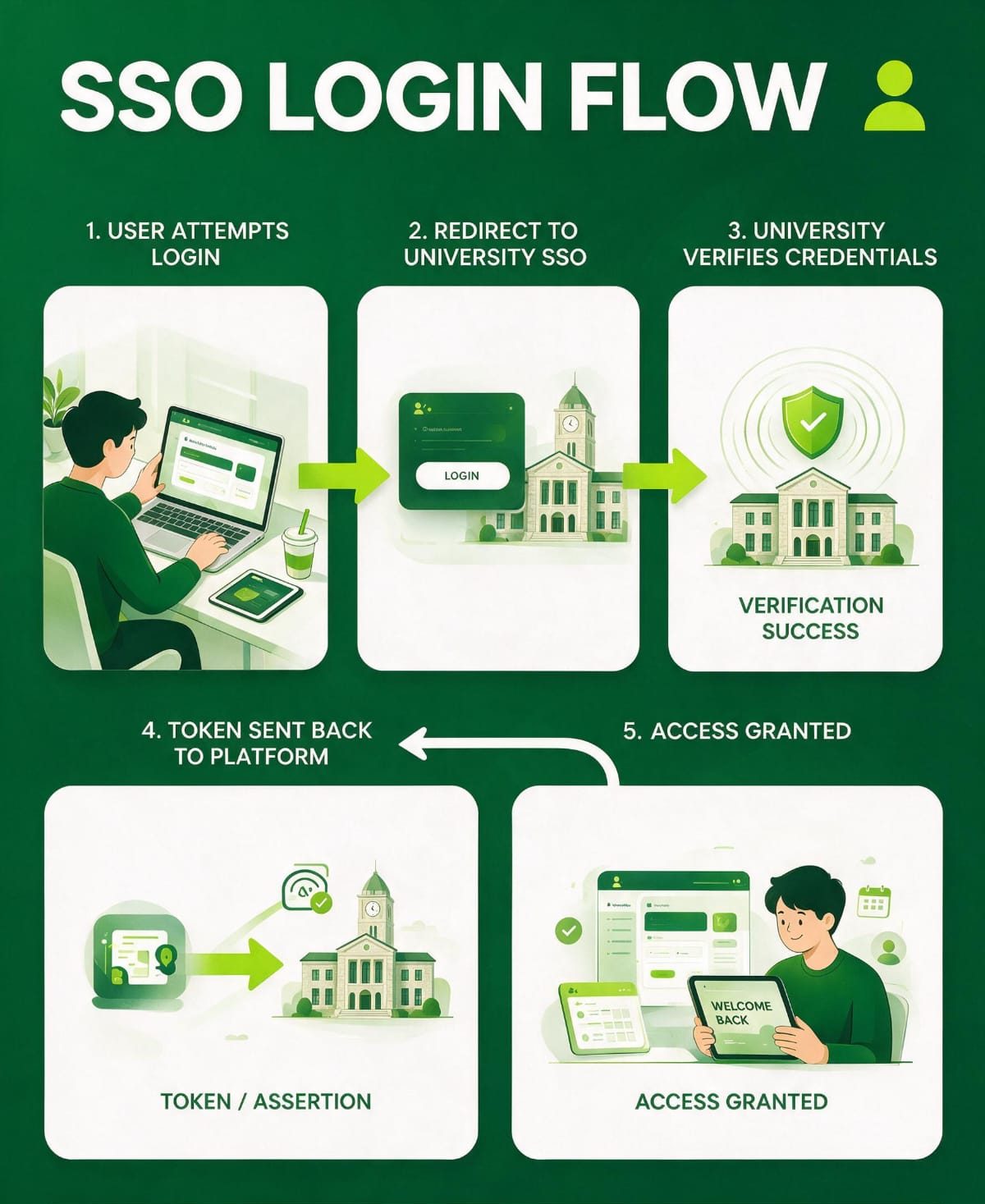
- The user opens the designated conference platform.
- The platform then sends the user to the university’s login page rather than asking for a conference-specific password.
- The host university verifies the user through whatever method it already uses internally.
- A confirmation of that identity is conferred by the university back to the conference platform.
- The conference platform opens the appropriate account for the now-verified individual.
What University Conference SSO Has to Do With MFA and With Peer Review
Multi-factor authentication is a different layer entirely from single sign-on. It is pertinent to be precise about the difference because the two are often used interchangeably. Single sign-on is where the user authentication happens; it is the login page that a user sees upon arrival. Multi-factor authentication, on the other hand, is a specific process employed to double-check a person’s identity. Access into the portal is withheld until the user completes another layer of security verification, often in the form of an OTP (one-time password) or a pre-approved security question.
When it comes to the conversation of peer review, a reviewer’s institutional identity can be confirmed with confidence through single sign-on. And the same is true again for conference administrators, whose access deserves its own separate consideration rather than an assumption that whatever was configured for attendees will simply extend upward to cover them too.
Registration and SSO Are Different Workflows
A faculty member can authenticate successfully through SSO and still need to choose a ticket type, register, pay, accept the event’s terms, complete a dietary field or select workshop sessions. SSO proves identity. Registration records participation. Conference registration SSO, in other words, describes two different systems working together, not one system replacing the other.
SSO and Abstract Submission
For an internal author, the sequence typically looks like this: university login, an author profile that gets created or matched to an existing one, a submission dashboard, and finally the abstract itself. SSO can reduce the number of separate credentials an internal author needs to keep track of, but submission rights themselves remain governed entirely by the conference workflow, not by the login method used to get there.
SSO and Peer Review
Reviewer SSO can establish a reviewer’s institutional identity with confidence, which is genuinely useful. What it cannot do is decide which abstracts that reviewer is actually assigned to see, score or discuss. That remains a function of reviewer assignment and role permissions inside the conference platform, entirely separate from how the reviewer logged in.
SSO and Conference Administrators
Organizer and administrator SSO deserves its own line item, separate from attendee, reviewer and author SSO. A platform may support one of these, both or different configurations for each. This is worth asking about explicitly during procurement rather than assuming that support for one automatically means support for the other.
What Information Can Be Passed Through SSO?
A university identity provider can typically pass along a defined set of attributes, sometimes called claims: email address, first name, last name, department, affiliation, a user identifier, and in some configurations group or role information. These attributes only matter once the underlying workflow makes sense, which is why this guide covers them here rather than earlier.
Dryfta’s public SAML documentation currently describes mapping email, first name and last name, with email used as the unique identifier. Anything beyond that should be confirmed directly with the product team before an organizer relies on it for planning.
Why Email Matching Needs Special Attention
An existing conference profile may use a different email alias from the one the university’s identity provider actually returns during login. Before launch, test primary institutional addresses, known aliases, changed surnames, alumni addresses, people with multiple affiliations, and any pre-existing conference accounts tied to an older email. The operational risk here is concrete rather than theoretical: poor matching creates duplicate conference profiles, and untangling those after submissions and reviews are already underway is far harder than testing for it in advance.
Just-in-Time Account Creation in Plain English
Some platforms can create a local conference profile automatically the first time an authenticated university user arrives, a pattern commonly called just-in-time, or JIT, provisioning. Conceptually, that is worth understanding, since it changes how quickly a new attendee’s account appears. What this guide will not do is describe Dryfta’s exact provisioning behaviour without current product verification, since that detail is exactly the kind that changes between releases and deserves a direct answer from the product team rather than an assumption carried over from an older document.
What the Conference Team Needs From University IT
| Question | What to determine |
|---|---|
| Identity system / IdP | What system does the university use? |
| SSO protocol | What does university IT and the platform support? |
| Technical contact | Who owns enterprise SaaS identity integrations? |
| User population | Faculty only, students, staff, everyone? |
| Guest strategy | How do external attendees authenticate? |
| Required attributes | What identity/profile information should be passed? |
| Access rules | Are particular groups eligible? |
| MFA/access policies | What controls are enforced at the IdP? |
| Test users | Which identities can be used for testing? |
| Timeline | When can configuration and testing begin? |
What University IT Needs From the Event Platform
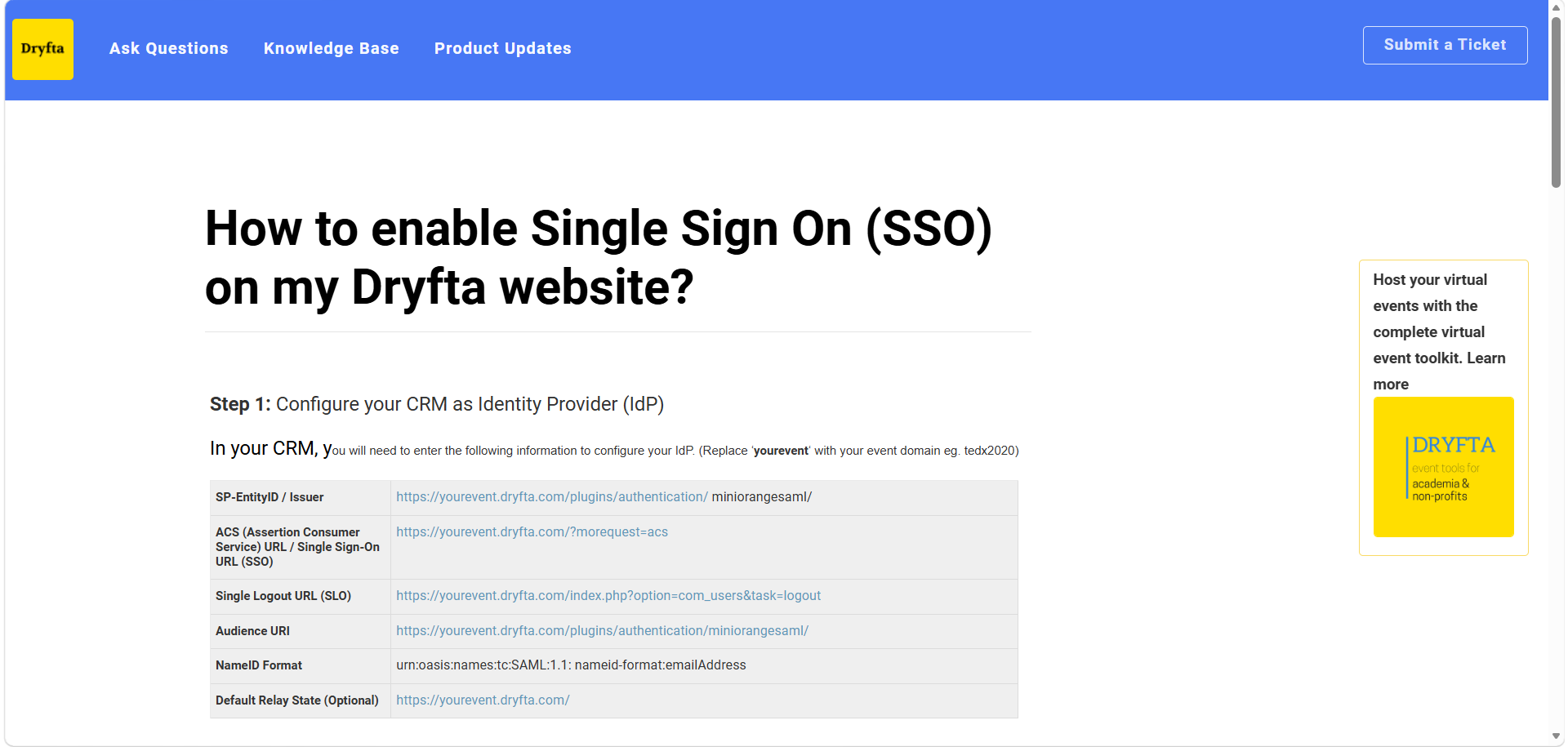
University IT will typically want entity or identifier information, the sign-on, redirect and ACS URLs, metadata, logout information where applicable, certificate and configuration details, the required attributes, unique identifier requirements, and access to a test environment. Rather than reproducing every field here, the sensible move is to hand IT Dryfta’s technical SSO setup article directly once the planning conversation above is complete, since that document is built to stay current with the exact configuration steps in a way a general guide like this one is not.
Build an SSO Responsibility Matrix
| Activity | Conference team | University IT | Platform/vendor |
|---|---|---|---|
| Define eligible users | Lead | Consult | Consult |
| Choose guest model | Lead | Consult | Confirm capability |
| Configure IdP | – | Lead | Support |
| Configure platform | Consult | Consult | Lead/shared |
| Attribute mapping | Define needs | Provide | Configure |
| Testing | Participate | Participate | Participate |
| Communication | Lead | Consult | Support |
| Troubleshooting | Route | Identity issues | Platform issues |
How Early Should You Start SSO Setup?
There is no single universal number worth publishing here, and any guide that gives you one is guessing. What can be said with confidence is that SSO setup can require IT approval, a vendor security review, enterprise-app registration, attribute mapping, test accounts, a guest-access decision, a privacy review and genuine user acceptance testing, all before a single login-dependent workflow goes live. The straightforward rule that follows from that list is simple: start the SSO conversation as soon as the conference platform is selected, well before abstract submission or registration opens.
Test SSO Before Opening Abstract Submissions
| Test user | What to test |
|---|---|
| Faculty | Login + profile |
| Student | Login + role |
| Internal reviewer | Login + assignments |
| Existing user | Account matching |
| New user | Account/profile creation |
| External guest | Alternative login |
| Disabled/unauthorized user | Access denied correctly |
| User with email alias | Duplicate handling |
Test the Entire User Journey, Not Just Login
Login is the easy part to test and the least revealing. What actually surfaces problems is following each role all the way through its real journey. For an author, that means login, profile, submission and a return visit later. For a reviewer, it means login, an assigned paper, a score and a submitted review. For an attendee, it means login, registration, a ticket or payment step and the dashboard afterward. For a speaker, it means login, a profile or task, and the programme itself. For an administrator, it means login followed by a check that every administrative permission actually landed correctly.
SSO Error Messages Need a Support Plan
| Issue | Likely owner |
|---|---|
| Authentication failure | University IT |
| Conference-profile/account-match issue | Conference team / platform support |
| Registration/payment problem | Conference registration team |
| Permission/role problem | Conference admin / platform support |
Routing matters here more than it seems like it should. Sending every SSO-related complaint straight to university IT overloads exactly the wrong team when the actual problem is a conference-profile mismatch or a payment failure that has nothing to do with authentication at all.
Plan the Login Page for Mixed Audiences
A login page serving a mixed academic and external audience needs to be genuinely easy to parse under deadline pressure. University members should see something like “Sign in with University Account.” External participants should see “Sign in as Guest” right next to it. One or two lines of plain explanatory text above those two options is usually enough so faculty, students, staff, speakers and external attendees are not left guessing which button actually applies to them.
Don’t Forget Mobile Access
Mobile deserves its own checklist rather than an assumption that whatever works on the web will simply carry over. Does SSO actually work inside the attendee app, or does it require a browser handoff partway through? Does the user remain authenticated after that handoff, or do they have to sign in twice? What happens when the session expires mid-conference? And critically, can guests still use the app at all, or does the mobile experience quietly assume everyone has a university identity?
SSO and Multiple Annual Conferences
Universities frequently run more than one event a year, sometimes many. It is worth asking directly whether SSO configuration has to be repeated event by event, or whether the underlying identity setup can be reused across multiple programmes once it exists. This is simultaneously an IT workload question and a procurement question, and the answer changes the total cost of running SSO across a university’s full conference calendar rather than a single event.
SSO Procurement Checklist for University Conference Software
Do you support attendee SSO, and separately, do you support administrator SSO? Which protocols are actually supported? Can SSO and guest accounts coexist inside the same event? Can existing accounts be matched to newly authenticated users? What attribute mapping is available, and can role or eligibility information be passed along with identity? How are new users created the first time they arrive? Can access be limited to particular institutional groups? How is logout handled, and how are certificates or keys renewed over time? Can conference platform SSO be reused across multiple events? How does mobile or app login actually work? Is a test environment available before launch? What support is provided during configuration itself? Is SSO included in the base plan or sold as an add-on? And finally, what happens to login when the university’s identity provider is temporarily unavailable?
Common SSO Mistakes University Conference Teams Make
Treating SSO as an IT-only project, when in fact conference rules determine who actually needs access in the first place. Forgetting external attendees entirely, which is probably the single most common and most damaging university-conference mistake on this list. Confusing login with registration, as though authentication alone meant a person’s participation was complete. Assuming email addresses will match cleanly without testing aliases and pre-existing accounts. Testing only one faculty account and calling the job done, rather than testing every major role separately. Leaving IT involvement too late, when identity integrations often need real review and coordination time. Making SSO mandatory unnecessarily for a genuinely mixed audience that needs an appropriate guest model instead. Assuming SSO automatically determines roles, when authentication and authorization remain entirely different questions. Ignoring mobile workflows and only testing the desktop browser experience. And having no fallback or support procedure in place, so nobody knows what to do when login fails on the day submissions are due.
One mistake worth calling out on its own: copying technical terminology straight into attendee-facing instructions. Attendees do not need to know what a SAML assertion is. They need to know which button to press.
How Dryfta Fits Into University Conference SSO
The useful way to think about Dryfta here is as a connected workflow rather than a protocol choice: university identity, into a Dryfta profile, into abstract submission, into reviewer access, into registration, into the programme and attendee dashboard. University conference SSO becomes considerably more valuable when the authenticated identity carries through that entire chain, rather than depositing faculty and students into separate systems for submissions, reviews, registration and programme access that do not talk to each other.
Dryfta’s public support material documents SAML specifically, and other current Dryfta pages may reference OIDC alongside it. Before treating any detailed claim about specific protocols, multiple identity providers, role mapping, provisioning behaviour, SP-initiated or IdP-initiated flows, or mobile SSO behaviour as settled, confirm current implementation directly with the Dryfta product team, since these are exactly the details that change fastest between releases.
To learn how to enable single sign-on at your next conference with Dryfta, read this comprehensive, step-by-step explainer here. To get a free demo of Dryfta’s purpose-built event management platform and abstract management system, click here.
University Conference SSO Readiness Checklist
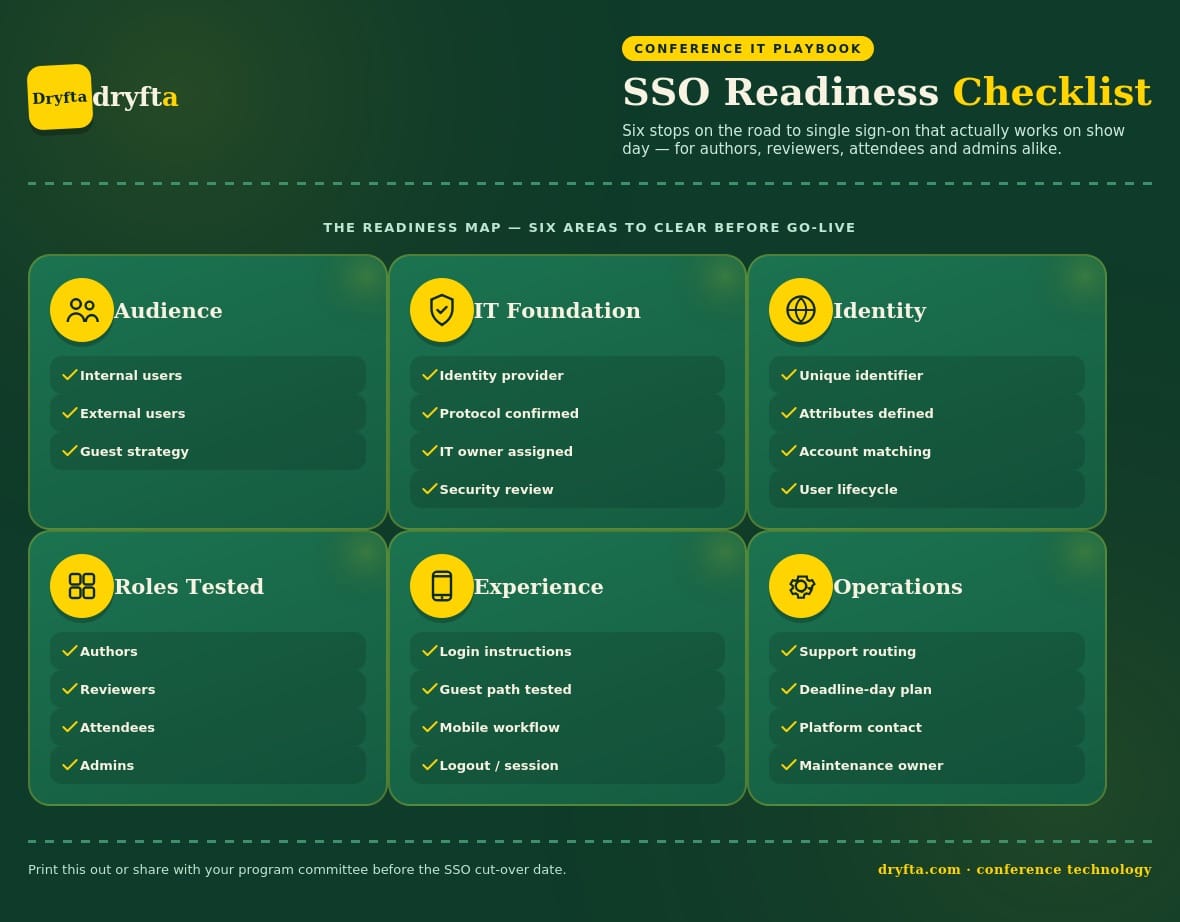
- Audience: internal users identified, external users identified, guest-login strategy chosen.
- IT: identity provider identified, protocol confirmed, an IT owner assigned, security review complete.
- Identity: unique identifier agreed, attributes defined, existing account matching tested, user lifecycle considered.
- Roles: authors tested, reviewers tested, attendees tested, admins tested.
- Experience: login page instructions clear, guest path tested, mobile workflow tested, logout and session behaviour tested.
- Operations: support routing documented, deadline-day fallback defined, platform support contact known, maintenance ownership assigned.
Frequently Asked Questions (FAQs)
What is SSO for a university conference?
It is a way for eligible participants to use an identity their university already manages to access the conference platform, instead of creating another separate password. It answers who someone is, not what they are allowed to do once inside.
How does SSO work for conference registration?
SSO authenticates the user. Registration remains a separate participation workflow that still requires choosing a ticket, paying if applicable, and accepting event terms, regardless of how the person logged in.
What is SAML SSO?
A mature enterprise standard used to exchange authentication information between an identity provider, typically the university, and a service provider, in this case the conference platform. It is common in university and enterprise SaaS environments.
What is OIDC?
A newer identity layer commonly used in modern web and mobile software. It serves a similar purpose to SAML but is built on a different technical foundation, and the conference platform and university IT need to agree on which one to use.
Is SAML or OIDC better for universities?
Neither is universally better. The right choice depends on which standard the platform and the university’s identity provider both support, and that is a question for IT and the vendor to settle together rather than the organizer alone.
Can external conference attendees use university SSO?
Only if the identity model in place actually supports them, which is uncommon for people with no relationship to the host institution. Otherwise, an appropriate guest login route is required so external attendees are not locked out.
Can reviewers use SSO?
Yes, SSO can confirm a reviewer’s institutional identity. Reviewer assignments and permissions, meaning which abstracts they can actually see and score, remain a separate configuration inside the platform itself.
Does SSO replace conference registration?
No. SSO proves identity. Registration records participation, payment and event-specific choices, and a successful login does not complete either of those on its own.
Does SSO replace MFA?
No. SSO describes where authentication happens. MFA describes how strongly identity is proven during that step. Whatever MFA policy the university enforces at its identity provider may apply, but SSO itself is not a substitute for it.
Does SSO automatically create a conference profile?
That depends entirely on the platform’s provisioning and account-matching configuration, sometimes called just-in-time provisioning. Confirm the specific behaviour with the vendor rather than assuming it.
Can a conference offer both SSO and normal login at the same time?
Many platforms can, but this is a specific capability worth confirming directly with any vendor under consideration rather than assuming it comes standard, since mixed-audience conferences typically depend on it.
How long does university SSO setup take?
There is no universal figure worth quoting, since timing depends on IT review, protocol setup, attribute mapping, the guest-access strategy chosen, and the depth of testing required. Kick off the conversation of the university conference SSO as soon as the platform is selected rather than waiting for a fixed countdown.