





When hosting an association event, the registration process should feel like a seamless part of your website. Redirecting members to a generic third-party ticketing page can weaken trust and increase drop-offs.
On the plus side, the solution is simple. You must integrate event registration forms directly into your existing event website.
When registration stays within your website, you maintain total brand consistency, which instantly reassures users their payment data is safe. The result is a more professional experience, fewer abandoned signups, and stronger conversion rates. Best of all, when you integrate event registration forms natively, attendee records stay organized and up to date without relying on manual data transfers.
This guide explains how to integrate event registration forms into association websites. It covers integration methods, design best practices, attendee experience improvements, and how Dryfta helps associations streamline registrations and increase sign-ups.
Common Methods to Integrate Event Registration Forms
Getting people to register for events starts with creating a simple process. As much as how your registration page looks will affect sign-ups, just as much is the functionality of that page.
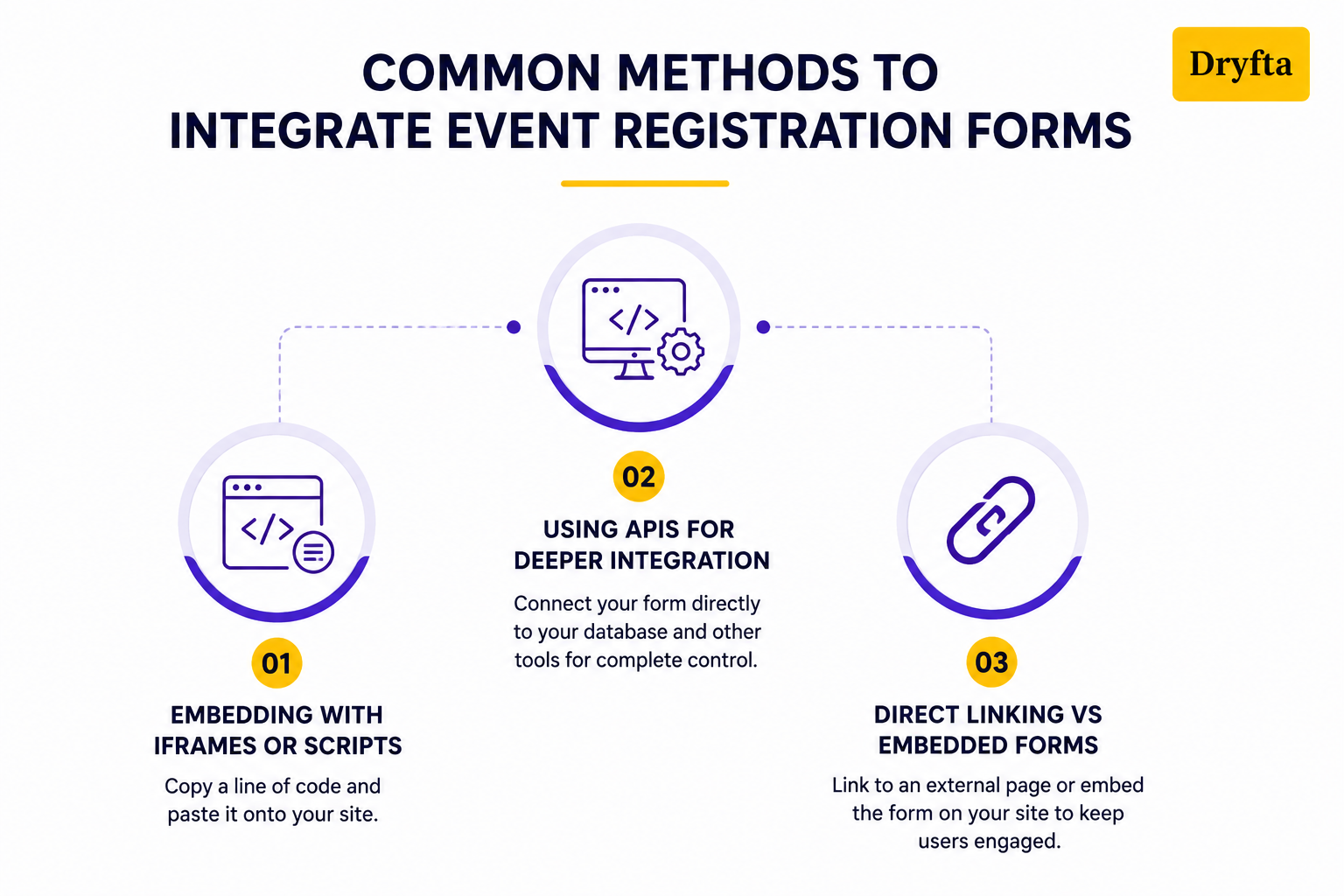
Below are the most common ways to get your event registration pages integrated into your website:
1. Embedding with iFrames or Scripts
This is the ultimate shortcut. Using an event registration form builder, you simply copy a line of code and paste it onto your site.
- Pros: Only takes a few minutes.
- Cons: iFrames are sometimes confusing or slow to load on mobile phones.
- The Catch: Ensure your registration tool is mobile-responsive and meets accessibility standards (such as screen-reader compatibility) so nobody gets left out.
2. Using APIs for Deeper Integration
If you are looking for complete control of all your event information, an API (Application Programming Interface) connects your form directly to your database. In addition, APIs let developers integrate event registration forms with their CRM, marketing automation, payment gateways, and other event management tools.
- Pros: Complete design freedom. The form looks 100% native to your site.
- Cons: You absolutely need a web developer to build and maintain it.
3. Direct Linking vs Embedded Forms
Should attendees stay on your event website or register somewhere else?
- Direct Linking: Add a registration link that leads visitors to a registration page on your event site. The downside is that you will lose visitors to your site and in some cases it could create a disjointed experience if the registration page doesn’t match your branding.
- Embedded Forms: If you embed event registration forms directly on your landing page, users will not be taken off your site, which typically means higher completion rates.
The Bottom Line: If you wish to have a quick implementation that keeps your branding with a mobile-friendly script embedding, choose direct linking. If you want to provide your users with a smooth experience and are ready to invest the extra money, you can choose an API.
Best Practices for Mobile-Friendly and Accessible Event Registration Forms
Let’s look at the facts. If your form is difficult to use on a mobile phone or is hard to navigate for people with disabilities, you are losing attendees. When you integrate event registration forms, optimizing for every user is non-negotiable.
When looking for an event registration form builder, you need to consider the following:
- Your mobile form needs to switch into one column, since the standard multi-column design won’t work on smaller screens. When filling in a phone number or zip code field, make sure that the button is big enough to hit easily and not by accident.
- The form should display the numerical keyboard automatically once the user clicks the phone number or zip code fields. This helps users register much faster.
- Users with visual impairments use assistive technologies. The form should have correct HTML tags (e.g., <label>) to make it clear what to enter in each box to a screen reader.
- The text should be clear and in contrast to the background. Also, if one of the required fields is left out, the form should be clearly marked with color and verbal notation of the error.
Note: Before you embed event registration form code onto your live site, test it on your own phone and try navigating it using only your keyboard’s “Tab” key. If you get stuck, your users will too.
Design and User Experience Best Practices to Integrate Event Registration Forms
When managing association events, the checkout experience should be seamless. Members should not feel like they’ve been directed to a different website during the registration process.
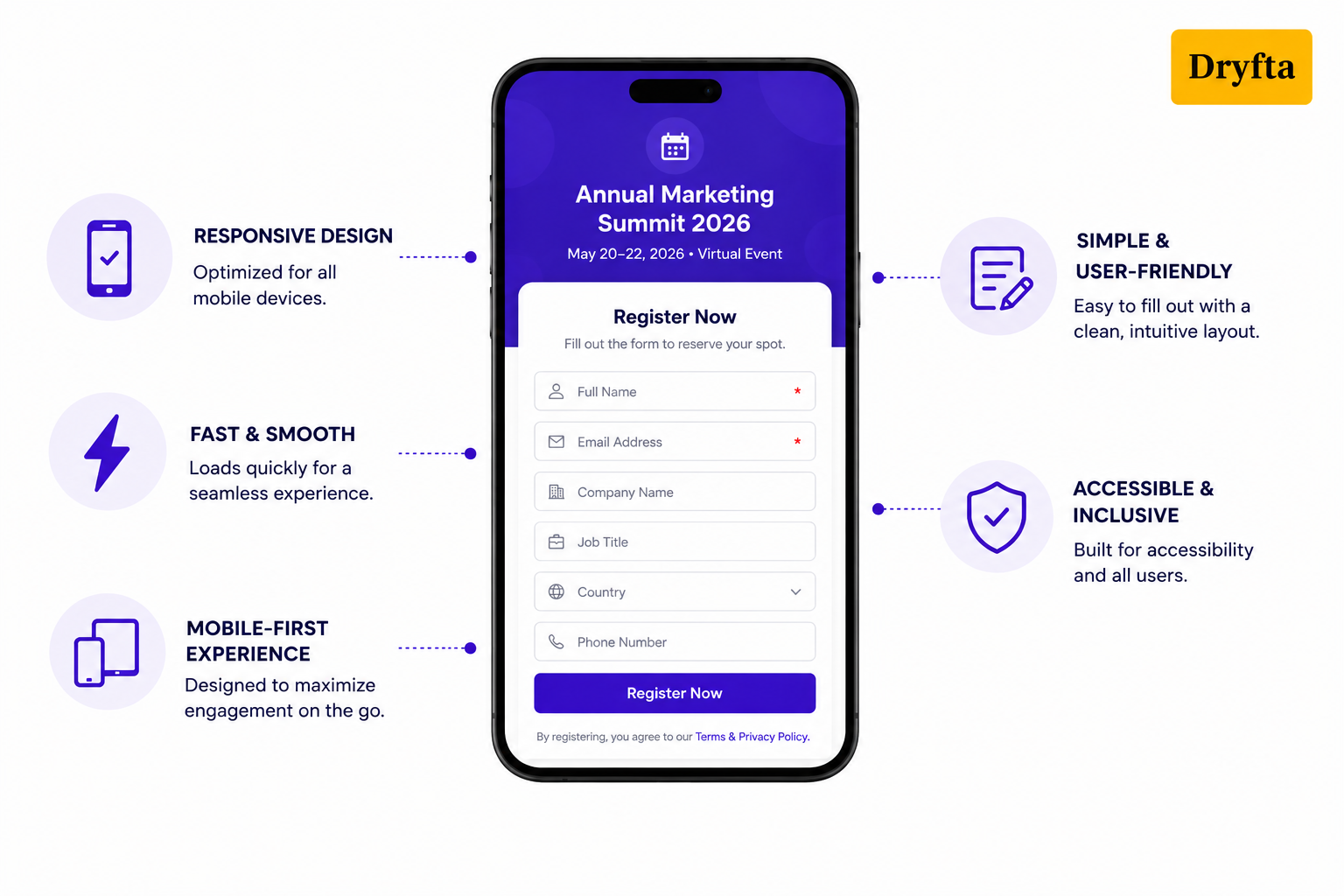
To maximize conversions, here are some tips to optimize your event registration form integration:
- Use your organization’s exact brand colors, button styles and typography to make the checkout look and feel just like the rest of your site and build trust in the process.
- Remove all unnecessary input areas to reduce user fatigue and keep your registration form short.
- Optimize your images, eliminate any unneeded scripts, and use light weight form elements to enable quick loading of the pages (even during peak registration times).
- Use enough contrast on both the background color and text so that those with low vision can clearly read what is being asked of them.
- In case the checkout is longer than one page, include a visible progress bar at the top of the page, letting users know how close they are to completing the form.
- Include clear calls to action, like “Register Now” or “Reserve Your Spot,” to move visitors to the next action.
- Don’t ask more questions than you need to. Shorter forms generate significantly more registrants.
- Provide obvious error messages immediately to correct spelling errors as soon as they occur.
Think of it this way. With every additional click, there is more opportunity for someone to abandon their checkout. Keep your registration form as simple as possible.
Did You Know? According to a study on form abandonment, nearly 8 out of 10 users start an online form but never complete it. A user-friendly event registration form can have a major impact on sign-ups.
How Dryfta’s Event Registration Form Builder Supports Seamless Integration?
Dryfta’s event registration form builder enables seamless integration into association websites through customizable, drag-and-drop tools. The system provides easy embed codes, API support, and specialized fields to integrate event registration forms into existing workflows while supporting user-specific registration tracks.
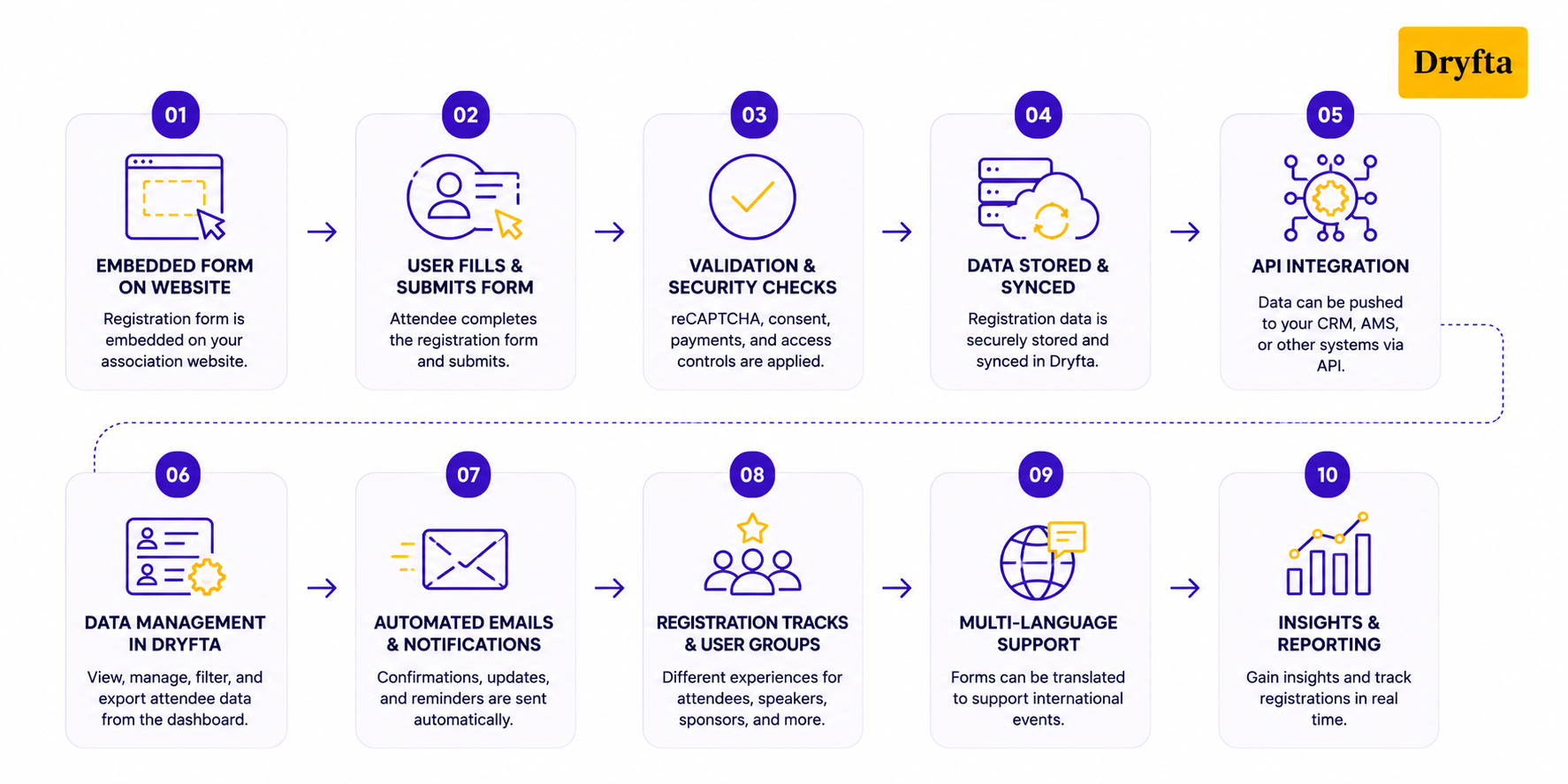
Here is how the system simplifies your event registration form integration while giving you complete creative freedom:
- To begin with, the intuitive drag-and-drop form builder allows organizers to create registration forms without coding. Adding, removing, or rearranging fields takes just a few clicks.
- Even better, forms are fully configurable. You can create different registration experiences for attendees, reviewers, speakers, sponsors, and other user groups.
- When organizations need to integrate event registration forms into their websites, Dryfta provides simple embed options that allow forms to appear directly within existing webpages for a seamless user experience.
- Each form can be customized using branded colors, logos, field layouts, and informative text to further match the organization’s branding.
- Registration forms can also be translated into various languages for international events.
- Additional features of the Dryfta include advanced file uploads, MP3 and MP4 uploads, rating fields, disclaimer text, consent checkboxes, and custom validation rules.
- Behind the scenes, registration data is automatically stored and synced with your event database.
- API support is beneficial for those organizations that require greater flexibility as it enables them to connect event registration forms to CRM systems.
- Attendee data is protected by various features including reCAPTCHA, privacy consent options, secure payments and user access controls.
- And that’s not all. Automated emails and waiting lists help save time and improve the registration experience.
Before you integrate your registration form, make sure it’s optimized for conversions. Our guide on event registration form template covers form design best practices and template ideas to help you get started.
Case Study – Memory Studies Association (MSA)
The Memory Studies Association (MSA) has used Dryfta for managing the organization’s 2021 Warsaw Conference with an attendance of more than 1500 people in over 220 virtual sessions. Additionally, by using Dryfta’s integrated event registration form, MSA was able to add custom registration forms to its own event website.
Dryfta also automated attendee data management, email communications, and ticketing workflows. This example shows how organizations can efficiently integrate event registration forms while improving the attendee experience and streamlining association event management.
Tips for Testing and Optimizing Your Integrated Registration Forms
Before going live, take time to test every step of the registration process. A single technical flaw can cost you registrations.
Here is how to test and perfect your setup:
- Complete the form on your own on Chrome, Safari, and Edge on both iPhone and Android devices to keep it completely responsive.
- Test your loading times on poor cellular networks, as slow load times will lead users to abandon the tab before they can finish.
- Test a transaction using a test credit card to ensure that confirmation emails and receipts are sent immediately.
- Monitor your conversion rates inside your dashboard to see exactly where users drop off or quit the form.
- Look for an event registration form builder that lets you easily adjust fields based on real-time user data.
- Add an optional survey on the thank-you page to gather immediate feedback about how easy it was to integrate event registration forms and sign up.
A Quick Fact: According to Baymard Institute research, 13% of users abandon a transaction when a website crashes or displays errors.
The Bottom Line
Integrating event registration form directly into your association website is a total game-changer. The approach eliminates confusion in regard to redirects and builds trust with your customers. This, in turn, greatly increases your ticket sales. Regardless of whether you opt for an easy-to-use embedded code with minimal customization options or a full-featured custom API, there are multiple ways to create seamless checkout experiences across the board.
Platforms like Dryfta take away most of the technical work for you with a drag-and-drop builder that can be customized for branding and integrates multiple secure payment processors. Are you ready to make your upcoming conference or meeting easier to register for? Take the next step by exploring Dryfta’s registration form integration options. Book a free demo today!

FAQs
1. What are the benefits of integrating event registration forms directly into my association website?
When you integrate event registration forms on your own site, you keep potential customers in one place. They do not need to leave your website. It significantly improves registration rates since visitors are not forced to go through confusing third-party redirects. It also makes sign-up a lot quicker, so there are fewer people who drop off before they sign up.
2. Can I customize the registration form to match my association’s branding?
Yes. You certainly can. Dryfta lets you fully customize how your forms appear. You can select colors, fonts and button styles that fit your association’s primary website. It also ensures your check-out will be recognized as an authentic part of your brand, and not just another generic plug-in.
3. Is it possible to integrate payment processing within the embedded registration form?
Yes, it is possible and also very easy. Dryfta allows you to connect directly to trusted payment tools within your form. Your customers will be able to securely enter their credit card info so they can purchase their tickets on your site and have a quick and safe checkout experience.
4. How do I ensure the embedded form works well on mobile devices?
A successful mobile experience is based on having a well-structured and adaptable responsive design for different devices. Prior to launch, it is recommended that you evaluate how your registration form will function on smartphones and tablets to identify any usability issues. As part of this, use easy-to-click form fields and eliminate crowded multi-column designs.
5. What technical skills are needed to integrate event registration forms into my website?
You only need basic technical skills for standard setups. Copying and pasting a simple HTML embed code into your website’s editor is usually enough to get started. However, if your team wants to build highly advanced custom workflows or deep database syncs, you may need developer support to use the API.
6. How can I track event registrations and manage attendee data from embedded forms?
Dryfta does all the heavy lifting by sending every new signup directly into a secure dashboard. You don’t have to manually copy data into spreadsheets. Instead, you can log in at any time to see live ticket sales, check your guest list, and print attendee reports with a single click.
