According to GlobalNewsWire, the global event industry is expected to grow at a CAGR of over 11.38% through 2033, fueled by hybrid and in-person demand. As organizers face higher attendee expectations and tighter budget scrutiny, choosing between Eventbrite and Whova goes beyond ticket sales.
To cut through the noise, in this blog, we break down which platform delivers better ROI and quality engagement for your 2026 events.
Introduction to Whova vs Eventbrite vs Dryfta
Whova is a mobile-first platform that is aimed at networking and attendee interaction. The platform performs well as a general-purpose corporate event solution offering community boards and engagement tools. In fact, many organizers view Whova as a strong choice for attendee engagement, event apps, networking, and conference experiences.
Eventbrite is effective for basic ticket sales and community events. It provides good reach and visibility and remains a popular choice for organizers looking for simple ticketing, public event listings, and fast event setup.
Dryfta is a highly specialized platform built for academic, research, nonprofit, and enterprise events that require complete event lifecycle management. In contrast to general tools, it includes advanced abstract management and peer-review processes. Dryfta provides a level of technical control and data integrity that generalized event platforms simply cannot match.
What Is Whova?
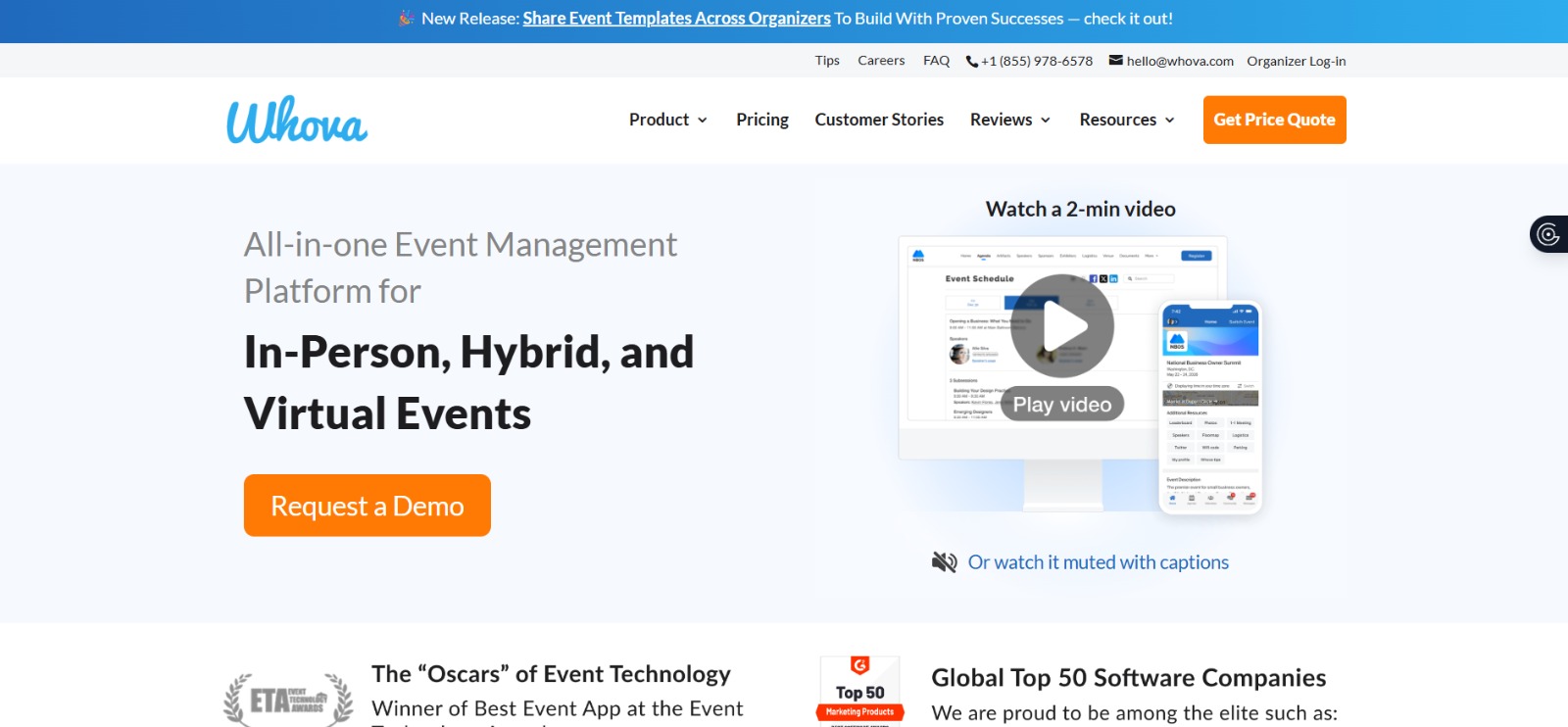
If you’ve ever been to a business conference or corporate event, you’ve likely used Whova. It’s one of the largest brands in the event tech industry today. But what exactly makes it so popular? Once you start comparing Whova vs Eventbrite, it becomes clear that Whova offers much more than ticket sales. It is built to help attendees engage with every part of the event experience.
Let’s look at what makes this software a heavy hitter in the event space.
Event App and Attendee Engagement
Whova is best known for its award-winning mobile app. Rather than handing attendees a stack of printed materials, Whova gives them a centralized digital workspace. The live updates and gamification features keep participants engaged during the event.
Agenda and Session Management
Managing multi-track schedules with dozens of speakers can be overwhelming. Whova offers interactive agendas that let attendees sort sessions by track, review speaker information, check venue maps, and build a personalized event calendar.
Networking and Community Tools
Networking is one of Whova’s strongest features. Attendees can join discussion boards, organize informal meetups, coordinate ride-sharing and connect with professionals who share similar interests.
Sponsor and Exhibitor Visibility
To keep your financial partners happy, Whova provides high-ROI digital booths. Sponsors and exhibitors can showcase promotional videos, interact directly with leads, collect contact details via QR code scanning, and set up tiered giveaways to attract traffic.
Best-Fit Event Types
Whova is explicitly tailored for multi-day professional events. If your absolute top priority is building a tight-knit community and keeping your crowd engaged, Whova is a highly reliable option to put on your tech radar.
What Is Eventbrite?
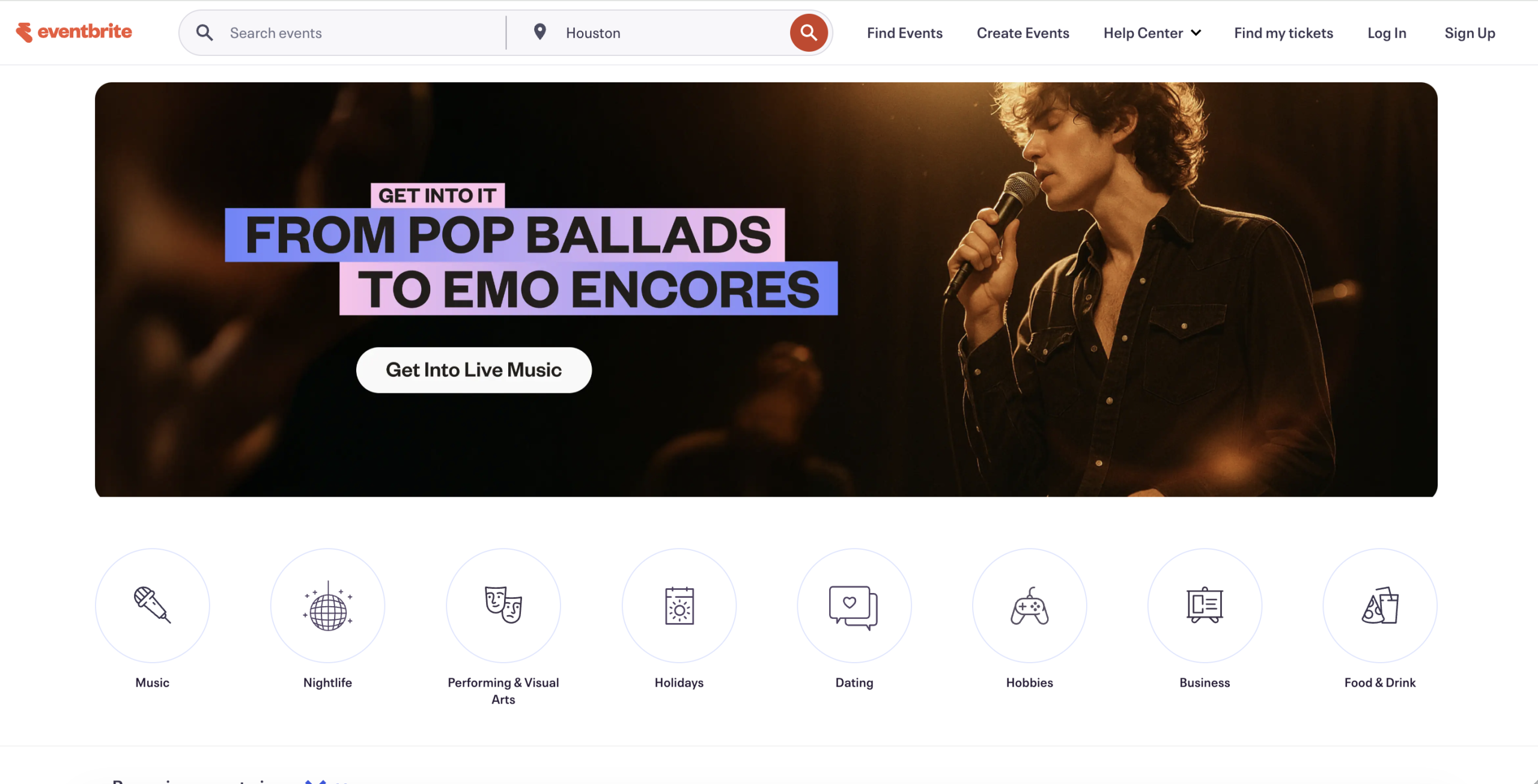
Eventbrite has earned its reputation by simplifying the ticketing process. Organizers can quickly set up event pages and start selling tickets without dealing with unnecessary complexity.
Here is a quick look at what Eventbrite does best:
Ticketing and Registration
Eventbrite is essentially designed to make it easier for people to register and buy tickets for events. There are several levels of ticket pricing, online payment options, easy sign-up systems, discount codes and automated confirmation emails to accelerate the sign-up process.
Event Discovery Marketplace
This is Eventbrite’s secret weapon. Your listing can be seen on the marketplace, where millions of people use the platform daily to discover fun weekend plans. It serves as a local events search engine, meaning your brand is in front of people who would not have seen you otherwise.
Simple Setup for Public Events
You do not need a degree in web design to use Eventbrite. The backend builder is pretty straightforward. You can launch a functional event page in under ten minutes.
Payment Processing
Eventbrite handles all financial transactions securely on its site and deposits the funds directly into your bank account. It accepts all major credit cards and digital wallets effortlessly out of the box.
Best-Fit Event Types
Eventbrite is the standard for public events such as concerts, charity events, local festivals and community classes. For those who want to make a profit off attendance at an open event, this is your go-to tool.
Whova vs Eventbrite: Quick Comparison
The table below compares Whova, Eventbrite, and Dryfta across essential event management features.
| Feature | Whova | Eventbrite | Dryfta |
|---|---|---|---|
| Best for | Conferences, association events, hybrid events | Ticketed public events and event promotion | Academic, research, nonprofit, and enterprise events |
| Core strength | Event app and attendee engagement | Ticketing and event discovery marketplace | End-to-end event and abstract management |
| Registration | Customizable forms integrated with attendee profiles. | Simple registration flows optimized for speed. | Flexible ticket types, access controls, and add-ons. |
| Ticketing | Supports paid and free tiers | Highly flexible ticketing with reserved seating | Secure ticketing with custom pricing rules and automated invoicing. |
| Agenda management | Interactive multi-track schedules with session RSVP. | Basic display of event date and time; no complex track scheduling. | Drag-and-drop builder that converts accepted abstracts into sessions. |
| Event app | Native mobile app with live polling, discussion boards, and Q&A. | Organizer app for check-ins; standard consumer app for ticket storage. | Native Android and iOS mobile event app for conferences with private messaging, surveys, gamification, attendee/speaker profiles, sponsors pages, and interactive event schedule. |
| Networking | Attendee networking, messaging, and community features. | Limited compared to dedicated conference platforms. | Matchmaking, networking, and meeting scheduling. |
| Sponsors/exhibitors | Dedicated exhibitor and sponsor management. | Not a primary feature. | Sponsor and exhibitor management. |
| Abstract management | Basic portal to collect speaker bios and review responses. | Not available | Comprehensive abstract management with a single, double, and triple-blind peer review system. |
| Analytics | Event insights and engagement tracking. | Deep marketing metrics and ticket ROI data. | Track recent registrations, top attendees, popular speakers, session check-ins, abstract submissions, and more. |
| Best-fit event type | In-person, virtual, and hybrid conferences. | Workshops, classes, community events, and ticketed experiences. | Research conferences, academic events, symposiums, and large-scale professional events. |
Why Choose Dryfta Over Whova and Eventbrite?
Let’s face it: while many other event management software do a good job of getting people registered and sending icebreaker messages, most fall short with the technical aspects. And if you’re tired of handling five different tools just to manage one conference, it’s time for a change. And this is where terms like Whova alternative Eventbrite often come up during early research, as organizers start exploring beyond default choices.
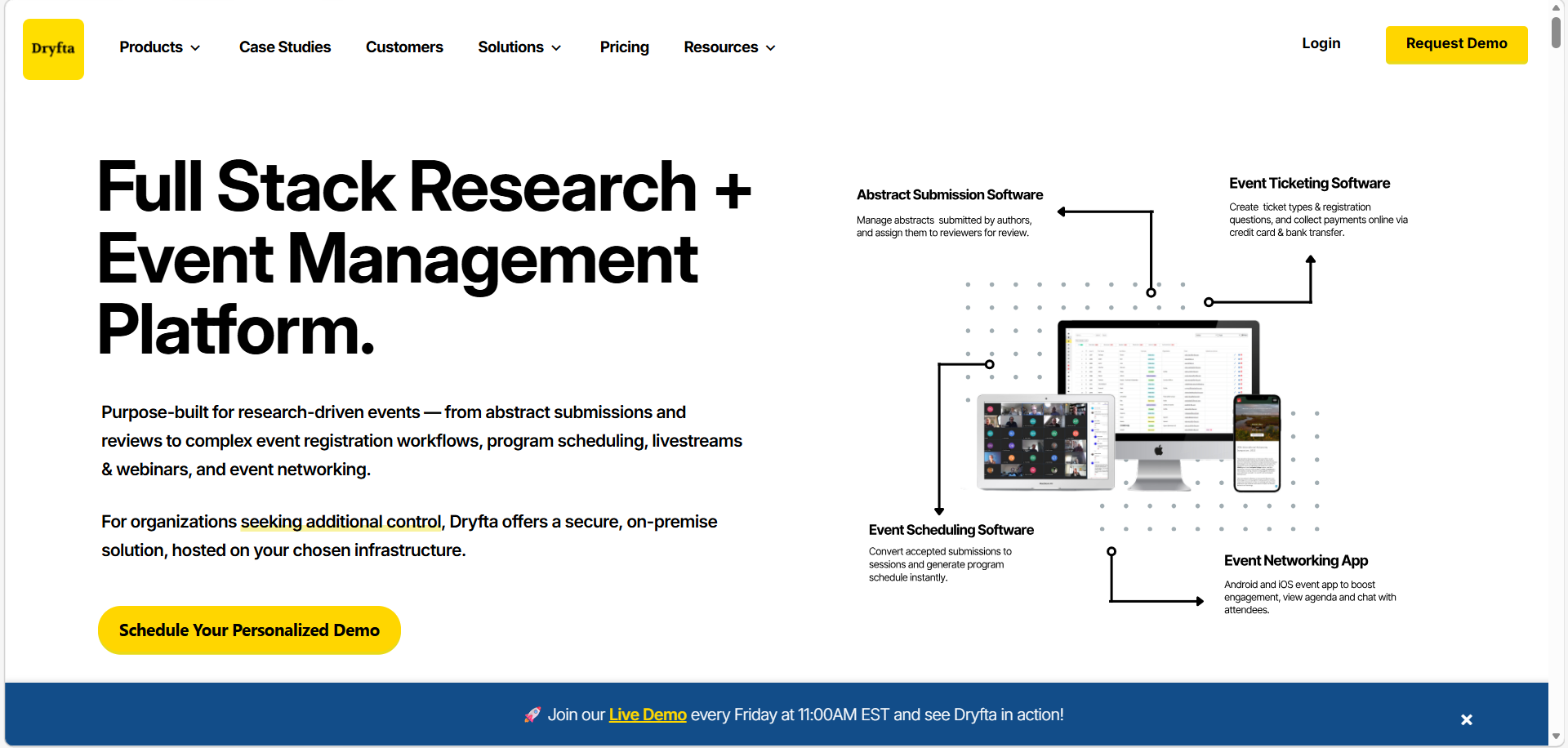
Comparing Whova vs Eventbrite vs Dryfta, Dryfta is unique as it can manage intricate event workflows without additional tools.
-
- Dryfta has an integrated paper submission, review, and publication process. As such, this workflow is not offered by either Whova or Eventbrite. Organizers are left to find additional third-party services to support their scholarly needs.
- To add to this, the platform is designed specifically for multi-track symposia. As such, organizers can create sessions based on extremely specific details related to accepted abstracts and speaker biographies. This level of detail cannot be seen in social-first apps.
- Dryfta lets organizers receive payments in multiple currencies and via multiple gateways at the same time. This is a serious need for international conferences, which Eventbrite’s regional settings tend to limit.
- Dryfta has an inbuilt event CRM to handle memberships and renewals. The feature is more than the event-based nature of Whova and the purely transactional nature of Eventbrite.
- While Eventbrite focuses on straightforward ticket payouts, Dryfta offers an in-built budgeting module to monitor costs and sponsorships.
Key Differences Between Whova vs Eventbrite vs Dryfta
At a quick glance, each platform focuses on very different priorities.
Whova leans toward:
-
- Supporting detailed event agendas in a series of sessions.
- Promoting in-app features and gamification.
- Promoting engagement with attendees via networking.
- Improving sponsors’ presence in the event setting.
- Monitoring attendee activity through built-in analytics.
Eventbrite centers around:
-
- Ticket sales and simple event payment processing.
- Getting events discovered through its public marketplace.
- Rapidly configuring events without complicated settings.
- Monitor participants using easy, user-friendly tools.
- Accessing larger markets with its existing user base.
Dryfta focuses on:
-
- Abstracts, peer reviews, and registrations managed within a single system.
- Favoring organized workflows of scholarly and professional events.
- Accurately managing multi-day schedules.
- Giving more control without the use of several external tools.
- Giving full control over attendee data and event content.
Whova vs Eventbrite: Feature-by-Feature Comparison
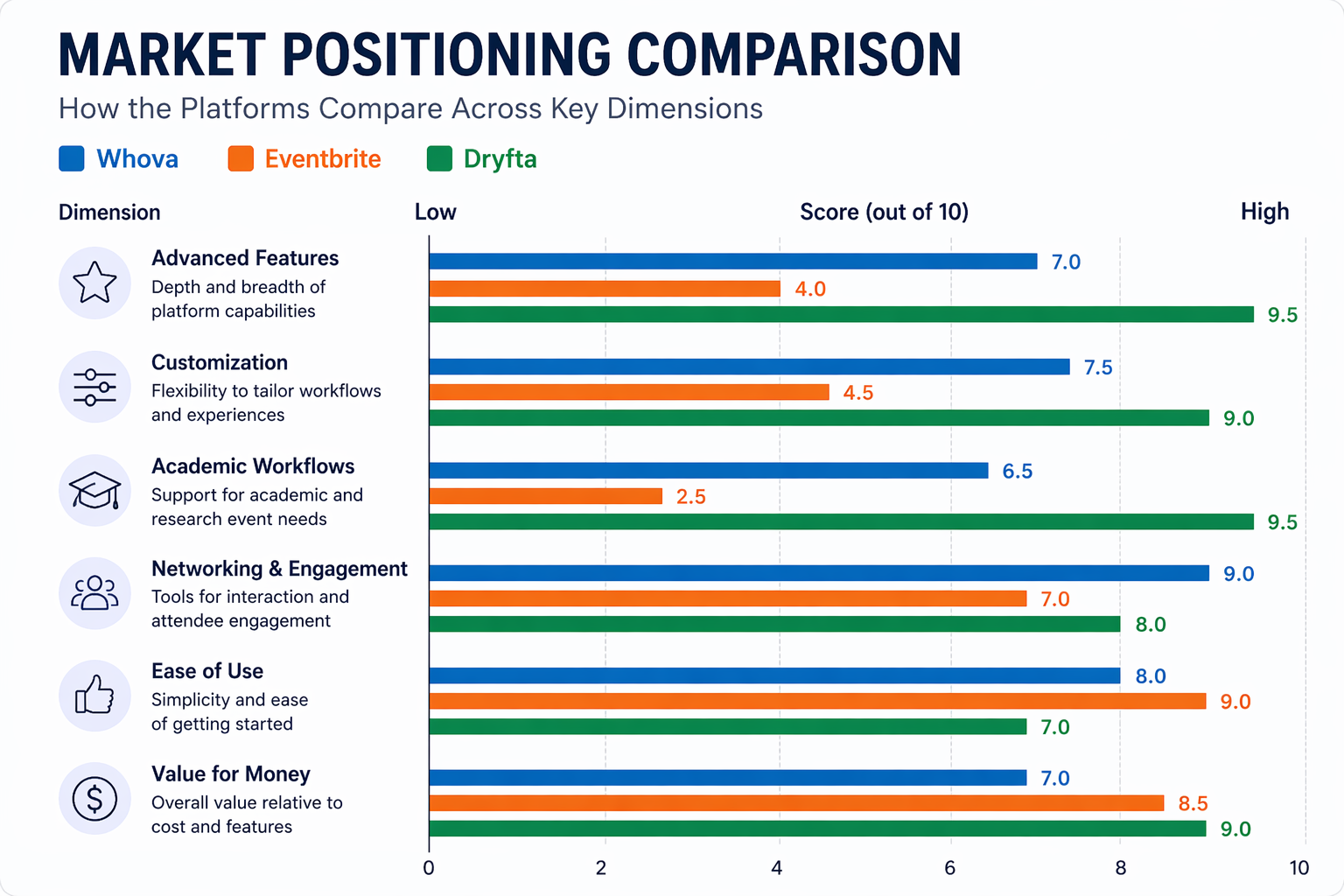
1. Registration and Ticketing
When it comes to registration and ticketing, the choice between Eventbrite vs Whova really depends on how much depth you need.
Eventbrite
-
- Simplified two-click guest checkout.
- Direct integration with social media platforms.
- High-traffic marketplace for public discovery.
- Mobile app specifically for entry scanning.
Whova
-
- Customizable registration forms for professionals.
- Tiered ticketing for members and non-members.
- Syncs instantly with the attendee networking app.
- Integrated waitlist and refund management tools.
2. Marketing and Event Discovery
When you consider Eventbrite vs Whova from a marketing perspective, the actual question is what you want to drive. One is inclined to create interest in the event, and the other is inclined to drive ticket sales to a broader audience. The breakdown is as follows:
Eventbrite
-
- Characterized by a huge international market to discover attendees.
- Offers automated search engine optimization to optimize event pages on Google.
- Provides direct Buy Tickets integration on Facebook and Instagram.
- Has in-built email marketing features to send out mass invitations.
Whova
-
- Generates custom social media graphics for speakers and attendees.
- Provides an option to incentivize attendee referrals.
- Includes an announcement system to send notifications to everyone.
3. Event Agenda and Session Management
When it comes to organizing what happens during the event, a Whova vs Eventbrite comparison highlights two completely different strategies for scheduling.
Eventbrite
-
- Displays event schedules and event details on event pages.
- Supports event creation and schedule updates.
- Best suited for simpler event programs.
Whova
-
- Provides an interactive event agenda.
- Allows attendees to create personalized schedules.
- Includes speaker profiles and session information.
- Supports multi-session and multi-track events.
4. Data Analytics and Reporting
Data only matters when you can actually use it. In a Whova vs Eventbrite comparison, most organizers end up with basic sales numbers instead of real insights into attendee behavior.
Eventbrite
-
- Tracks real-time ticket sales and total revenue.
- Monitors traffic sources to see where buyers originate.
- Provides basic geographic data on attendee locations.
- Generates check-in reports to monitor peak entry times.
Whova
-
- Measures attendee engagement via app clicks and messages.
- Tracks session popularity through virtual likes and check-ins.
- Reports on sponsor ROI through banner click-through rates.
- Monitors community board activity and networking statistics.
5. Attendee Engagement and Networking
True event success depends on how well your audience engages with your content and with each other.
Eventbrite
- Supports organizer-to-attendee communication.
- Provides attendee registration management.
- Offers event updates through the platform.
- Primarily focuses on event discovery and ticketing.
Whova
- Includes attendee messaging features.
- Provides a community board for discussions.
- Supports attendee networking opportunities.
- Offers meetup planning within the event app.
6. Mobile Event App
When comparing Whova vs Eventbrite, the mobile event app features are often a major factor, especially for organizers who want a more streamlined and updated event experience.
Eventbrite
- Offers a mobile app for event discovery.
- Allows attendees to access tickets digitally.
- Supports mobile event check-ins.
- Provides access to event details and registrations.
Whova
- Delivers a dedicated event mobile app.
- Provides agenda access and event updates.
- Supports attendee networking and messaging.
- Includes community and engagement features.
7. Sponsor and Exhibitor Management
A good sponsor engagement not only improves satisfaction but also increases the likelihood of renewals and long-term partnerships. When evaluating Whova vs Eventbrite, sponsor visibility and engagement tools are crucial for organizers looking to maximize revenue.
Eventbrite
- Places basic sponsor logos on the main ticket listing.
- Offers simple text descriptions for promotional partners.
- Provides event visibility through its marketplace.
Whova
- Builds interactive virtual booths with video showcases.
- Tracks banner ad impressions and live link clicks.
- Collects lead generation data for exhibitors automatically.
8. Integrations and Data Exports
When comparing Whova vs Eventbrite, integrations matter only if they actually save you time. The actual value is reflected in the manual work they relieve you of. Here is how each platform uses third-party tools to get the job done:
Eventbrite
-
- Salesforce and HubSpot: Adds attendee contact data and purchase history to your CRM to monitor lead conversion.
- Mailchimp: Automatically sends your attendee lists to initiate email marketing campaigns and post-event newsletters.
- Facebook and Instagram: Lets you add a direct checkout button on your social accounts.
Whova
-
- Zoom and Microsoft Teams: Integrates live video feeds into the session agenda to provide a smooth virtual attendee experience.
- Constant Contact: Registers your mailing list with the registration information to manage pre-event logistics and announcements.
- Slido: Adds live polling and word clouds to the event’s activity feed to increase audience engagement.
Pricing Comparison: Whova vs Eventbrite
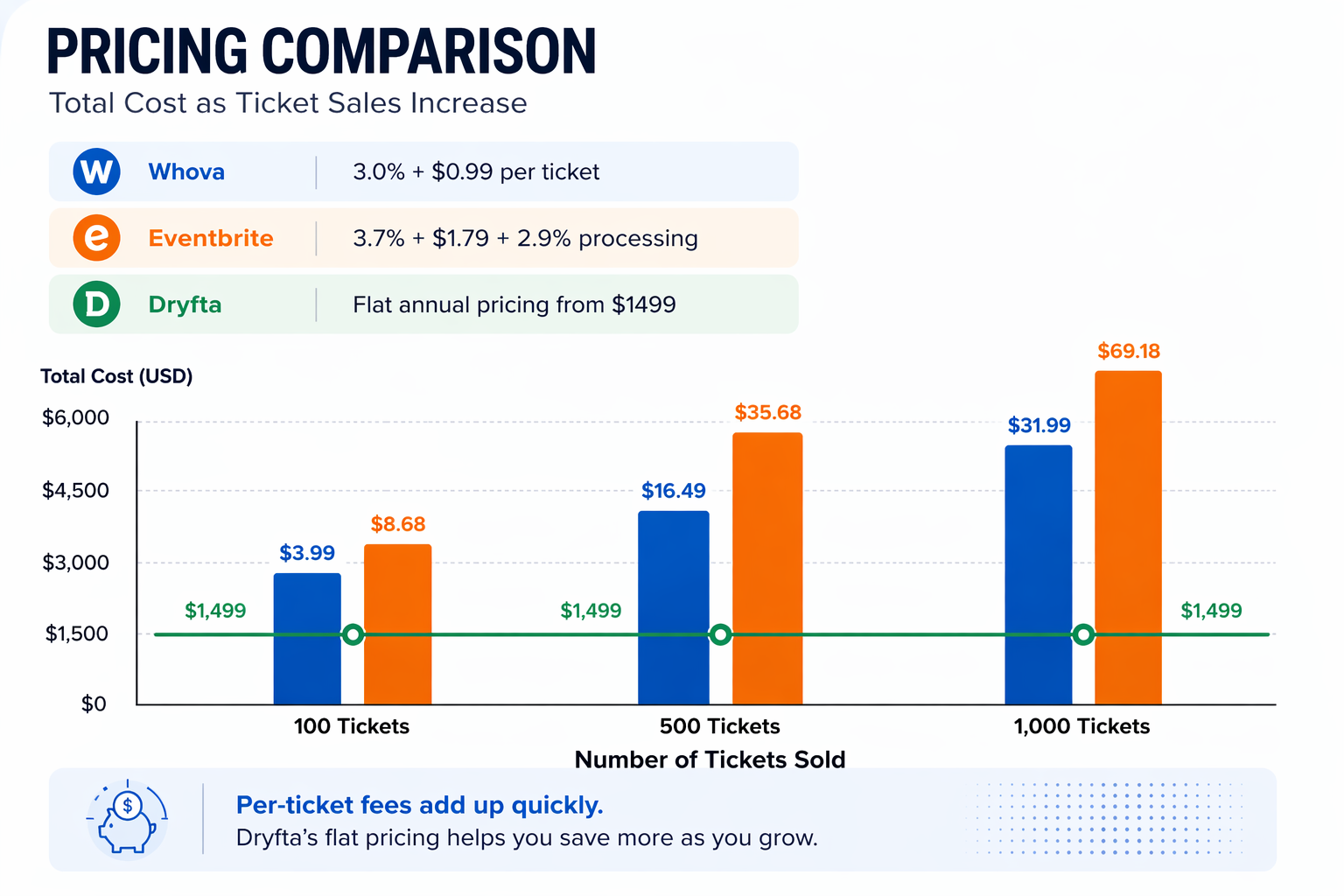
Trying to break down Whova vs Eventbrite pricing? This is a brief Whova vs Eventbrite comparison with a third alternative that puts a spin on the game.
Whova Pricing Model
-
- Free plan for free events
- Paid plan is approximately 3.0% + $0.99 per ticket
- No monthly fee, but the cost increases with ticket volume
Eventbrite Pricing Model
-
- Free for free events
- Paid events cost about 3.7% + $1.79 per ticket plus 2.9% processing
Cost Considerations for Larger Conferences: Pricing should be evaluated beyond the initial fee because attendee volume, ticket sales, mobile event app requirements, networking features, and event complexity can significantly impact the total cost.
Why the Cheapest Option May Not Be the Best Fit? Choosing the lowest-cost platform can lead to missing features and additional software expenses that ultimately cost more in time.
User Experience: Organizer Perspective
For organizers, choosing between Whova vs Eventbrite often comes down to ease versus control.
Eventbrite
-
- Lightning-fast setup for basic ticket pages.
- Intuitive dashboard focused on sales conversion.
- Automated payouts and basic marketing reports.
Whova
-
- Centralized hub for managing attendees’ social interaction.
- Ready-made templates for speaker and sponsor lists.
- Mobile-first design for live engagement monitoring.
Dryfta
-
- All-in-one control over the entire research and registration lifecycle.
- Robust dashboard for tracking abstract reviews and budget.
- Advanced automation for attendee communications and participation certificates.
- Superior white-labeling to keep organizers in full control of their brand.
User Experience: Attendee Perspective
From an attendee’s point of view, the choice in Whova vs Eventbrite shapes their overall experience.
Eventbrite
-
- Fast, guest-checkout ticket purchasing.
- Digital tickets are stored in a simple app.
- Basic event reminders via email.
Whova
-
- Social-heavy app with attendee icebreakers.
- Community boards for public discussions.
- In-app messaging between participants.
Dryfta
-
- Seamless access to personal schedules and accepted abstracts.
- Automated, instant downloads for participation certificates.
- Personalized portals for managing submissions and peer feedback.
- Professional interface that prioritizes scholarly content.
Whova vs Eventbrite: Pros and Cons
Choosing between Whova vs Eventbrite depends entirely on what your team needs most. Let’s look at the strengths and weaknesses of both platforms to help you find the right fit for your next event.
Whova Pros
- Features a mobile event app that keeps everyone connected seamlessly.
- Offers excellent attendee engagement features like live polling and real-time session Q&As.
- Built specifically to handle complex multi-day corporate or association conferences.
- Smart matchmaking tools make professional networking feel natural.
- Sponsors get trackable digital booths and real-time click metrics.
Whova Cons
- The extensive backend setup can feel overwhelming for a webinar-style event.
- Custom per-event pricing quotes do not fit small budgets well.
- The system adds too many steps if you just need basic ticketing.
- Lacks a built-in system to manage academic research abstracts or peer review. workflows
Eventbrite Pros
- The account setup and event page design take only a few minutes.
- The checkout system handles ticket tiers and promo codes seamlessly.
- Gives you automatic exposure on a public marketplace where people search for things to do.
- Most customers already know and trust the familiar payment process.
Eventbrite Cons
- Offers very limited tools for organizing multi-track agendas.
- Lacks deep networking features and attendee matchmaking options.
- Sponsors are limited to simple text descriptions on your page.
- It cannot handle academic abstract submissions or review workflows.
Whova vs Eventbrite vs Dryfta: Best Platform by Event Type
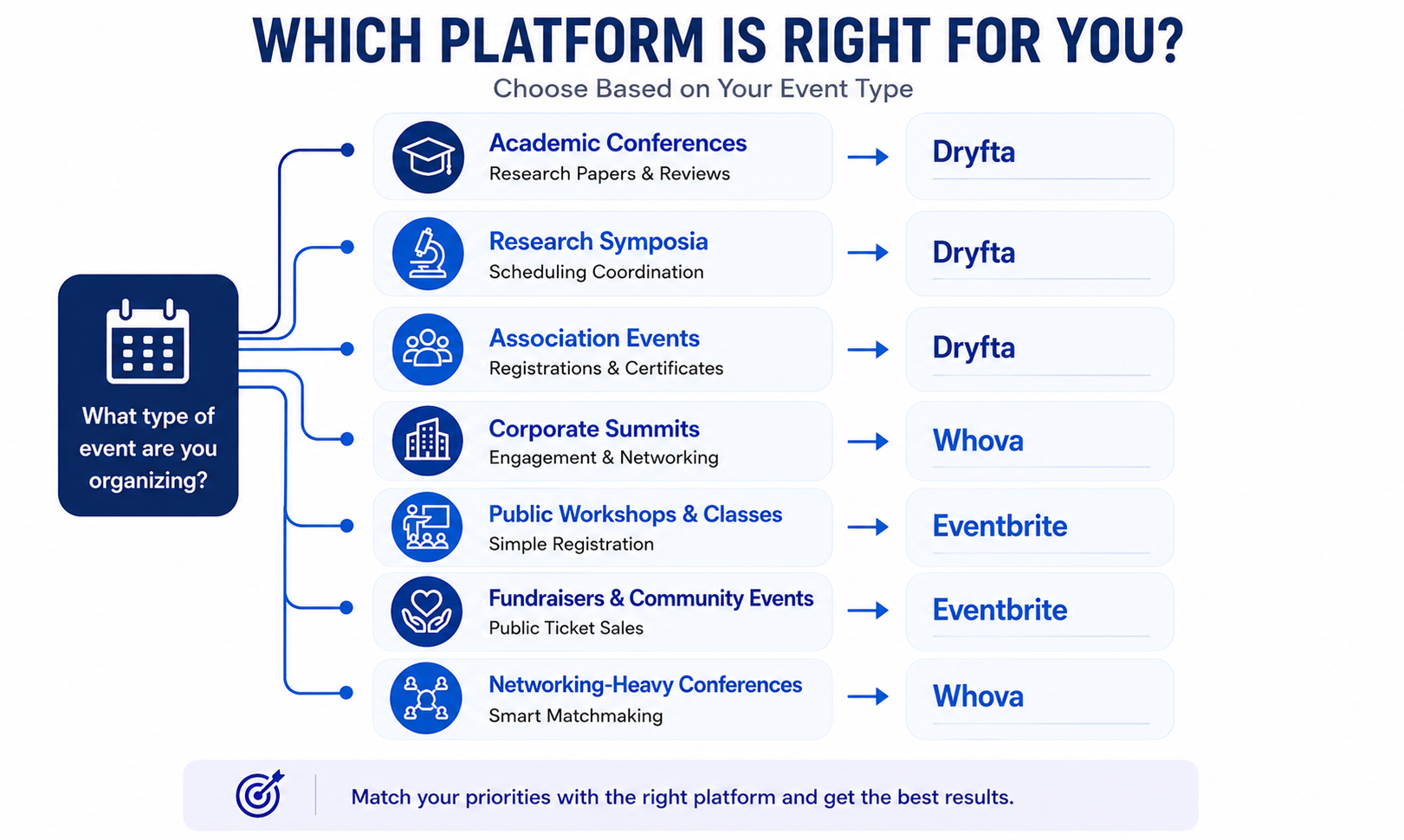
- Academic Conferences: Dryfta is undoubtedly the best choice here because it has built-in tools for collecting research papers and managing grading panels.
- Research Symposia: Dryfta is purpose-built for research conferences that need detailed scheduling coordination. When speakers are involved in multiple sessions across different tracks, the platform automatically checks for scheduling conflicts and helps keep the program organized.
- Association Events: Dryfta helps associations manage registrations and generate participation certificates. It gives your community a dedicated space to interact year-round.
- Corporate Summits: Whova is a popular choice for corporate conferences as it combines attendee engagement tools with exhibitor and sponsor features. Gamification, leaderboards, document sharing, digital exhibitor booths, and analytics all contribute to a more interactive event experience.
- Public Workshops and Classes: Many organizers choose Eventbrite for workshops and training sessions because of its ease of use. You do not need a tech background to get your registration page live and the checkout process is convenient for buyers.
- Fundraisers and Community Events: Eventbrite is particularly useful for events that rely on public ticket sales. Along with registration tools, its event marketplace helps increase event discoverability among people searching for local experiences.
- Networking-Heavy Conferences: Whova is the go-to tool if your main goal is getting people to network. Its mobile app features smart matchmaking profiles that allow attendees to search for peers by shared interests.
Whova vs Eventbrite vs Dryfta: Which One Should You Choose?
- Choose Whova if you are running a multi-day corporate conference or business expo where attendee networking is your top priority. It is the best choice if you want a mobile app packed with icebreakers, community boards, gamification and trackable digital booths for your corporate sponsors.
- Choose Eventbrite if you are hosting a public workshop or charity fundraiser and need to sell tickets fast. It is perfect if you want a simple ten-minute setup, a secure checkout page that buyers already trust, and a massive public marketplace to help promote your listing.
- Choose Dryfta if you are managing an academic conference or professional association event with complex workflows. It is the absolute best if you need an all-in-one event management platform to handle ticket sales alongside abstract submissions, blind peer-review grading, multi-track schedules, abstract book publishing, and a self-service dashboard for your authors and reviewers.
When Should You Switch From Whova or Eventbrite?
- Signs You Have Outgrown Eventbrite: You should look for a new tool when your event has multiple tracks and overlapping breakout rooms. It is also time to switch if you are tired of paying high per-ticket fees, or if your attendees need good networking tools.
- Signs You Need More Than Whova: Events that rely on abstract management and peer-review processes often require more specialized tools. Pricing preferences can also become a factor if you are looking for a simpler long-term cost structure.
- Signs You Need a Full Event Lifecycle Platform: You need a complete all-in-one event platform if your team is wasting hours copy-pasting data between separate tools for ticket sales, abstract submissions, email marketing, and post-event reporting. Bringing everything under one roof minimizes human error and saves your staff a lot of time.
The Bottom Line
When choosing Whova vs Eventbrite for an upcoming event, it all boils down to what type of event experience you envision.
If you are looking for a platform to launch events quickly and sell tickets to as many people as possible, Eventbrite makes it easy. If you would like additional features such as more structured activities, better networking opportunities and longer-term engagement during the event itself, then Whova offers the added features.
However, if your event requires complex workflows, access to detailed data, or academic content, Dryfta provides the one-stop solution. Additionally, Dryfta enables you to have total control over managing your event submissions, registrations, and attendee engagement. Schedule a free demo with Dryfta today to see how we simplify event management every step of the way.
FAQs
1. Can Eventbrite handle complex event agendas?
Not exactly. Eventbrite is more of a ticketing platform and does not support multi-track scheduling. Although you can list simple session times in the description, it cannot handle complex speaker profiles or personal agenda builders. For technical programs, a specialized platform such as Dryfta is a much more solid option.
2. Does Whova integrate with other tools?
Yes, Whova is connected with various popular platforms to make logistics easier. It integrates with Zoom and Microsoft Teams by default to support virtual meetings, and integrates with registration software, such as Eventbrite and Cvent. It also supports APIs and Zapier to export attendee and lead retrieval data to other CRMs and marketing software.
3. Which platform is better for free events?
Although Eventbrite is free for basic ticketing, Dryfta is the best option among professional organizers since it saves significant time. It keeps all event data in one place, so you do not rely on spreadsheets or extra tools.
4. Can I manage sponsors and exhibitors in Eventbrite?
Yes, Eventbrite offers features to track sponsors and exhibitors. However, it does not provide an all-inclusive trade show management platform. With that said, you can use Eventbrite’s primary (ticketing and marketing) functions to create structured sponsor packages and showcase their branding.
5. Which platform is easier to use: Whova or Eventbrite?
Eventbrite is considered relatively easy to use for basic ticketing and public event search/discovery, making it a good option for events with straightforward needs. Whova, on the other hand, is considered a more robust event management tool due to its ability to engage attendees through various methods.
6. Does Eventbrite have a mobile app like Whova?
Yes, Eventbrite has mobile apps, but they serve different purposes than Whova. While Whova specializes in networking attendees and interacting with the conference, Eventbrite provides the Eventbrite App to buy tickets and the Eventbrite Organizer app to scan tickets and check-ins.
7. Which platform has better networking features?
Dryfta provides better professional networking. It goes beyond small talk, as it enables participants to network around common research interests, accepted abstracts, and particular academic interests. As networking is directly related to the event program, it saves time and helps individuals establish more valuable collaborations that general tools often lack.
8. Is Eventbrite good for virtual events?
Eventbrite covers basic ticketing for virtual events but relies on external tools for streaming. Dryfta goes further with a fully integrated virtual setup. You can run live sessions, manage event Q&A and chat, and share materials, thereby saving time and creating a seamless experience for both organizers and attendees.
