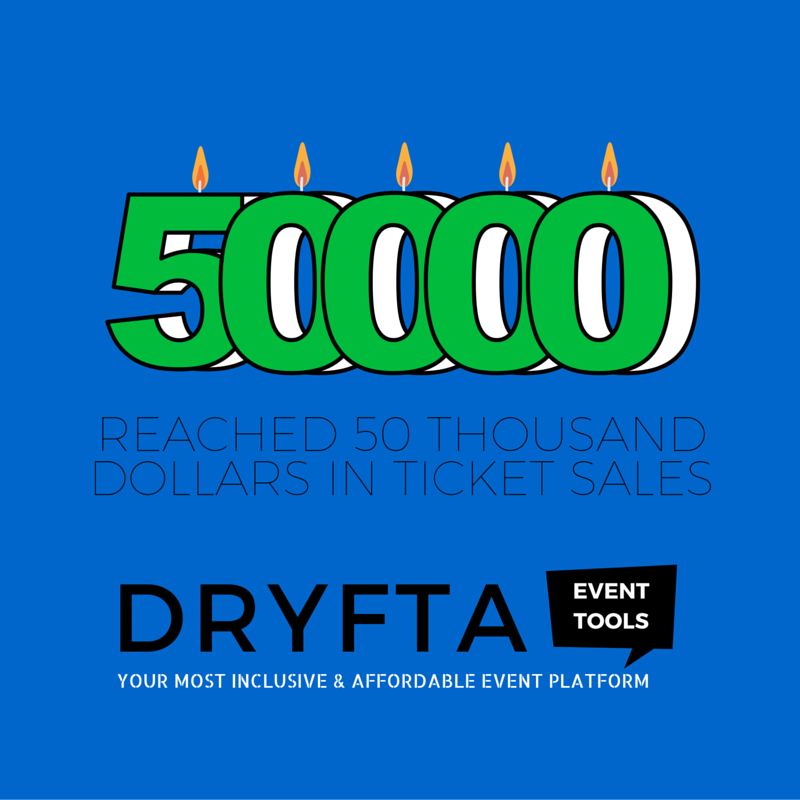
It is with immense gratitude that we share the news that the conferences hosted on Dryfta event platform have reached 50 Thousand dollars in combined ticket sales! This is a milestone to cherish and remember. We’re now more confident than ever to take on bigger events and conferences using the Dryfta event platform. Bring it on!
Zeb Reyaz
Update Multiple Abstracts’ Statuses at Once
Updating abstract’s status by going to each abstract? Isnt that too cumbersome to do it for each abstract out of hundreds of abstract submissions you might have? Let’s make it easy for you.
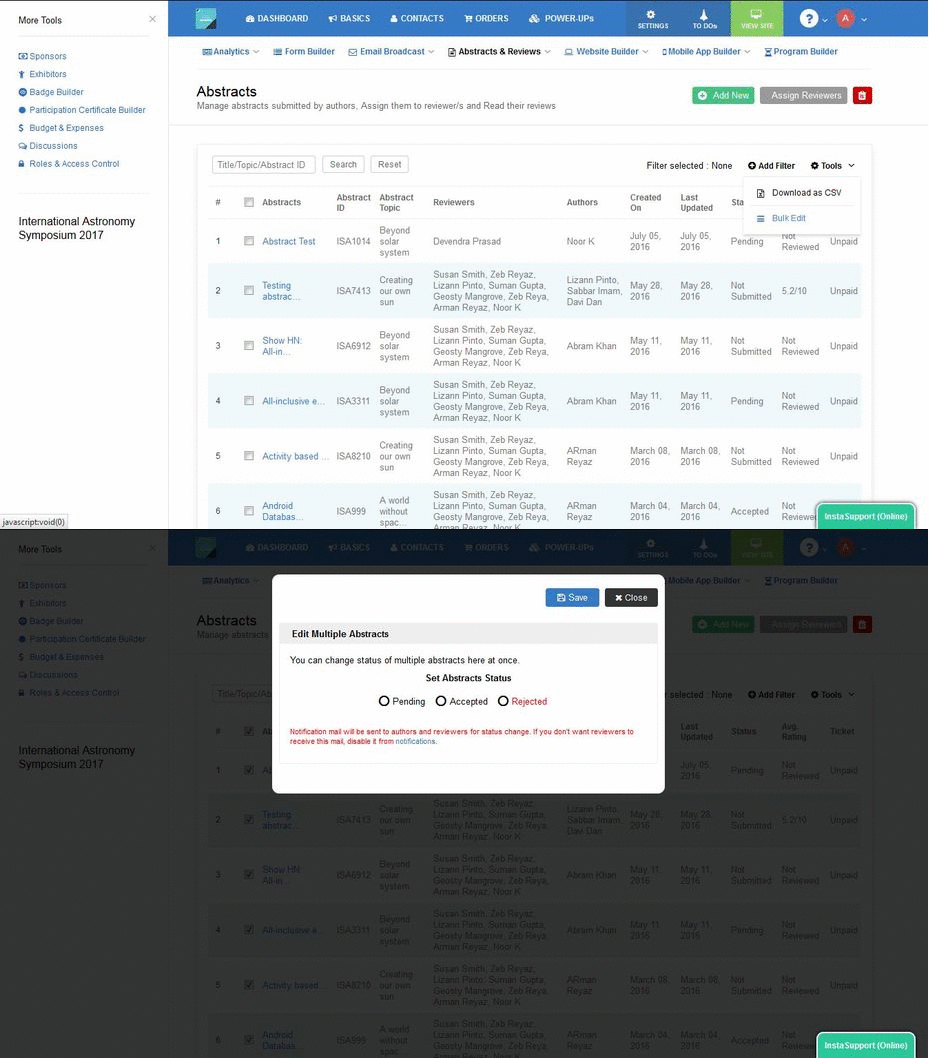
Introducing Bulk Status Update for Abstracts. Simply select the abstracts you want to update the status for, click on Bulk Edit, choose a status and then click on Save. As simple as that!
On bulk status update, the authors and reviewers receive the abstract status change notification in their inbox. Admin has the option to disable sending abstract status change notification to reviewers.
Related Searches
- Still Accepting Abstract Submissions Through Email?
- Guide for Writing Conference Abstracts
- Checklist for Successful Abstract Launch
- Abstract Book Builder for Conferences
- AI Quality Checks & Plagiarism Detection for Abstracts
- Advanced Auto-Assignment in Abstract Management
- Simple Bulk Download in Abstract Management
- Step-by-Step Guide to Setting Up Peer Review for Abstracts
- Top 10 Features of Abstract Management Software
- Complete Guide to Writing Abstracts [PDF]
- How to write Abstract for a Conference
- Benefits of using Abstract Management System
- What is an abstract management system?
- How to Submit Abstracts using Abstract Management System
Get regular dose of latest event tech!
Last week, Conferences sold Tickets worth 20 Thousand Dollars
The conferences hosted on Dryfta event platform have together sold tickets worth 20 Thousand dollars last week!
Please note that the conference organizers didnt pay any ‘per registrant’ fee except for purchasing the monthly/annual subscription plan as per their needs.
Also, when conferences sell tickets using the Dryfta event platform, they receive payments directly into their bank accounts. We do not hold funds.
Related Searches
- Top 10 Online Ticketing Platforms with Lowest Fees
- New Waitlist Features for Improved Ticket Management
- Introducing Ticket Swapping: Simplifying Event Management
- Transforming Event Ticketing with Tax Manager
- How to Sell Tickets for Your Annual Event
- How to Price Event Tickets for Maximum ROI ?
- Sell Event Tickets with Square Payments
- Sell Tickets on Dryfta Without a Merchant Account
Get regular dose of latest event tech!
New pricing update
Effective from July 12, 2016, the pricing will be revised for the following plans and the Unlimited events plan will be removed and replaced with Five events plan.
Five events (previously Unlimited events) plan (Annual)
New pricing – $11799 per year (Old pricing – $3499 per year) for up to 5 events.
Five events (previously Unlimited events) plan (Monthly)
New pricing – $1129 per month (Old pricing – $329 per month) for up to 5 events.
Single event plan (Annual)
New pricing – $3499 per year (Old pricing – $1399 per year) for up to 5000 contacts.
Single event plan (Monthly)
New pricing – $329 per month (Old pricing – $129 per month) for up to 5000 contacts.
620 contacts plan
New pricing – $169 per month. (Old pricing – $105 per month)
520 contacts plan
New pricing – $149 per month. (Old pricing – $90 per month)
320 contacts plan
New pricing – $105 per month. (Old pricing – $60 per month)
220 contacts plan
New pricing – $90 per month. (Old pricing – $45 per month)
The other features remain unaltered.
Existing customers shall be exempted from this pricing and shall continue to pay according to the old pricing for the calendar year.
Build Event Registration Forms Faster with updated Form Builder
In our last update, we have added a few important features to the platform viz. Option to add Multi-level drop down navigation menus, Abstract Rating filter to filter abstracts by its overall average rating, and some more.
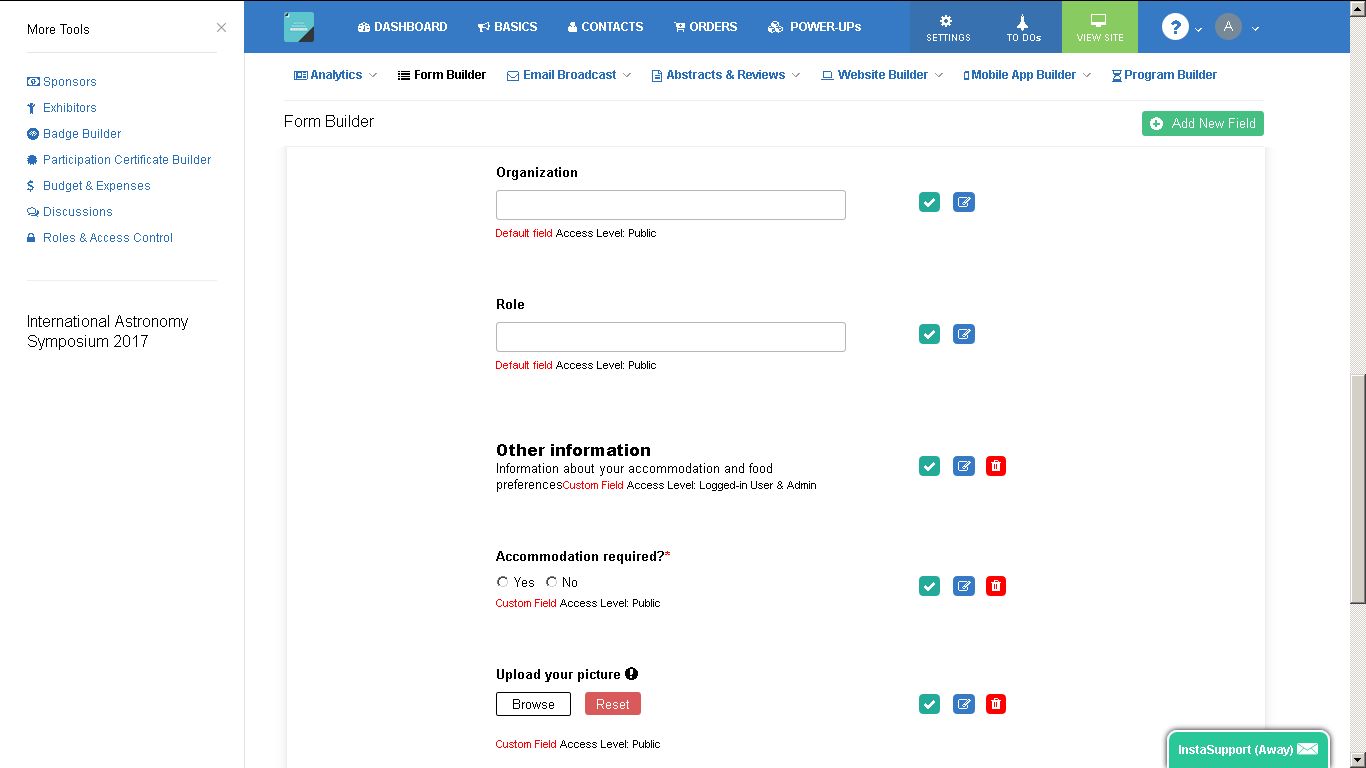
But amongst all the updates, the most important was the Drag and Drop feature in Form builder, Page Labels and Widgets Manager. Earlier, to order items, one has to enter synchronised numbers so an item numbered 1 comes before the item numbered 2, and item numbered 6 should go after item numbered 5, and so on. That, we figured, involved too much Mathematics and was taking a lot of toll on an already busy brain! Thus, Drag & Drop feature.
This, hopefully, will make it much easier now to arrange fields, pages and widgets. Give it a try and let us know if you love the new updates!
Get regular dose of latest event tech!
The Event Platform for Programming Conferences
If you’re hosting a programming conference, Dryfta is your best bet. Period.
For most event organizers, it is a very common approach to set up an event management platform using a smorgasbord of tools viz. WordPress, Eventbrite, OpenCFP and Mailchimp. But what would it be like if you could have used these tools from a single platform, all fully integrated with one another, making for a seamless data flow among each other. This is exactly the pain point Dryfta event platform solves.
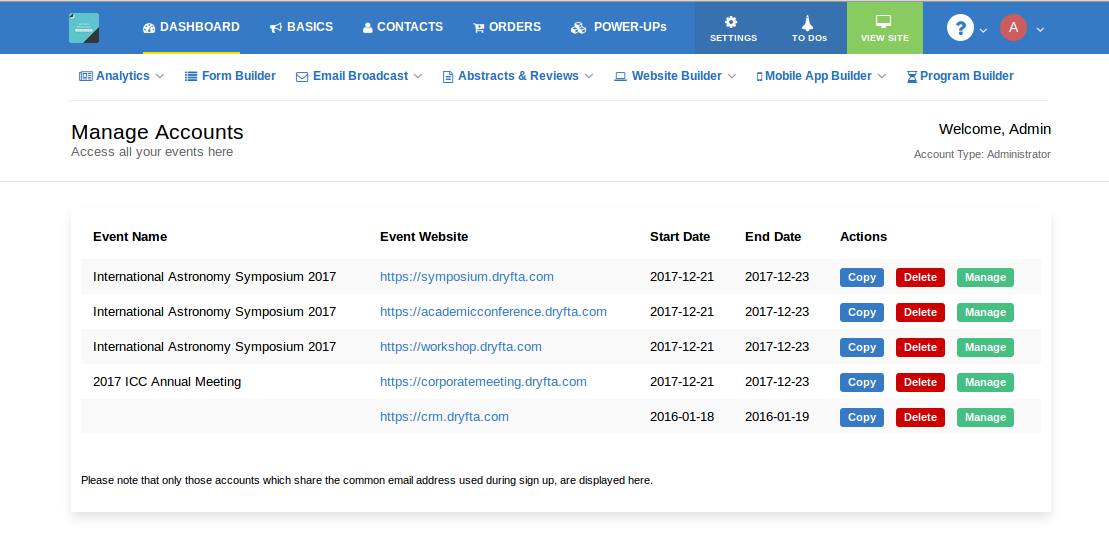
Now, manage all your events from one place in your Dryfta event platform
You will now be able to access all your events from a single control panel. Simply hover on My profile icon in your dashboard, click on My Events and there you will see all your past and upcoming events you have created.
There’re three buttons besides each event. Copy, Manage, Delete.
Click on Manage button to manage your event.
Use Copy button to copy your event along with the event data. You have the option to choose which event data you want to copy on to the new event.
Delete button is there to delete the event. Please note that the event is not deleted right away. It goes in hibernation for 13 days and you have all that time to repeal the deletion process. If you do not do anything, the event shall be subsequently deleted from the system.
Dryfta & Google Analytics let you see who’s visited your event website
You can now integrate Google analytics with your Dryfta-powered event website. Simply paste your Google Analytics ID into your Dryfta dashboard and you would be able to view website hits, number of pageviews, locations of your website visitors, in real-time, and everything else that Google analytics offers.
The more you know your visitors, the more you understand your prospective attendees, and make decisions accordingly like which prospects need more targeting and re-targeting, for which countries should you increase your ad spending for your event, and other similarly important decisions. These decisions are what is going to make your event a success.
Break your Long Event Registration Form into Multiple Short Forms
A long & lengthy event registration form is a major put off and deters attendees from signing up for the event. One way is to refrain from asking too much information upfront during the online event registration. Try limiting your event registration form to basic information only viz. Name, Email address etc. You can always ask them to update their profile later from their dashboard once they have signed up.
However, if it is imperative to collect all the information during the registration process, then you can break the form into multiple pages. This basically means breaking a large form into multiple small forms, connected by next & previous buttons, making it easy for attendees to fill up the form with the required information and proceed to the next form and eventually complete the event registration process.
Dryfta has a Pagebreak button to break your form into multiple pages with option to define form headings and buttons to move back and forth when filling the registration form.
This button is also available for other forms including abstract submission and review submission forms, making it easy for authors and reviewers to submit their papers and reviews respectively. Give it a try!
We do not hold your funds
Dryfta is a platform to sell tickets and accept payments directly without any hold whatsoever on your funds.
When using Dryfta to sell your event tickets, your funds go directly to your payment gateway or the merchant account you’re using. All you have to do is sign up for a payment gateway like PayPal or Stripe. Then, add the payment gateway credentials into your Dryfta platform, create the ticket types and registration questions, and you’re good to go!
Whenever a ticket is sold on your event website, the funds go directly to your Stripe or PayPal account or any of the Dryfta-supported payment gateway you’re using. You can then withdraw funds from your merchant account to your bank account anytime you want. The withdrawal process typically takes 2-3 days to transfer your funds to your bank account.
We do not charge a “percentage” on payment transactions except 2 credits per transaction. The cost of 1 credit is 2 USD or less based on the credit pack you choose. That’s it—no other hidden charges.
What sets Dryfta apart from other event platforms?
The one unique difference between Dryfta and every other event platform is that Dryfta is built with integration in mind. Over the next few months, we are planning to integrate Dryfta with widely used apps including Salesforce, Mailchimp, WordPress and Quickbooks. We completely understand that the future is about collaboration between platforms. We’ll keep you posted!
The Pain Points that Dryfta Solves
A common approach to set up an academic or a nonprofit conference is to use an array of tools, e.g., WordPress, Eventbrite, Easychair, and Mailchimp. Then put your staff into multi-tasking mode and try to get your event off the ground.
What would it be like if you could access all of these features from a single platform, all fully integrated, making for a seamless, unified data flow? Dryfta event platform solves this issue of unstructured data flow caused primarily due to using one too many tools by offering a set of fully-integrated tools. Let’s see how Dryfta stacks up with each of these tools regarding features and functionality.