


A form field on your conference registration form that asks, “Do you have special requirements?” leaves people guessing what the question means. They may be wondering if it is safe to disclose and who might be on the other end of the support system. Will this individual even understand my accessibility needs? is a question that pops up far too often.
A clear conference accessibility statement chucks the need for such guesswork and leaves no room for the jitters. At the very core, conferences and events ought to be accessible to all kinds of attendees. Any and all special needs can be accounted for with a little pre-arrangement for accessibility. This does not have to be a barrier for entry into conferences for individuals.
It is the responsibility of conference organizers to ensure that this is conveyed.
Have a question? The team’s got an answer.
Need to send a query? You know where to send it to.
This might seem as simple as ABC. But this is also where even the most put-together conferences fall through miserably: a lack of proper guidance for attendees needing extra accessibility.
In this guide, we’re taking you down to you a copy-ready conference accessibility statement template that has everything you’ll need to consider for your next event. Starting from the very first thing a user sees, the registration page, to instructions on venue entry and accommodation support, we’ve got it all.
This article follows a very simple framework:
Commit → Explain → Ask → Contact → Follow Up.
What is A Conference Accessibility Statement?
A conference accessibility statement is participant-facing communication that explains your commitment, how to request support, who to contact, and where to find practical information. 3 of the below-related items are fairly easy to confuse. So let’s get them in order first.
- The conference accessibility statement gives event guidance to participants regarding the overall event.
- An accommodation request is the information an attendee provides about the support they need.
- A platform accessibility statement describes the software or website and it is not the same as an event accommodation statement.
The 5 Things Every Conference Accessibility Statement Should Cover
- Commit: State that the event aims to support participation by people with disabilities.
- Explain: Name examples of available support without implying that the list is complete.
- Ask: Tell attendees exactly how to request an accommodation.
- Contact: Provide a monitored email address or form rather than a general inbox.
- Follow Up: Explain what happens after a request is submitted.
Copy-ready templates
Each template includes a note on where it belongs. Replace the bracketed fields before you publish.
A. Short registration-page statement
Place this on the registration landing page with a link to your full accessibility information.
Accessibility at [Conference Name]
We want [Conference Name] to be welcoming and accessible to all participants. If you require disability-related accommodations or have accessibility questions, please tell us during registration or contact [accessibility email]. Requests received by [date] give us the best opportunity to make arrangements, but we will consider later requests wherever reasonably possible.
B. Registration-form question
Add this as its own field, separate from dietary needs.
Do you require any disability-related accommodations or accessibility support to participate fully in the conference?
Answer options: No, I do not need support. Yes, I will provide details below. I would prefer someone from the conference team to contact me.
Follow-up field: Please tell us what accommodation or support would help you participate. Please describe the accommodation you need rather than providing medical information unless it is necessary for us to arrange the request.
C. Registration confirmation email block
Need an accessibility accommodation?
If you requested accessibility support during registration, our team will review your request and contact you if additional information is needed. If you did not submit a request, or your needs have changed, contact us at [email].
D. Pre-event “Know Before You Go” block
Accessibility and accommodations
We want you to be able to participate comfortably in [Conference Name]. Accessibility information for the venue is available at [link]. If you have already requested an accommodation, you do not need to submit it again unless your requirements have changed. If you need additional support, contact [email or phone]. We will do our best to respond to requests received close to the conference, although some arrangements may require advance notice.
E. Virtual or hybrid statement
Digital accessibility
[Conference Name] includes [virtual or hybrid] participation. If you require captions, interpretation, accessible materials or another accommodation to participate online, please let us know during registration or contact [email]. Instructions for joining the virtual platform and requesting technical assistance will be sent before the conference.
Keep accessibility and dietary requirements separate
A single field labeled “Dietary / disability / special requirements” is too broad. The information often goes to different teams and carries different privacy considerations. Use one field for dietary needs and another for accessibility support so each request reaches the right person.
How To Write An Accommodation Deadline
A hard cutoff can discourage people from asking. Instead of writing ‘Accommodation requests must be received by September 23,’ try this:
‘Requests received by May 10 give us the best opportunity to arrange support. If you contact us after this date, we will still review your request and let you know what can be arranged.’
This wording puts across the ideal timeline to your attendees and also explains what happens to requests that do come in a little later.
What To Avoid In Your Wording
- Do not write “Contact us if you are disabled.” Write “Contact us if you require an accommodation or accessibility support.”
- Do not use “special needs” without explanation, because “disability-related support” is clearer.
- Do not claim that the venue is fully accessible unless you have verified it, and describe specific access features instead.
- Do not promise that all needs will be accommodated, because you can explain the request process without an absolute promise.
- Do not ask for a diagnosis, because you only need to know what support would help.
- Do not hide the contact route in your Terms and Conditions.
Where The Statement Should Appear
- The event website carries the full accessibility information.
- The registration landing page carries the short statement and a link.
- The registration form carries the accommodation question.
- The confirmation email carries a reminder and the contact route.
- The pre-event email carries final practical access information.
- The mobile app or attendee guide carries onsite access information.
Repeat the access route in each channel rather than the entire paragraph.
Build a Simple Workflow Behind The Statement
A promise to follow up only works if someone owns the request. Use this sequence: Request → Review → Assign → Confirm → Deliver → Close.
- Record the attendee and the support they requested.
- Note the owner and any venue or vendor dependency.
- Track the status, attendee confirmation, onsite handoff, and completion.
- Name a backup contact so requests are never left waiting.
How Dryfta Helps in Conference Accessibility
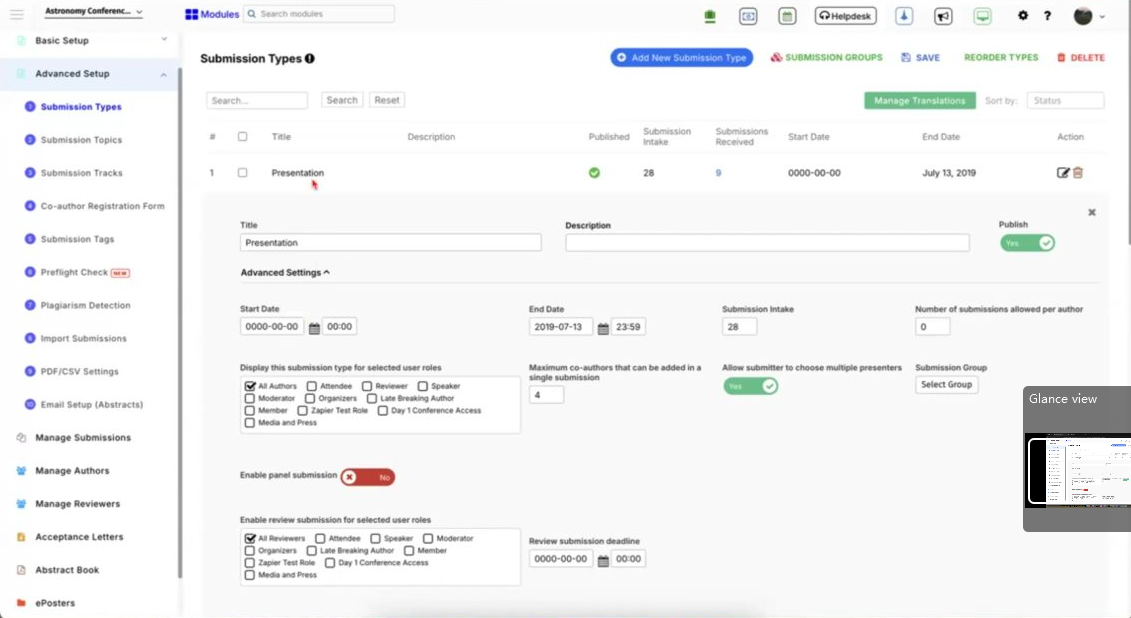
Dryfta can help you connect your statement to practical workflows through configurable registration fields, attendee records, email follow-up, event-site information and segmented communications.
Software in itself does not guarantee accessibility or legal compliance, so as organizers, you’ll still need to verify their venue, vendors and materials. Please confirm any specific field or email behavior with your account team before you rely on it.
Sign up for a free demo with Dryfta today and watch our purpose-built event management tool in action.
The Bottom Line
Every attendee is asking you 4 questions:
- Can I participate?
- What support can I ask for?
- How do I ask?
- Who will respond?
Your conference accessibility statement should answer each of these questions in plain and simple language for attendees. Reserve your sophisticated lingo for a different occassion.
When it comes to conference accessibility, use this framework to check your wording:
Commit → Explain → Ask → Contact → Follow Up.
Then place the right template at each touchpoint, review your wording after every event you host, and make sure that you have a team ready to respond to every attendee query swiftly.
Frequently asked questions (FAQs)
Should we ask attendees what disability they have?
Certainly not, no. As event planners, all you need to know is what accommodation or support would help them participate. The specific type of disability that they may have can be invasive to ask unless the attendee is willing.
Should we create a dedicated accessibility email address?
Yes wherever such an arrangement is practical. A monitored address can make the contact route clear for you and keep requests together.
Is this the same as a website accessibility statement?
No. What a website statement does is describe the nature of the software. An event accessibility statement, on the other hand, has more to do with participant support.