
A late abstract. A remote presentation request. A refund outside the usual policy. A sponsor wanting to swap a promised benefit. A room change an hour before the session starts.
If you organize conferences, you’ve probably dealt with all of these.
And honestly, making the decision is one thing. However, remembering why the decision was made, who approved it, what rule was changed, and what needs to happen next is another.
That’s why a conference decision log is so useful.
In this guide, we’ll walk through an easy-to-follow workflow for handling conference decisions, from deciding what belongs in the log to setting approval rights, recording exceptions, tracking follow-up actions, and spotting new precedents.
And yes, there’s a downloadable conference decision log template you can use to put it all into practice.
But before we get into the nuts and bolts…
What Is a Conference Decision Log?
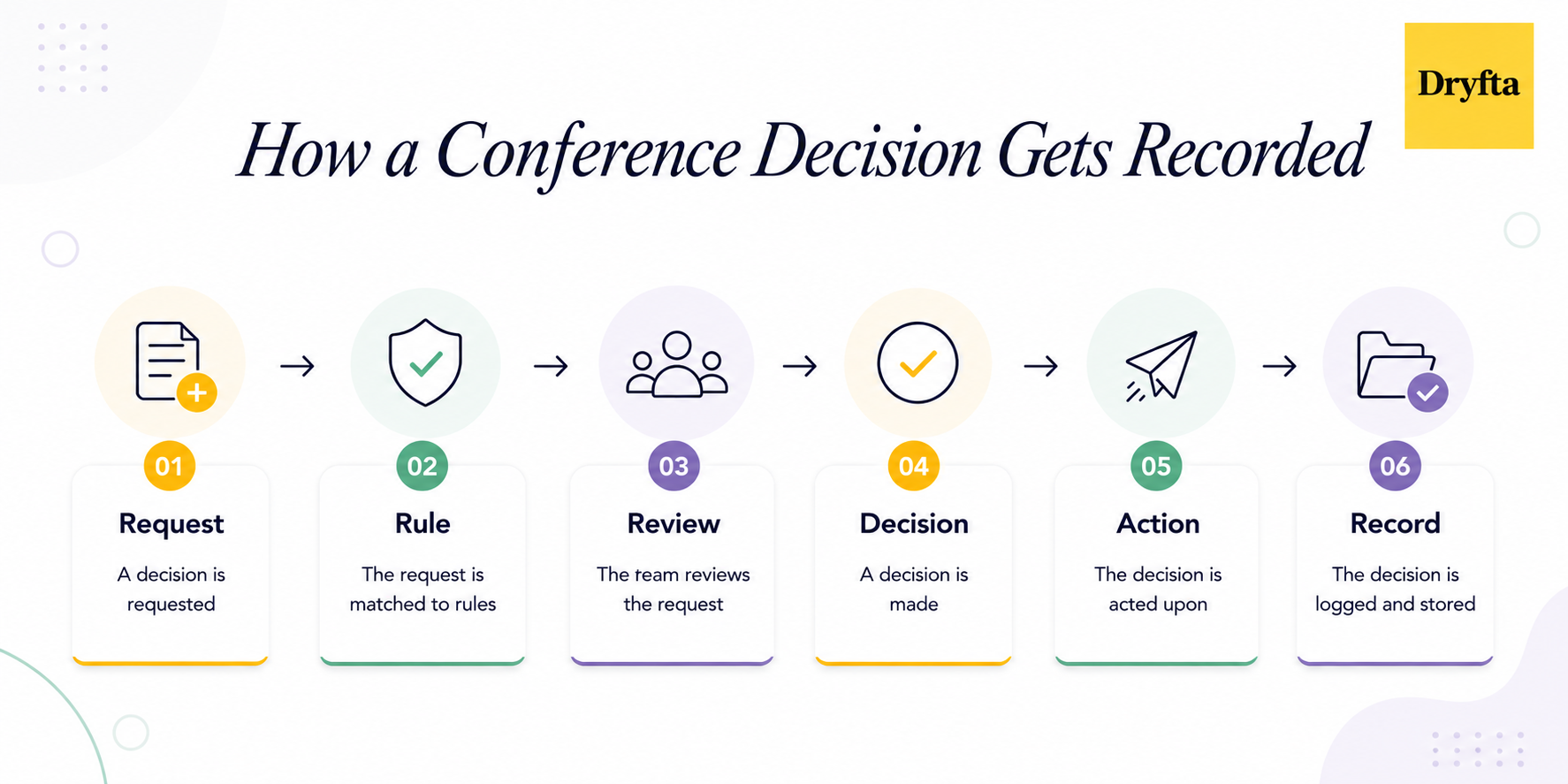
A conference decision log is where you record the important decisions and approved exceptions that come up while planning and running a conference.
Because let’s be real, conference teams make a lot of decisions. Someone asks to submit an abstract after the deadline. A guest wants a last-minute refund. A speaker needs to switch their presentation time. A sponsor wants a change to their package. The list could go on and on.
What happens next? Someone gives a thumbs-up in chat and two weeks later nobody remembers who approved what or where the conference approval workflow happened.
That is where a conference decision log earns its keep.
It records:
- What exception was requested and which normal rule applied
- Who reviewed and approved the decision
- Why the decision was made
- Any conditions attached to the approval
- What action followed and where the decision was recorded
The framework keeps the whole thing refreshingly simple:
Request → Rule → Review → Decision → Action → Record
Think of it as writing down the reason behind every important exception as part of your conference exception tracking. That way, when someone asks, “Why did we decide that?” you don’t have to rely on memory.
It can save your conference team from revisiting the same conference operations decisions again and again.
Why Conferences Need a Decision Log?
We all know that conference planning isn’t about one big decision. It runs on hundreds of small calls made by different people under different circumstances. And with decisions spread across different tools, it’s easy to lose track of who approved what.
Without a record of past decisions, two attendees asking for the exact same exception might end up with completely different answers. Someone gets a full refund outside official policy, while another guest gets turned away.
Here’s why every conference needs a conference decision log:
- No more arguing over old decisions because every approved exception is recorded in one place.
- Everyone knows who has the final sign-off before an urgent request lands on their desk.
- Everyone knows who has the final sign-off before an urgent request.
- Special approvals like remote presentation requests don’t get lost in a sea of emails.
Running your event with a clear conference governance log guarantees complete fairness for every participant involved.
Decision Log vs Other Management Tools
If you’ve ever planned a conference, you know information ends up everywhere. Meeting minutes, task trackers, issue logs, approval records, risk registers, and plenty more.
So, why add another one?
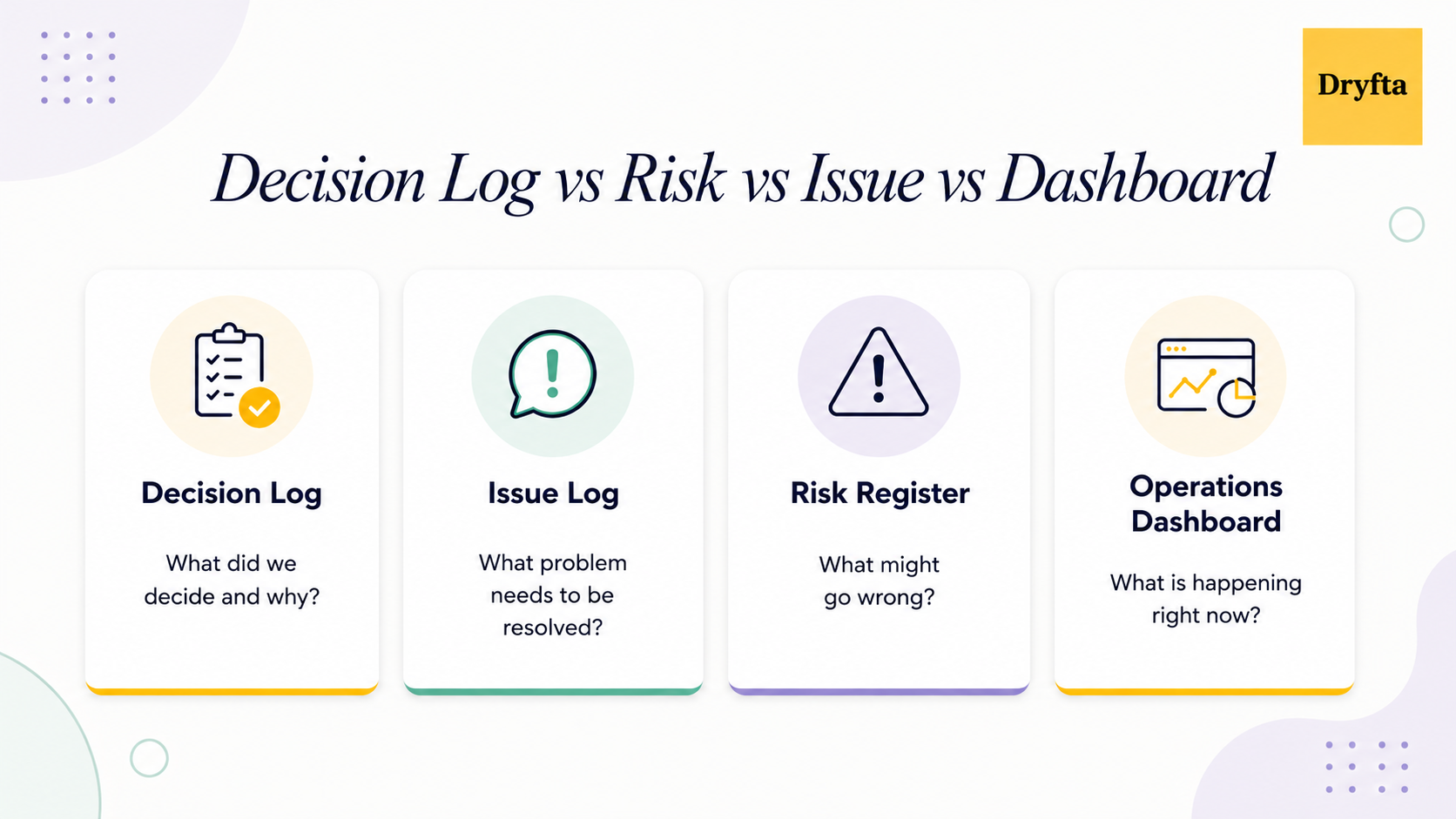
Because each of those conference management tools answers a different question. A task tracker tells you what needs to get done. Meeting minutes tell you what was discussed. A risk register shows what could go wrong.
A conference decision log focuses on something more specific: what the team actually decided, why they decided it, who approved the decision and what followed.
Here’s the easiest way to see the difference:
| Tool | Main question |
|---|---|
| Decision log | What did we decide and why? |
| Exception log | Which normal rule was overridden? |
| Approval tracker | Who must approve this request? |
| Issue log | What problem must be resolved? |
| Risk register | What might go wrong? |
| Meeting minutes | What was discussed? |
| Task tracker | What work must be completed? |
| Operations dashboard | What is happening right now? |
Say a speaker asks to present remotely even though the conference normally requires in-person presentations. The issue log might track the problem. The approval tracker might show who needs to sign off. A task tracker might remind someone to update the schedule.
But the decision log records the important part: whether the exception was approved, who approved it, why, and what conditions came with that approval.
What Decisions Should Go Into the Log?
You definitely do not want to record every single decision. If your team spends 20 minutes debating the color of the name badges, that doesn’t need a place in your conference decision log. A better approach is to use a materiality test.
Ask yourself: Would forgetting this decision create confusion, unfairness, financial exposure, conference disruption, or any sort of rework?
If the answer is yes, log it.
These are the kinds of decisions you should be logging:
- Policy overrides like accepting a submission past midnight.
- Attendee exceptions such as custom fee adjustments.
- Contractual changes with vendors or sponsors.
- Financial decisions that significantly affect your event budget.
- Schedule changes like swapping main stage speaker slots.
- Precedent-setting decisions that become the new set of rules for future years.
- Formal approvals from senior leaders or committee heads.
- Decisions affecting multiple teams like event registration and onsite leads at once.
- Reversals or superseding decisions that replace or overturn an earlier one.
The goal of conference decision logging isn’t to write everything down. It’s to keep track of the decisions that people will come back to later.
What Is a Conference Exception?
A conference exception is simply a decision to handle a request differently from the normal rule.
The easiest way to think about it is:
Standard Rule + Special Request = Exception Decision
For example, if your conference normally closes abstract submissions on September 15 but a committee approves a late submission, the late acceptance is the exception. The important part isn’t only recording that it was approved. You also need to record the standard rule that was overridden.
Why? Because without that context, someone looking at the decision months later might assume the exception was actually the normal policy.
Also, when you record the exceptions, your team can see whether it was a one-off exception or something that should now become part of the conference planning process.
Conference Exceptions Worth Tracking
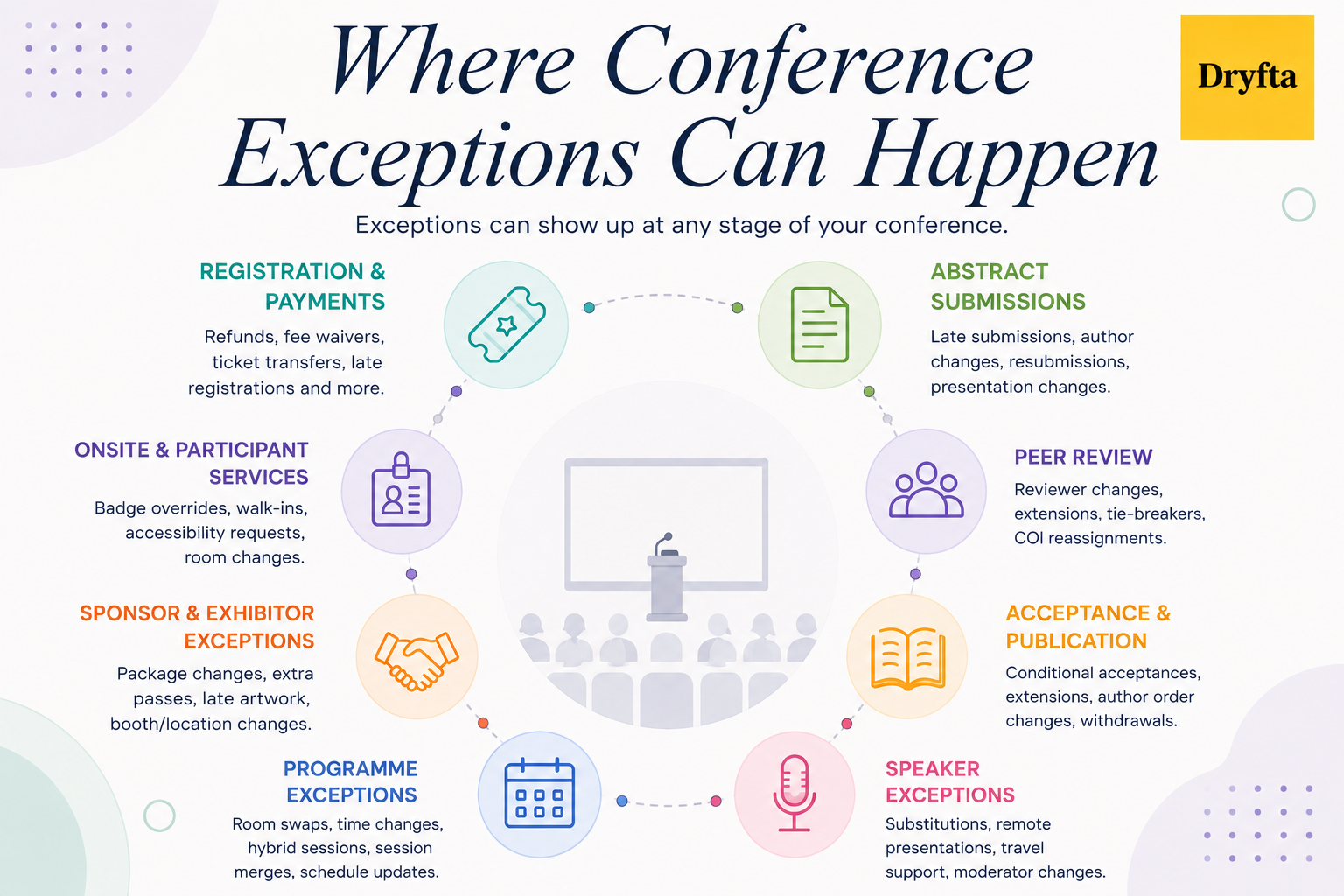
Exceptions are bound to happen. But not every single one needs to end up in your conference decision log.
These are the ones worth tracking:
1. Registration and Payment Exceptions
- Late registration processing past standard cutoff dates
- Full or partial fee waivers for special guest requests
- Ticket transfer approvals between different colleagues
- Refund requests processed outside usual policy limits
- Payment deadline extensions
- Complimentary registration passes issued to VIPs
- Ticket category overrides for specific attendees
2. Abstract Submission Exceptions
- Late abstract approvals after the deadline
- Incomplete submission corrections during review
- Author additions or removals on existing submissions
- Poster-to-oral presentation changes and vice versa
- Reinstated abstract requests
- Resubmission approvals after major revisions
3. Peer Review Exceptions
- Reviewer replacements during evaluation
- Tie-breaker reviews for split scores
- Reviewer deadline extensions granted during busy periods
- Conflict of interest reassignments to new reviewers
- Review invalidations for non-compliant feedback
- Senior adjudication interventions
4. Acceptance and Publication Exceptions
- Conditional acceptances requiring revisions
- Camera-ready submission extensions
- Last-minute author order changes
- Presenting author changes updated in official proceeding records
- Publication withdrawals requested before final indexing
5. Speaker Exceptions
- Speaker substitutions arranged when original keynotes drop out
- Travel support budget exceptions
- Remote presentation approvals for speakers facing travel issues
- Late presentation slide uploads accepted right before sessions
- Session moderator changes
6. Programme Exceptions
- Last-minute room swaps to accommodate audience size shifts
- Session time changes scheduled during active program updates
- Live-to-hybrid session changes
- Session merge approvals
- Conference schedule update exceptions
7. Sponsor and Exhibitor Exceptions
- Changes to sponsor package benefits
- Extra complimentary passes outside the contract
- Late logo and artwork submissions accepted past printing deadlines
- Booth location changes
- Changes to sponsor contract deliverables
8. Onsite and Participant-Service Exceptions
- Access credential overrides granted for missing badges
- Last-minute room changes
- Walk-in registrations accepted when capacity limits allow
- Special accessibility arrangements
- Temporary room capacity limits
Your conference approval log must keep everyone on the same page when unexpected requests come up.
Also, some exceptions happen because a conference has to make a change during the submission or review process. If you want to see how these stages connect from the initial call for papers through final proceedings, read our guide to the call for papers to published proceedings workflow.
How to Set Approval Rules for Conference Exceptions
One of the easiest ways to avoid last-minute confusion is to decide upfront who can make which call. A conference version of DACI works well alongside your conference decision log.
Conference Version of DACI:
- Driver moves the request forward and makes sure it reaches a decision.
- Approver holds the final authority and signs off on the decision.
- Contributors provide the information or expertise needed to make the call.
- Informed receives the outcome but does not take part in the decision.
Essential Fields to Include in a Conference Decision Log
| Field group | What to capture |
|---|---|
| Basic details | Decision ID, event or year, date raised, required-by date, category, linked record, and record ID |
| Request | What was requested, which standard rule applies, and why an exception or decision was needed |
| Decision | Current status, severity, driver, approver, contributors, final decision, reason, and any conditions attached |
| Impact | Financial impact, programme impact, participant impact, fairness or precedent concerns, operational effects, and contractual or compliance impact where relevant |
| Action | Who needs to act, when the action is due, who needs to be informed, which source record must be updated, and when the decision takes effect |
| History | Review or expiry date, whether it sets a precedent, outcome, related decisions it replaces, decisions that replace it, and when the record was last updated |
How to Keep Conference Decisions Consistent Over Time
Keeping your conference decision log simple starts with using the same status names across the board. Everyone should be able to see if a decision is still being discussed, approved, completed, or replaced.
Use Consistent Decision Statuses
Standardizing status tags stops team members from making up random labels.
Proposed
Pending information
Under review
Approved
Approved with conditions
Denied
Withdrawn
Implemented
Expired
Superseded
Treat Conditional Approvals Differently
“Approved with conditions” isn’t the same as “approved.” If a remote presentation still depends on an AV test or a final slide upload, write those conditions down clearly. That way, nobody has to go through hundreds of old emails to work out what was actually approved.
Add Review Dates and Track Precedent
Some decisions are temporary. Give them an end date or a review trigger. A conference decision log should also show whether a decision was a one-time exception or something that could become a reusable precedent.
- Mark one-time exceptions clearly
- Add review dates where needed
- Record when a decision expires
- Flag repeated exceptions for policy review
If the same exception keeps coming back, it may be time to fix the underlying rule rather than keep approving the same workaround.
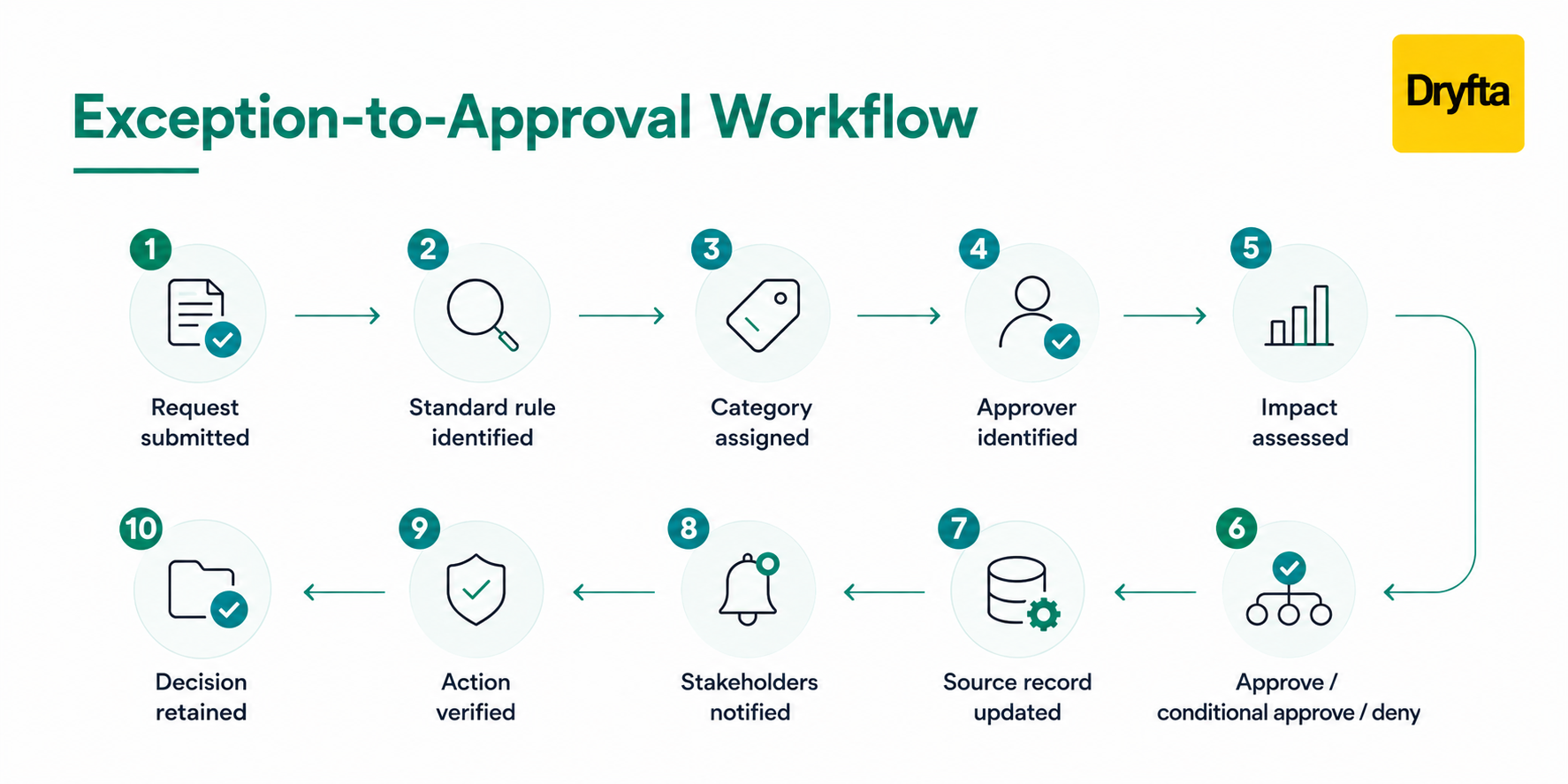
Questions You Must Ask Before Approving an Exception
When every request is evaluated the same way, it’s much easier to make decisions you can stand behind. Here are the questions to ask before updating your conference decision log.
- Is the request something the team has the authority to approve?
- Would approving it go against an existing conference policy?
- Have we handled a similar exception before?
- Could approving it treat similar participants unfairly?
- What financial cost or operational disruption could it cause?
- Could it affect contracts, compliance, or published conference materials?
- What would be the impact if we turn the request down?
- Could specific conditions make the exception safer or easier to manage?
How to Categorize, Record, and Link Your Decisions?
Now that you know what to record, let’s look at how to keep your conference decision log organized day to day. We’ll cover how to rate severity, log decisions, handle rejections, and connect everything together.
Use Severity Levels to Decide Who Handles What
| Level | When to use it | Who handles it |
|---|---|---|
| Routine | Small impact and within normal authority | Functional manager |
| Material | Affects money, participants, the programme, or multiple teams | Senior approver |
| High impact | Could affect contracts, policy, research integrity, major finances, or organizational risk | Designated senior authority |
Use Real Decisions to Test the Model
A severity model makes a lot more sense once you see it in action. For example:
- A late abstract may be accepted after a documented technical issue, with a firm completion deadline.
- A co-author may replace a speaker if the required registration and speaker steps are completed.
- A refund exception can record the outcome and approving authority without storing sensitive personal details.
Log Material Decisions, Even When They Are Denied
Absolutely, as long as the request meets your materiality threshold.
Rejected requests are just as important to record because they give your committee something to refer back to if the decision is challenged later. Keeping rejected requests in your event decision log also helps you spot recurring policy gaps and shows that your event approval process is fair.
Keep Sensitive Information Out of the Shared Log
Your conference decision log should explain the decision while leaving sensitive personal information out of it.
Avoid adding details such as:
Medical or disability information
Passport details
Payment-card information
Personal disputes
Confidential reviewer information
Sensitive contract details
Where appropriate, keep the shared entry simple, such as “Approved following confidential review by authorized officer.”
Link the Decision to the Source Record
Don’t waste time copy-pasting full registration details or entire abstracts into your conference decision log.
- Just save the unique ID and record type from your event platform.
- Let your event management platform hold the detailed records.
- Use your conference decision log to track decisions, approvals, and exceptions.
Use the Decision Log Throughout the Conference Lifecycle
Don’t wait until something goes wrong to start a decision log. Use it from the beginning of the planning process and keep it updated all the way through your post-event review.
| Stage | What belongs in the log |
|---|---|
| Planning phase | Important policy calls, unusual budget decisions, venue commitments, and changes involving sponsors |
| Abstracts and review | Exceptions to submission rules, changes to review arrangements, author updates, and unusual acceptance decisions |
| Final stretch | Speaker changes, last-minute programme adjustments, registration requests, and sponsor-related decisions |
| During the event | Urgent decisions, temporary arrangements, quick changes to participant handling, and follow-up actions |
| After the event | Decisions that kept coming up, areas where teams handled similar cases differently, unresolved items, and policy improvements for the next event |
For a broader view of live event performance, see our guide to the conference operations dashboard.
How to Turn a Conference Decision Log Into a Policy Improvement Tool
A conference decision log can do more than record what happened. After the event, use it to spot where your policies worked well and where the same exceptions kept coming back. Start by reviewing the log and grouping decisions by type. You may notice that the same policy keeps generating exceptions or that certain requests need approval again and again.
Look for:
- Material decisions: How many significant decisions were made?
- Exception patterns: Which categories generated the most exceptions?
- Approval outcomes: How often were requests approved or denied?
- Decision time: Which requests took the longest to resolve?
- Conditional approvals: How often did approvals come with conditions?
- Repeat exceptions: Which exceptions kept showing up?
- Overdue actions: Which decisions still had unfinished follow-up?
- Reopened decisions: Which decisions had to be revisited or replaced?
If the same exception keeps appearing, ask whether the underlying rule needs to be clarified or changed. A one-off workaround becoming a regular occurrence is usually a pretty good signal that the policy needs another look.
Common Mistakes When Managing a Conference Decision Log
- Logging everything: Record only the decisions and exceptions that people may need to understand later.
- Skipping the reasoning: Explain why the decision was made. Add enough context so future organizers understand it.
- Leaving out the standard rule: Always note which policy or rule the exception replaced.
- Not naming an approver: Make it clear who had the final say.
- Using “Approved” too loosely: Use a separate status and record the conditions.
- Treating similar cases differently: Check earlier decisions before approving a similar exception.
- Keeping unnecessary sensitive details: Leave private information in the source system.
- Deleting reversed decisions: Keep them and mark them as superseded instead.
- Never reviewing the log: Review it after the conference to spot patterns and policy gaps.
- Forgetting to update the source system: Make sure approved decisions are carried out in your conference platform.
A decision log is a great place to start, but it isn’t the whole picture. If you’re looking for more ways to keep your conference running smoothly, read our guide to common conference planning mistakes and how to avoid them.
How Dryfta Fits Into the Workflow?
A conference decision log and the conference platform serve different purposes. The decision log can record why an exception was approved, who approved it and what needs to happen next. Dryfta can then hold the operational workflow that follows.
For example:
- Speaker exception: A remote presentation is approved, then the relevant speaker and session records are updated in Dryfta.
- Late abstract: An exception is approved, then the submission can continue through the usual peer review process.
- Registration exception: A special registration decision is approved, then the relevant registration record is updated accordingly.
In simple terms: the conference decision log preserves the reasoning behind the decision, while Dryfta helps put that decision into action.
Click below and use our conference decision log template to keep all your event decisions organized and easy to revisit.
Dryfta_Conference_Decision_Log_and_Approval_Matrix _Template

Book a personalized demo with Dryfta today!
Frequently Asked Questions
1. What is a conference decision log?
A conference decision log is a shared record of important decisions and exceptions made while planning and running a conference. It captures what was decided, who approved it, why it was decided, and what happened next.
2. What should go into a conference decision log?
Log decisions that could cause confusion, unfairness, extra cost, programme changes, or major rework if they were forgotten. Examples include fee waivers, late submissions, speaker changes, programme changes, and policy exceptions.
3. Should denied requests be added to the log?
Yes, if the request is important enough to meet your materiality threshold. Keeping a record of major denials helps teams handle similar requests more consistently later.
4. How should conference exceptions be recorded?
Start with the normal rule, then record the special request, decision, reason, approval, conditions, and action taken. Keeping the original rule visible makes the decision easier to understand later.
5. How does Dryfta fit with a conference decision log?
The decision log keeps the reasoning and approval history. Dryfta handles the related conference records, such as attendees, registrations, abstracts, speakers, sessions, and programme details.
