
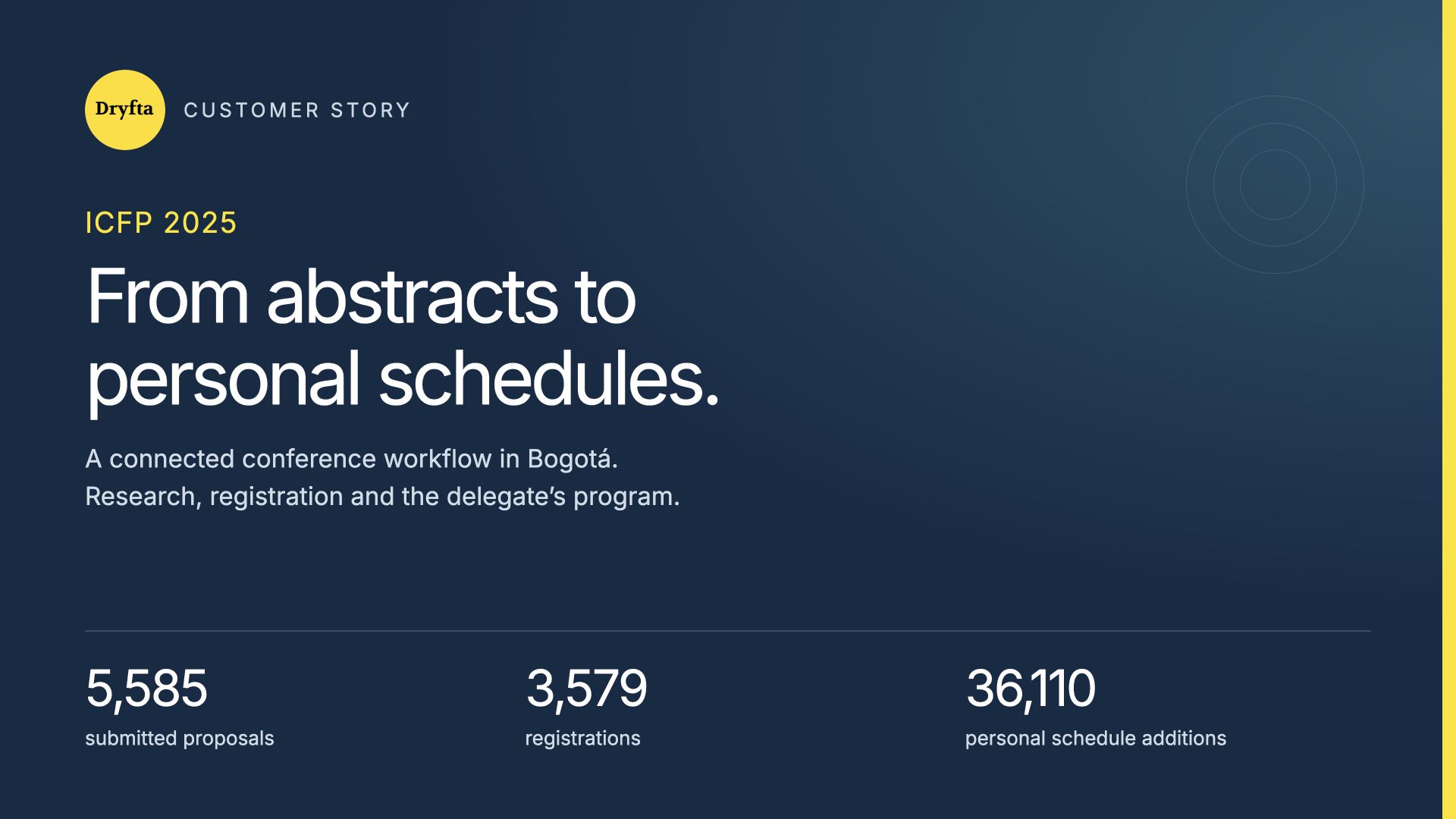
At ICFP 2025 in Bogotá, researchers, policymakers and advocates needed a practical way to share research and plan a busy conference. Dryfta connected the event’s submissions, registration records and public program in one platform. The backend reviewed for this case study shows 5,585 submissions, 3,579 registrations and 36,110 additions to personal schedules. These figures describe different parts of the event workflow, rather than a single attendance total. This case study follows that connected workflow, from organizing submitted research to helping delegates choose sessions, and explains what other conference teams can learn from the actual platform views and records available today.
ICFP 2025 at a glance
The International Conference on Family Planning took place in Bogotá, Colombia, from 3–6 November 2025. It brought together people working in research, policy and sexual and reproductive health. The official conference retrospective reports more than 3,500 delegates from 131 countries.
The official organizers’ announcement identifies the co-hosts as the William H. Gates Sr. Institute for Population and Reproductive Health at Johns Hopkins, the Government of Colombia, Profamilia and Fundación Valle del Lili. The Gates Foundation, formerly the Bill & Melinda Gates Foundation, is listed among the conference’s core organizing group. These are separate organizations with different roles.
| Measure | Recorded total | What is counted |
|---|---|---|
| Submitted proposals | 5,585 | Submitted content, with unfinished drafts counted separately. |
| Individual abstracts | 4,515 | The Individual Abstract submission type. |
| Pre-formed panels | 1,070 | The Pre-formed Panel submission type. |
| Reviewer records | 914 | Accounts listed as reviewers, rather than completed reviews. |
| Registrations | 3,579 | Registration records, rather than a verified attendance total. |
| Personal schedule additions | 36,110 | The report’s “Sessions added to schedule” counter. |
About these figures: This is a dated view of the event’s current records. Submissions, reviewer accounts, registrations and session saves count different things. They should not be added together or treated as unique attendees.
The work behind an international research conference
ICFP combined a large research submission process with a program covering many subjects and session formats. The organizing team needed to track proposals and review decisions. Delegates needed a straightforward way to find relevant sessions and plan their time.
The event’s Dryfta account brings these jobs into one event workspace. Its submission reports show the research pipeline. Registration counters show the records held by the event. The public program presents sessions by day, with search, filters and room information. Together, these views show a practical connection between work behind the scenes and the program delegates explore.
Organizing 5,585 submissions without losing the overview
Submission Insights records 4,515 individual abstracts and 1,070 pre-formed panels, adding up to 5,585 submissions. Treating these as separate submission types lets the team see how much of its content comes from each format.
The same area lists 914 reviewer records, 4,148 author records and 4,746 co-author records. The author and co-author totals describe roles and may overlap; they are not a combined count of unique people.
- Separate content formats: Individual abstracts and panels have their own totals.
- A visible review workflow: The dashboard separates assigned, reviewed and decision statuses.
- Drafts kept apart: The system shows 368 drafts separately from submitted proposals.
- Useful role totals: Reviewer, author and co-author counters give the team an overview of the records involved.
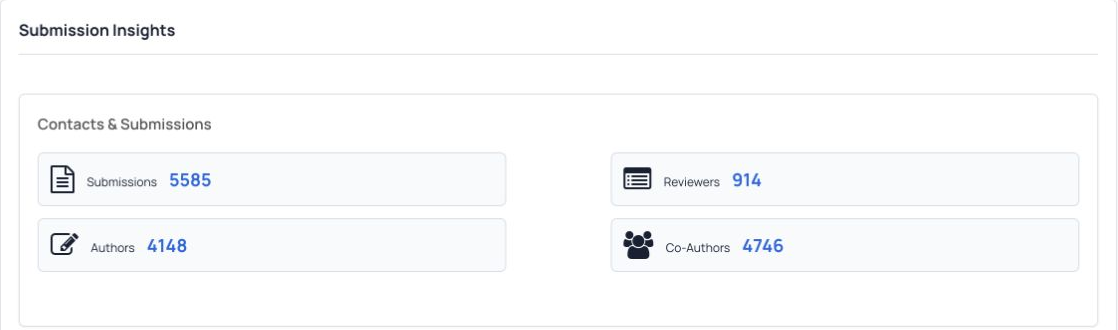
For a conference team, the benefit is a clear place to check the scale and status of the submission process. The team can distinguish submitted work from unfinished records before preparing reports or planning the program.
Keeping registration records clearly labelled
The event dashboard records 3,579 registrations. This is a useful operational measure: it describes registration records in the event system. The conference’s public retrospective describes its reported participation separately.
That distinction matters when different teams prepare reports. A registration record does not, by itself, confirm that someone attended. A saved session does not prove that a delegate entered the room. Clear labels make the numbers easier to understand and help avoid misleading comparisons.
Reporting tip: Decide which measure answers your question before using a total. Registration records help describe the event database; confirmed attendance requires the appropriate attendance records.
Helping delegates find sessions and build a personal plan
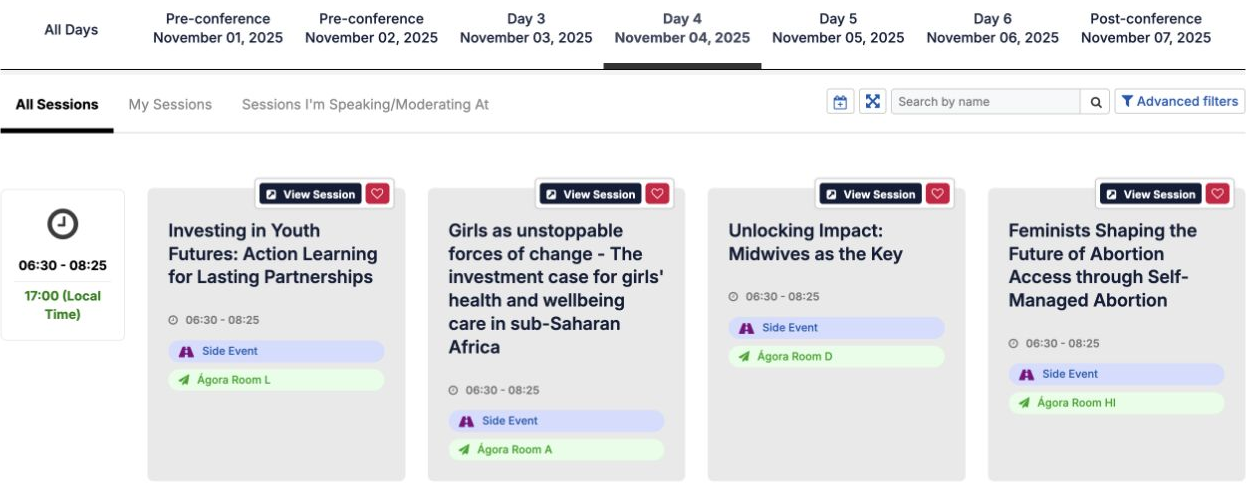
The public ICFP 2025 program lets visitors choose a day, search by session name and open additional filters. Its session cards show the title, time, format and room. The screenshot below shows the program for 4 November.
These details help a delegate answer everyday questions: Which session is relevant to my work? When does it start? Where should I go? A personal schedule control sits beside each session, connecting the full program with individual planning.
- Choose the conference day. Use the tabs to narrow the program to the day you need.
- Find relevant sessions. Search by name or use the available filters.
- Check the practical details. Read the time, room and session type, then open the session for more information.
- Plan your time. Use the personal schedule controls when signed in with the appropriate event account.
Understanding 36,110 additions to personal schedules
The Sessions Insights widget records 36,110 sessions added to schedules. This is evidence of planning activity across the program: delegates could select sessions rather than relying only on the full conference list.
It is an activity total, not a count of 36,110 people. One person can save many sessions. The widget also shows 533 recorded session check-ins, which is a separate measure and should not be used as the conference’s total attendance.
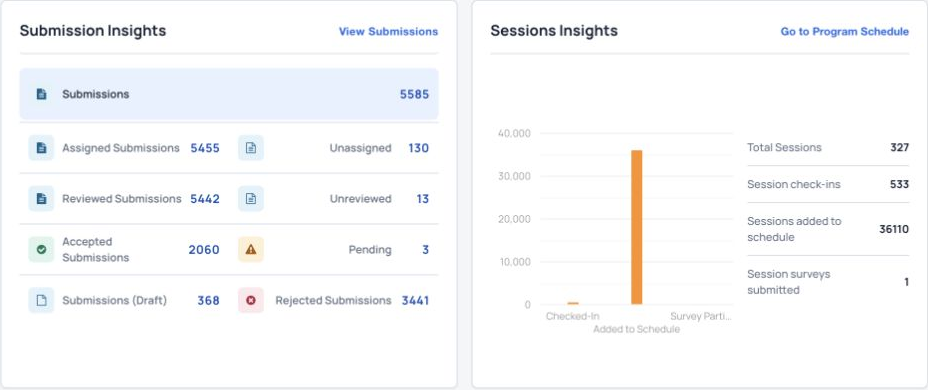
For organizers, keeping schedule activity beside other event reports makes it easier to describe how the platform was used. It also makes the limits of each measure visible: planning, registration and recorded check-ins answer different questions.
Practical lessons for other conference teams
The useful lesson from ICFP 2025 is the connection between the research process and the delegate’s program experience. Teams planning a similar event can apply these ideas:
- Set up clear submission types. Keep individual papers and panel proposals easy to distinguish.
- Track progress using named statuses. Separate drafts, submitted work, review progress and decisions.
- Make the program easy to scan. Give delegates clear day tabs, search, room details and session formats.
- Support personal planning. Let people select the sessions they want to follow.
- Agree on reporting definitions. Label records, people and activity totals accurately.
The platform views demonstrate these workflow benefits. They do not measure staff time saved, cost savings or the conference’s wider health impact.
Sources and scope
Operational figures and screenshots come from the ICFP 2025 Dryfta dashboard, Submission Insights, submission list totals and public program reviewed on 21 October 2026. They describe the records visible on that date, rather than a reconstruction of the database on the final conference day. Reporting screens use different session groupings, so this case study does not present a combined session total.
Conference dates and location are supported by the official event site. Public participation is reported in the ICFP 2025 Impact Hub. Organizer roles are documented in the official opening announcement and core organizing group. Screenshots show real platform views with private participant and payment information excluded.
For a broader view of the event’s use of Dryfta, read the existing Gates Institute case study. That earlier article reports a different historical snapshot; the figures here are dated separately.
Planning a conference with similar needs?
Explore Dryfta’s abstract management, registration and ticketing, and event scheduling tools. Request a demo to see how these tools could support your event.